

Download Assets
This tutorial includes 4 sample images, 4 sample PSDs and 1 PDF guide. Downloads are free with a PHLEARN account.
- Download the sample images and PSDs from every free tutorial on PHLEARN
- New free tutorials published every week
- One free account — sign up once, then download anything
Free PDF Guide · 3 Pages
This Tutorial as a Step-by-Step PDF
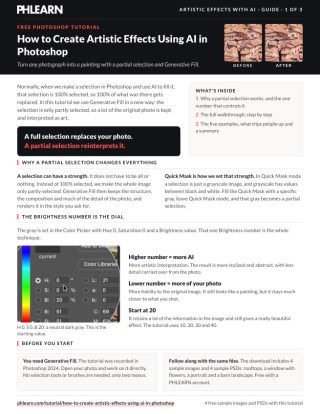
The guide walks through Select > Edit in Quick Mask Mode (Q), Edit > Fill with a Color at H 0, S 0, B 20, leaving Quick Mask to turn the fill into a partial selection, and Generative Fill with prompts like watercolor painting. It compares Brightness 10, 20, 30 and 40. Keep it next to your keyboard.
description
Create artistic effects using AI in Photoshop by handing Generative Fill a selection that is only partly active. The fill value sets the strength, and the photograph stays underneath.
Most people hand Generative Fill a selection that is 100% active, so Photoshop replaces everything inside it. Make that selection only partly active and the tool stops replacing your photograph and starts reinterpreting it.
This free tutorial shows the Quick Mask trick that does it: fill with a neutral gray at a set brightness, exit Quick Mask, then run Generative Fill with any style you like. The brightness number is a fidelity dial – raise it for a looser, more abstract result, lower it to keep more of your original image.
Enjoying This Free Tutorial?
We publish a new free tutorial every week, each one with sample images and PSDs you can download and follow along with. Sign up and they land straight in your inbox, along with early word on sales, events and subscriber-only offers.
Image Source
Photography by Muhtelif, Shahin Khalaji, Bravingbird and Siegfried Poepperl, sourced from Pexels and Unsplash.
Create Artistic Effects Using AI in Photoshop
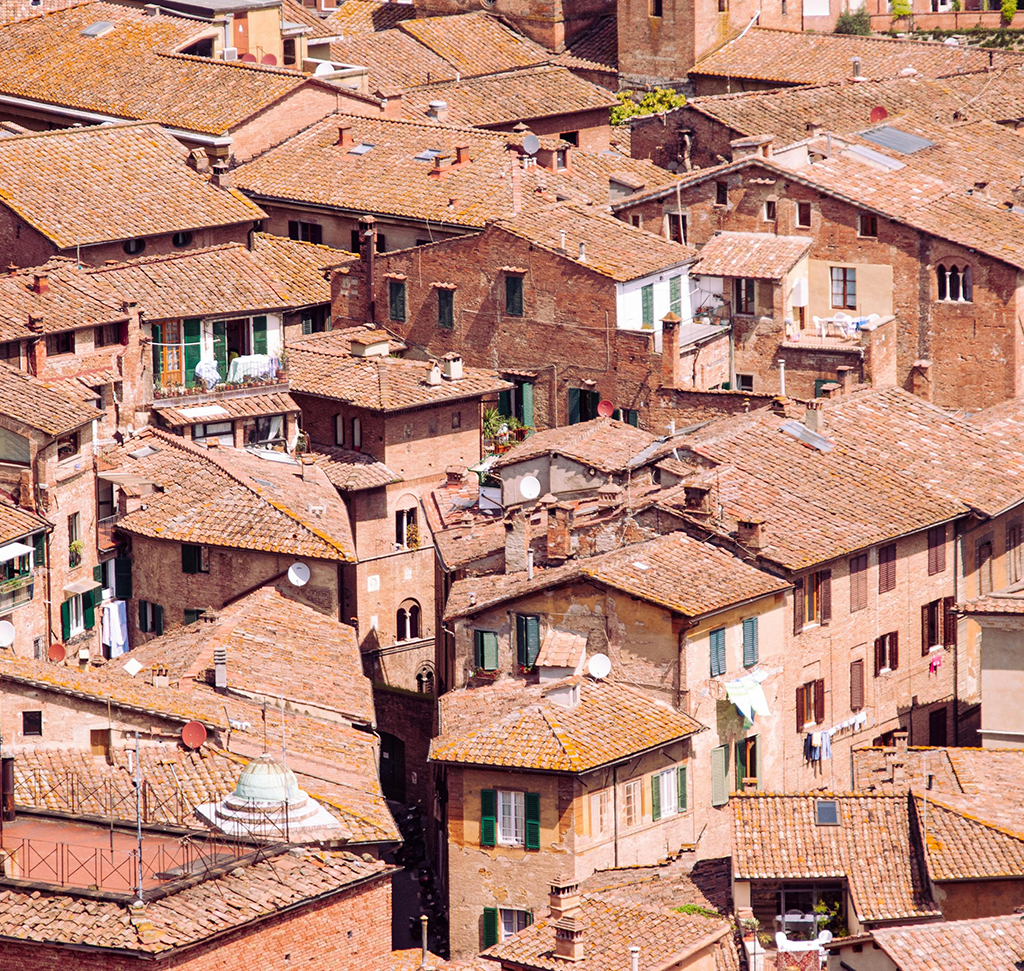
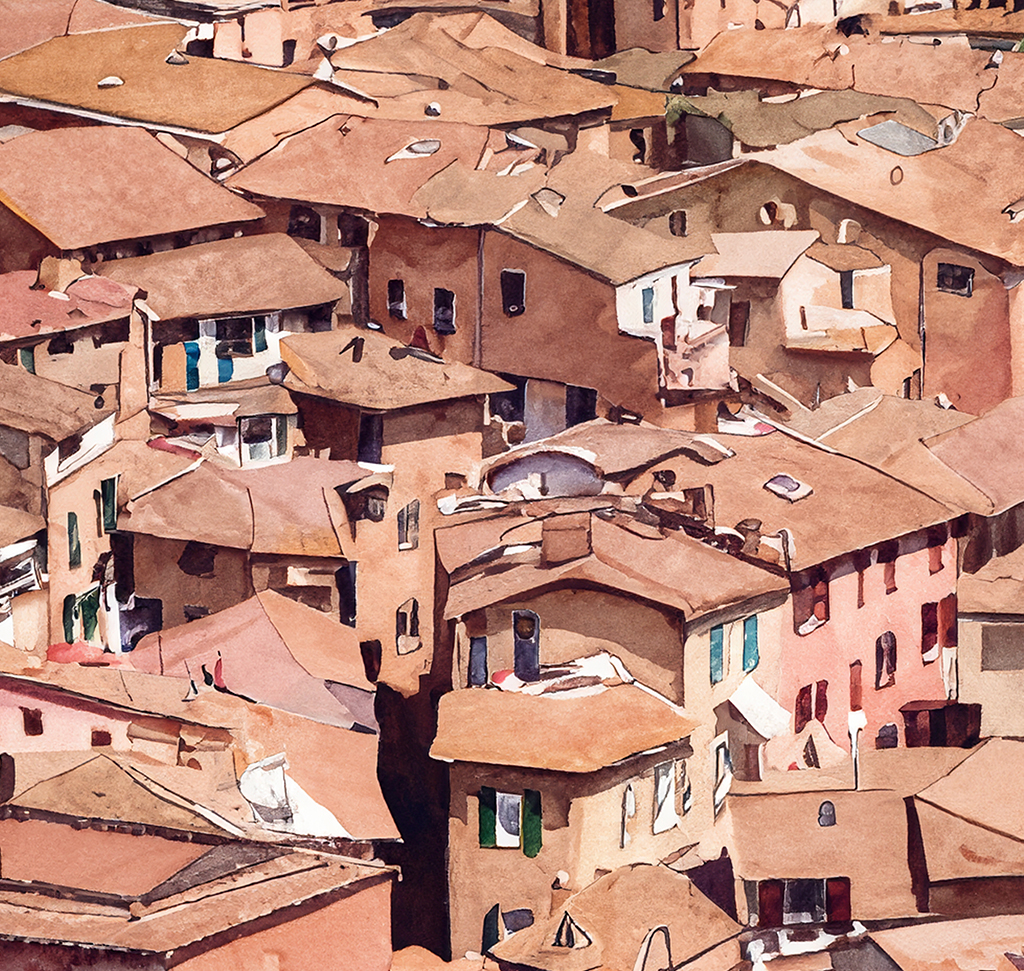
Turning a photograph into something that reads as a painting usually means a filter, and filters usually look like filters. This approach uses Generative Fill instead, but with one change that makes all the difference: the selection is deliberately incomplete.
Instead of handing Photoshop an area that is 100% selected, you hand it one that is around 70 or 80% selected. A lot of the original photograph survives and gets reinterpreted rather than replaced.
Why a Partial Selection Changes Everything
When most people make a selection and run Generative Fill, that selection is fully active — every pixel inside it is 100% selected, so Photoshop replaces 100% of what was there. That is why generative results so often feel disconnected from the photo they came from.
A selection does not have to be all or nothing. It can have a strength, and you can set that strength to a specific number. Do that and Generative Fill stops being a replacement tool and starts being an interpretation tool — it keeps the structure, the composition and much of the detail of your photograph, and renders all of it in the style you asked for. How Generative Fill selections work is worth reading alongside this.
Making a Partial Selection with Quick Mask
Quick Mask is the route to a partial selection, because in Quick Mask mode a selection is just a grayscale image — and grayscale has values between black and white.
-
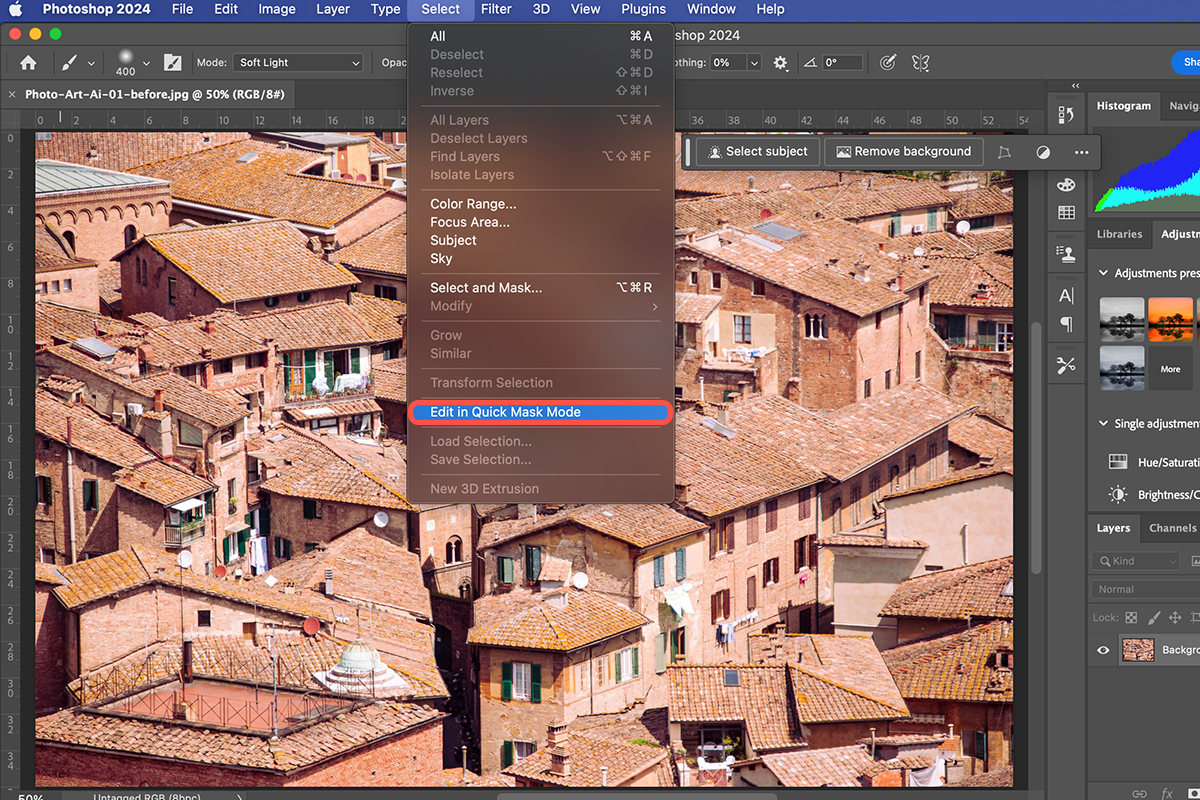
Go to Select > Edit in Quick Mask Mode
The keyboard shortcut is Q. Your image turns red, which is how you know the mode is active.
The Fill Value That Sets the Strength
With Quick Mask active, fill the whole thing with a specific shade of gray. The exact value is the control.
-
Go to Edit > Fill and choose Color
The Color Picker opens.
-
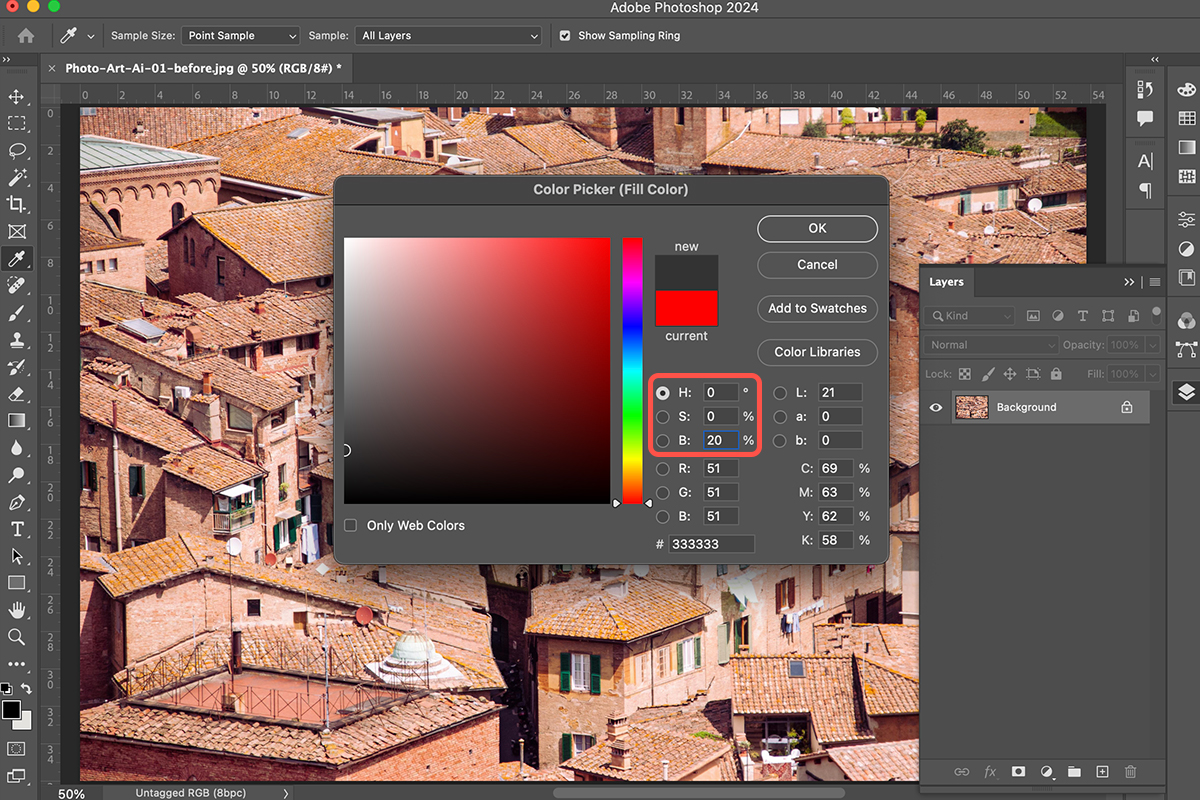
Set Hue to 0, Saturation to 0 and Brightness to 20
Zero hue and zero saturation give you a neutral gray. At a brightness of 20 the picker reads 51, 51, 51 in RGB, or #333333.
-
Click OK, then OK again
The whole frame fills with that value.
What the Brightness Number Actually Does
This one number is the whole technique, so it is worth stating plainly. The higher the brightness, the more artistic interpretation you get — more of the result is invented by the AI. The lower the brightness, the more fidelity you keep to your original photograph.
Twenty is a good place to start. It holds on to a lot of the original image while still producing a genuinely painterly result.
Turn It Back into a Selection
Go back to Select and uncheck Edit in Quick Mask Mode. The red overlay disappears and the gray fill converts into a selection.
-
Select > uncheck Edit in Quick Mask Mode
Or press Q again. The fill becomes a selection.
It Will Look Like Nothing Is Selected
Expect no marching ants, or a selection edge that looks wrong. That is exactly what a partial selection looks like — Photoshop only draws the boundary at 50% selected, and yours is a uniform 20%.
The selection is there and it is doing its job. Do not go back and redo it because the screen looks empty; and do not forget to leave Quick Mask mode, which is the most common way to lose the whole effect.
Generate the Painting
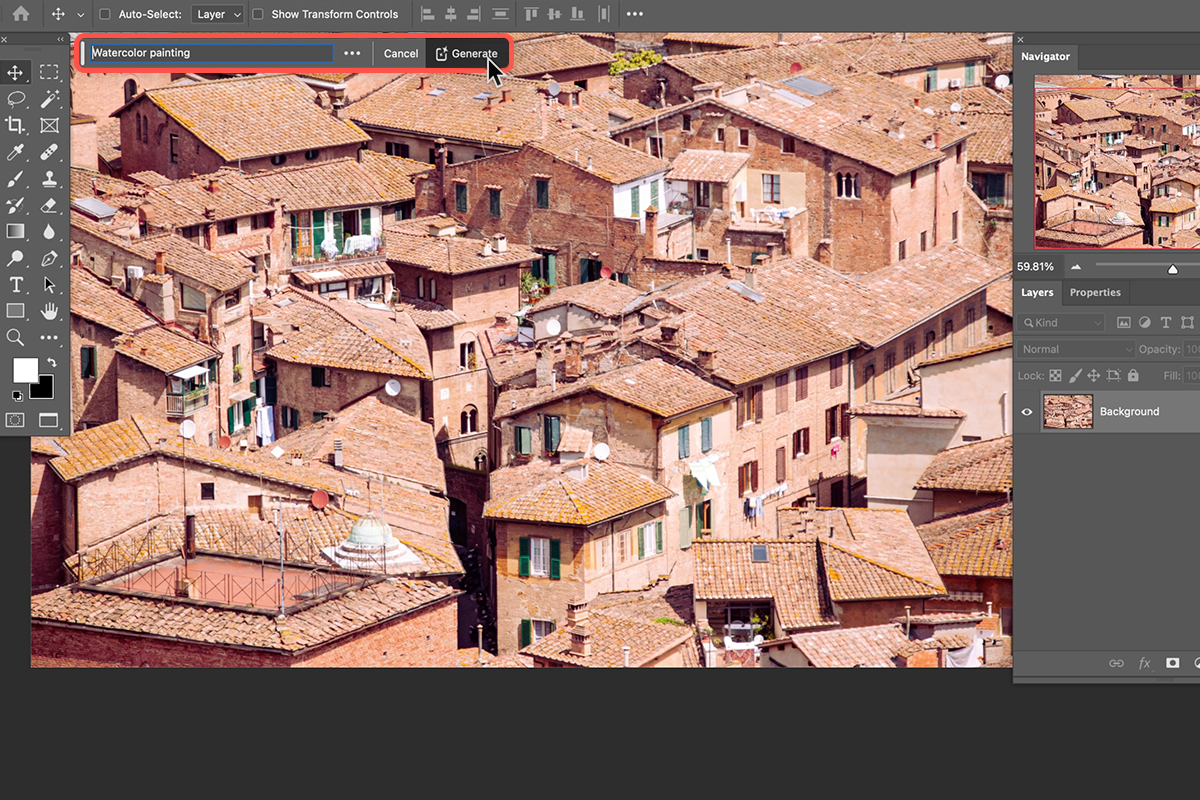
With the selection active, the contextual task bar offers Generative Fill. Click it, type what you want, and click Generate.
-
Click Generative Fill
It appears in the contextual task bar below your image.
-
Type your prompt
Something as simple as watercolor painting is enough.
-
Click Generate
Photoshop returns several variations to choose between.
Keep Generating for More Options
As with every generative tool in Photoshop, clicking Generate again produces a fresh set of variations from the same prompt and the same selection. If the first batch is close but not right, another round costs nothing but time. The same is true across the rest of the toolset, from Generative Fill itself to Generative Expand.
The Same Photo at Four Different Values
The workflow above never changes. Only two things vary: the brightness number and the prompt. Running the same photograph through several values is the fastest way to understand what the dial is doing.
-
Brightness 20, prompt “watercolor painting”
Holds a lot of the original structure and reinterprets it as watercolor.
-
Brightness 20, prompt “oil painting”
Same fidelity, completely different medium. The prompt and the number are independent controls.
-
Brightness 30, prompt “painting”
Noticeably more stylized. The AI is taking over more of the image.
-
Brightness 40, prompt “painting”
More abstract again, with less detail carried over from the photograph.
-
Brightness 10, prompt “painting”
Much closer to the original. Still clearly a painting, but the photograph is doing most of the work.
Start at 20 and Move From There
Put the 40 and the 10 side by side and the relationship is obvious: one is an abstract interpretation that takes cues from your photo, the other is your photo wearing a painting’s clothes. Neither is more correct.
Twenty sits in the middle and is the sensible default. Want it looser and more abstract? Raise the number. Want more of your original photograph to come through? Lower it. That is the entire decision.
What This Works Best On
Flowers, landscapes and nature give the strongest results. Organic subjects have the kind of irregular detail that painting styles handle well, and the looser interpretations at higher brightness values suit them particularly.
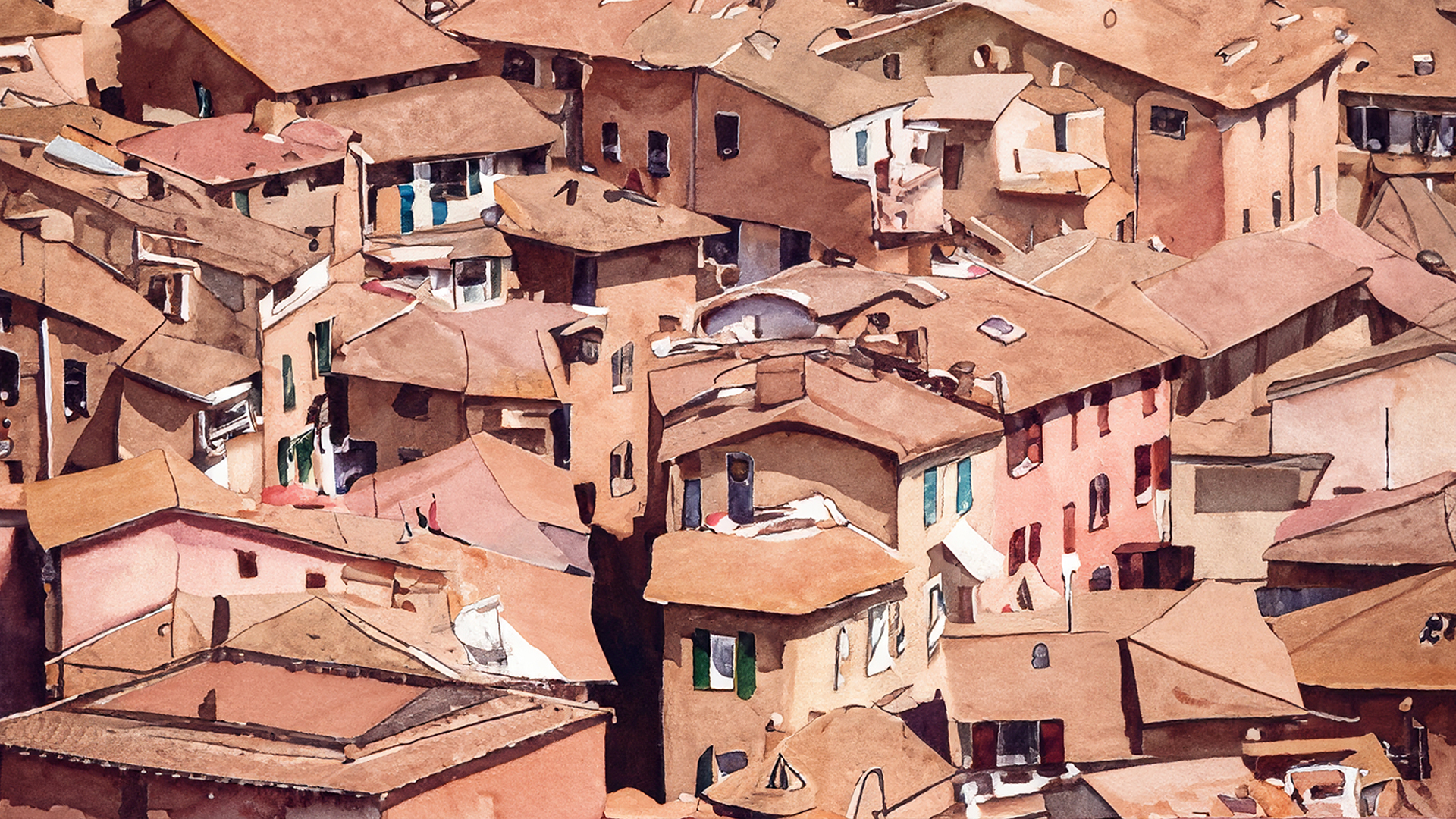
That said, the example running through this tutorial is a dense cluster of terracotta rooftops — architecture, straight lines and all — and it holds up at every value tested. Try your own subjects before ruling anything out.
Why This Beats a One-Click Filter
A painting filter applies the same transformation everywhere regardless of what is in the frame, which is why the results tend to look identical from photo to photo. Generative Fill is producing an actual interpretation of your specific image, guided by a prompt you wrote.
The partial selection is what keeps that interpretation anchored. Without it you get something new that happens to sit where your photograph used to be. With it, the composition, the light and the structure all survive, and only the rendering changes.
The Number Is the Whole Technique
Everything else here is mechanical: Quick Mask, fill, exit Quick Mask, Generative Fill. You will have it memorized after two attempts.
The judgment is entirely in that one brightness value, and it is worth running the same image at 10, 20, 30 and 40 once so you have a feel for the range. After that you will know which number to reach for before you start.
For more creative looks like this taught in order, our PRO Artistic Effects Learning Path is where to go next.
Quick Reference: Keys, Menus and Settings
- Quick Mask onSelect > Edit in Quick Mask Mode, or Q
- Set the strengthEdit > Fill, Contents: Color; H 0, S 0, B 20; OK, then OK
- Quick Mask offUncheck Select > Edit in Quick Mask Mode, or Q again; the fill becomes a partial selection
- Generate the artGenerative Fill: “watercolor painting”, “oil painting” or “painting”, then Generate
- Turn the dialBrightness 10 stays close to the photo, 20 to start, 30 more stylized, 40 abstract
Free Downloads
Follow Along on the Same Photos
Get the rooftops, window, portrait and barn photos, the four finished PSDs and the 3-page PDF guide. Free with a PHLEARN account.
Artistic Effects With Generative Fill: Common Questions
How do I turn a photo into a painting with Generative Fill?
Make the whole image only partly selected, then run Generative Fill with a style prompt. A normal selection replaces 100% of what was there; a partial one keeps much of the photo and reinterprets it as art.
How do I make a partial selection?
Go to Select > Edit in Quick Mask Mode (Q). Choose Edit > Fill, set Contents to Color and pick Hue 0, Saturation 0, Brightness 20. Click OK twice, then uncheck Edit in Quick Mask Mode to turn the fill into a selection.
What does the Brightness number change?
Higher means more artistic interpretation from the AI. Lower means more fidelity to your original photo. Hue and Saturation stay at 0 so the gray is neutral.
What Brightness value should I start with?
Start at 20. It keeps a lot of the image and still gives a painterly result. The video also tries 30 and 40 for more abstract looks and 10 to stay close to the photo.
It looks like nothing is selected. Did it work?
Yes. A partial selection often shows no outline, but it is active, which is why Generative Fill appears in the Contextual Task Bar. Don’t redo it.
Why is my image still red?
You are still in Quick Mask mode. Go to Select and uncheck Edit in Quick Mask Mode, or press Q. The fill only becomes a selection once you leave.
What prompt should I type?
Keep it simple. The video uses “watercolor painting”, “oil painting” and just “painting”. The prompt sets the style and the Brightness number sets how far it strays from the photo.
How do I get more versions to choose from?
Click Generate again for a new set of variations from the same selection, or change the prompt.
What kinds of photos work best?
Aaron finds it works really well on flowers and landscapes, and the more abstract, higher values suit landscapes in particular. The rooftops and the portrait hold up well too, so try your own subjects.
Are the sample files free?
Yes, with a free PHLEARN account. You get 4 sample images, 4 sample PSDs and 1 PDF guide: rooftops, a window with flowers, a portrait and a barn landscape, their finished files and a 3-page step-by-step guide.
Master Photoshop, Lightroom and Photography
Join PHLEARN PRO for $12.99 a month, or $99.99 a year (save 36%). Cancel anytime, with a 100% money-back guarantee.





