

description
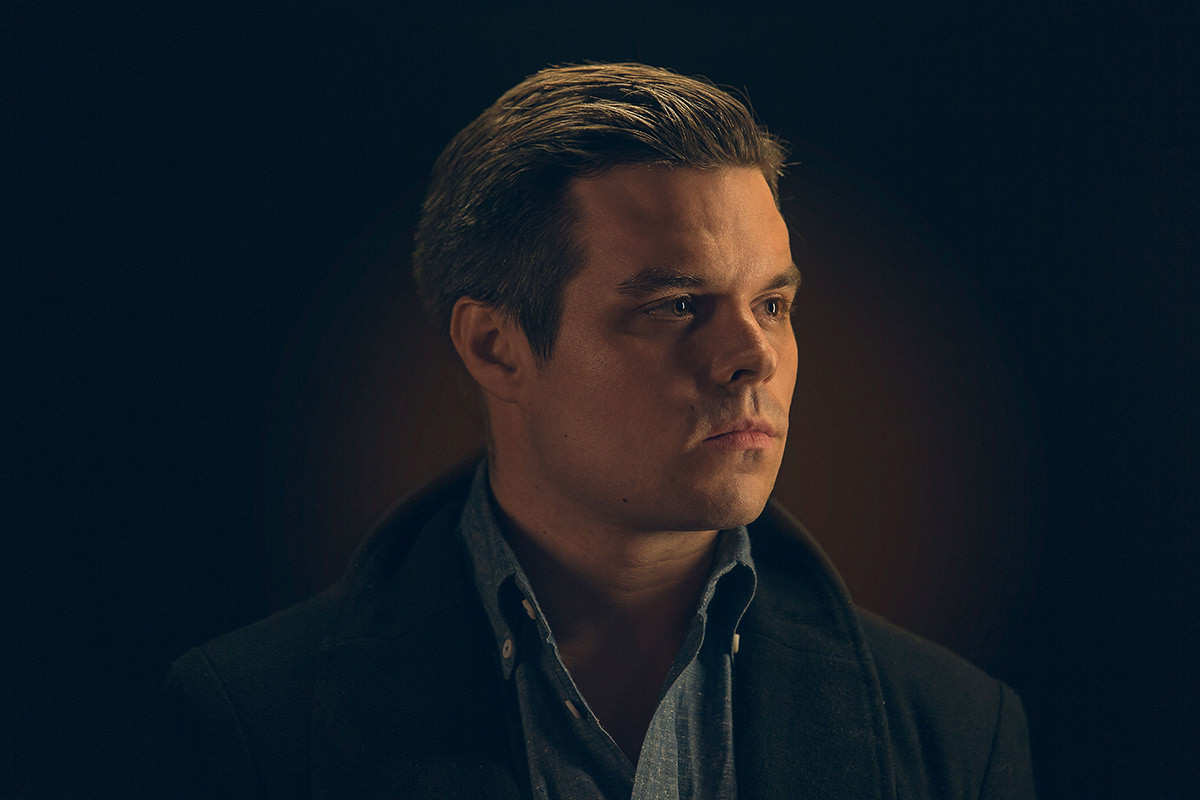
Studio lighting does not have to start with an expensive strobe setup. This tutorial builds a full DIY lighting kit for under fifty dollars out of inexpensive, low-heat continuous fluorescent work lights, walks through the distinct roles a main light, fill light, and accent light each play in shaping a portrait, shows how black gaffer tape stands in for grids and barn doors, and finishes with posing tips for drawing out a natural, candid expression.
Enjoying This Free Tutorial?
We publish a new free tutorial every week, each one with sample images and PSDs you can download and follow along with. Sign up and they land straight in your inbox, along with early word on sales, events and subscriber-only offers.
How to Light an Amazing Portrait With a Low-Cost DIY Lighting Kit
Studio lighting doesn’t have to mean an expensive strobe setup right out of the gate. This tutorial builds a full DIY lighting kit for under fifty dollars using inexpensive continuous fluorescent lights, covers the roles of a main light, fill light, and accent light, and finishes with posing tips for getting a natural-looking portrait once the lights are in place.
Choosing Lights for a Budget DIY Kit
Three simple criteria, cost, continuous output, and low heat, guided the choice of light for this entire kit.
-
Prioritize Affordability
Choose a light that keeps the entire kit’s cost accessible, aiming for something inexpensive enough for anyone to try.
-
Choose Continuous Light Over Strobes
Pick continuous lighting instead of strobes so it’s possible to see exactly what the light is doing to the subject in real time.
-
Choose a Low-Heat Light
Choose a light that doesn’t produce much heat, which makes it safe to use gels or other lighting modifiers directly on or near it.
Assembling the DIY Lighting Kit
The kit itself is built from inexpensive, daisy-chainable fluorescent work lights, ready to be positioned as a main, fill, and accent light.
-
Buy Low-Profile Fluorescent Lights
Order a set of low-profile fluorescent lights, such as the DIY Lighting Kit used here, at around $15 per light.
-
Daisy Chain the Lights Together
Connect multiple lights to the same power cord using their daisy chain capability, reducing the number of outlets needed.
Why Continuous Lighting Helps Beginners
A strobe only fires for a fraction of a second, which makes it hard for someone new to lighting to see exactly how a light is shaping a subject’s face before the shot is taken. Continuous lighting stays on the entire time, so its effect on shadows and highlights can be studied and adjusted in real time, well before ever pressing the shutter.
Setting Up the Main (Key) Light
The main light, also called the key light, does the majority of the work lighting the subject’s face and is typically the brightest and largest light in the setup.
-
Position the Main Light Closest and Brightest
Place the main light so it illuminates the majority of the subject’s face, keeping it the brightest and usually the largest light used.
Adding a Fill Light
A fill light softens the shadows the main light leaves behind, without competing with it for brightness.
-
Position the Fill Light Farther Back
Place the fill light farther away from the subject than the main light.
-
Reduce the Fill Light’s Brightness
Keep the fill light dimmer than the main light so it softens shadows without erasing them entirely.
Adding an Accent Light
An accent light highlights a specific area of the subject or scene, commonly placed above as a hair light or to the side as a rim light.
-
Place the Accent Light Above for a Hair Light
Position an accent light above the subject to add a highlight along the hair.
-
Place the Accent Light to the Side for a Rim Light
Position an accent light beside the subject instead to bring a rim of light along one edge, accenting darker areas of the frame.
Shaping Light With Gaffer Tape Modifiers
Black gaffer or duct tape stands in for professional grids, flags, and barn doors, controlling exactly where each light’s output goes.
-
Tape Off Unwanted Light Spill
Apply black gaffer tape or duct tape around the edges of a light to block it from shining in unwanted directions.
-
Narrow the Light’s Beam
Adjust how much of the light is taped off to control how large or small its effective beam becomes.
Why Low-Heat Lights Matter for These Modifiers
Tape and other DIY modifiers placed directly against a hot light source risk melting, discoloring, or even creating a fire hazard over time. Because these fluorescent lights run cool, gaffer tape and similar homemade modifiers can be used directly on or near them safely, which is part of why they were chosen for this kit in the first place.
Posing the Subject Toward the Main Light
Having the subject turn toward the main light does most of the work of flattering their facial features before any additional posing is needed.
-
Have the Subject Look Toward the Main Light
Direct the subject to turn their face toward the main light to define their facial features more attractively.
-
Have the Subject Look Slightly Away From the Camera
Ask the subject to look a little away from the camera itself, which helps reduce the intimidation of a lens pointed directly at them.
Capturing Natural, Candid Expressions
Letting a subject’s expression happen naturally, rather than forcing a big smile, tends to produce a portrait that feels more like the actual person.
-
Avoid Forcing a Big Smile
Skip asking for an exaggerated smile, since it often reads as less natural than a relaxed expression.
-
Capture Candid Moments Between Poses
Watch for and capture candid moments during the shoot, which tend to give a better sense of who the subject actually is than a posed smile.
Why Candid Moments Beat a Forced Smile
A big deliberate smile can look stiff or artificial once it’s held in place for the time it takes to compose and capture a shot. Candid moments captured between poses tend to carry a subject’s real personality and energy, which is often exactly what makes a portrait feel genuine rather than staged.
Why This Approach Works
Choosing continuous, low-heat lights over strobes is what makes this kit genuinely beginner-friendly, since the effect of each light can be studied in real time before a single frame is captured. Building a lighting setup around three distinct roles, main, fill, and accent, gives a portrait depth and shape instead of a single flat source of light. Letting a subject’s expression happen naturally rather than forcing a smile is what turns a technically well-lit photo into a portrait that actually looks like the person in it.
Final Thoughts
None of this required expensive studio strobes, just a handful of cheap fluorescent lights, some gaffer tape, and an understanding of how a main, fill, and accent light work together. Once the lighting is dialed in, a following episode picks up these same portraits and brings them to their fullest potential in Photoshop.

Quick Reference: Settings and Tips
- The lightsLow-profile continuous fluorescent lights, about $15 each, daisy-chained to one cord
- Main lightBrightest and usually largest; lights most of the face
- Fill lightFarther from the subject and less bright than the main light
- Accent lightAbove the subject for a hair light, beside it for a rim light
- Shape the lightBlack gaffer or duct tape over the parts that shouldn’t shine
- PoseFace toward the main light, eyes a little away from the camera
- ExpressionSkip the forced smile; catch the candid moments
DIY Portrait Lighting: Common Questions
Can I really light a portrait for under $50?
Yes. The kit in the video uses low-profile fluorescent lights ordered from Amazon for about $15 each, and you may find cheaper versions in other stores.
Why use continuous lights instead of strobes?
Continuous lights stay on, so you can see exactly what each light is doing to your subject as you move it. That makes them a great way to learn studio lighting.
Why does it matter that the lights stay cool?
Lights that don’t produce much heat let you use gels to change the color, or your own modifiers to shape the light.
What does daisy chaining the lights do?
These lights connect to each other, so several of them can run from the same power cord.
What is a main or key light?
The light that lights most of the subject’s face. It is usually the brightest light in the setup and usually the largest too.
What does a fill light do?
It fills in the shadows the main light leaves behind. Place it a little farther from the subject than the main light and keep it a little less bright.
What is the difference between a hair light and a rim light?
Both are accent lights. Placed above the subject it’s called a hair light; placed beside the subject it’s a rim light, bringing accent to the dark areas.
How do I control where a cheap light spills?
Use gaffer tape or black duct tape in place of grids, flags and barn doors. Tape off the areas where you don’t want light showing through, which also controls how large or small the light is.
Where should my subject look?
Have them turn toward the main light to define their facial features, and look a little away from the camera so the lens feels less intimidating. Candid moments between poses usually look more natural than a big forced smile.
Master Photoshop, Lightroom and Photography
Join PHLEARN PRO for $12.99 a month, or $99.99 a year (save 36%). Cancel anytime, with a 100% money-back guarantee.





