
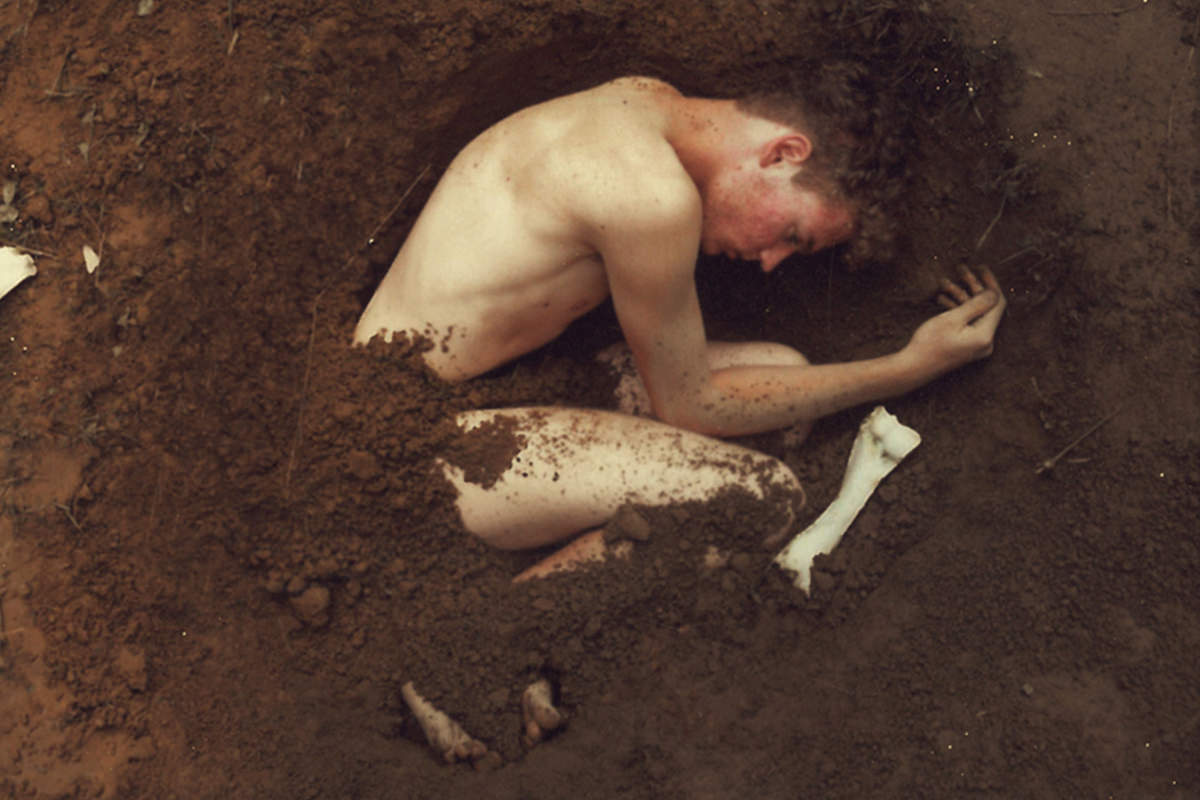

description
The Clone Stamp’s giveaway is its soft, round edge — you can always see where one cloned area stops. This free tutorial fixes that by building a custom brush from random hand-painted splatters, tuning it with Shape Dynamics, Scattering and wider spacing until it paints like separate clumps of dirt, then loading that brush into the Clone Stamp so every stroke samples real texture and tone instead of leaving a smooth boundary behind.
Enjoying This Free Tutorial?
We publish a new free tutorial every week, each one with sample images and PSDs you can download and follow along with. Sign up and they land straight in your inbox, along with early word on sales, events and subscriber-only offers.

Combine Custom Brushes and Clone Stamp in Photoshop
A regular Clone Stamp tool works fine for most retouching, but it leaves a telltale soft, fuzzy edge that gives away exactly where one cloned area ends and another begins. Building a custom brush that looks like little clumps of dirt and pairing it with the Clone Stamp solves that problem completely, since every stroke picks up real texture and definition instead of a smooth, obvious edge.
Building a Random Splatter Brush Shape
The foundation of the custom brush is a completely random, hand-painted splatter rather than any deliberate pattern.
-
Create a New 500×500 Pixel Document
Press Cmd/Ctrl+N and set the new document to 500 by 500 pixels.
-
Load the Natural Brushes and Paint a Random Splatter
Right-click with the Brush tool, load the Natural Brushes set, and paint black on white with a mix of splatter shapes at different sizes, aiming for something that looks completely random with no repeating pattern.
Defining the Brush and Refining It With Shape Dynamics
Turning that splatter into an actual brush, then adding some randomization settings, is what starts to make it look like real clumps of dirt.
-
Define a Brush Preset From the Splatter
Go to Edit > Define Brush Preset, name it, and click OK.
-
Test the Brush and Open Brush Settings
On a new layer, paint with the new brush in a bright color to check the shape, then go to Window > Brush to open the Brush panel.
-
Enable Shape Dynamics and Increase Spacing
Turn on Shape Dynamics, raise Size Jitter and Angle Jitter, lower the minimum diameter, then go to Brush Tip Shape and increase the spacing so individual clumps of dirt separate from each other.
-
Turn On Scattering With a Small Brush
Enable Scattering and reduce the brush size, keeping the scatter distance fairly tight so the individual clumps stay close together.
Why Shape Dynamics and Scattering Remove the Fuzzy Edge Look
A standard brush or Clone Stamp stroke has a soft, round, uniform edge, which is exactly what gives cloned areas away. Building a brush out of randomly scattered, individually defined clumps means every stroke has real, uneven edges throughout, so there’s no single soft boundary left for the eye to notice.
Saving the Dirt Clot Brush Preset
Once the brush behaves the way you want, saving it as its own preset makes it available for later use with any tool that uses brushes.
-
Delete the Test Layer and Save a New Brush Preset
Delete the layer used for testing, then open the Brush panel’s options menu and choose New Brush Preset, naming it something identifiable.
Cloning With the Dirt Brush to Blend Transitions
With the brush saved, the Clone Stamp tool can use it directly to blend an area seamlessly using real texture rather than a smooth sample.
-
Select the Dirt Brush With the Clone Stamp Tool
Select the Clone Stamp tool, right-click to choose the new dirt brush from the very end of the brush list, and set Sample to Current and Below on a new layer.
-
Sample Dirt and Paint Over the Transition
Hold Alt/Option to sample an area of existing dirt, then paint directly over the transition area that needs to blend, sampling from a couple of different spots for a more natural, varied result.
Why Sampling With the Brush Beats Painting It In Directly
Using the Clone Stamp tool with the custom brush, rather than just painting the brush shape in a flat color, pulls in the actual tone and detail already present in the surrounding dirt. That’s what makes the blended area look like it was always part of the same ground rather than a texture pasted on top of it — the same combination of a custom brush and the Clone Stamp works just as well for other materials beyond dirt.
Stylizing With a Warm Curves Grade
A final color pass gives the whole image a warmer, earthier feel that matches the texture work already done.
-
Add a Curves Layer and Darken With Warm Tones
Add a Curves adjustment layer, drag the curve down to darken the image, increase the Red channel, and decrease the Blue channel for a warm orange tone.
-
Lower Saturation if Needed
If the resulting color feels too saturated, add a Hue/Saturation adjustment layer and lower saturation slightly.
Why a Warm, Slightly Desaturated Grade Reads as Earthy
A strong, fully saturated orange tone can look artificial rather than natural. Pairing that same warm color push with a modest reduction in overall saturation keeps the tone feeling grounded and earthy instead of oversaturated, which matches the dirt texture created earlier in the edit.
Toning Skin With a Levels Output Adjustment
One more small adjustment adds a final bit of contrast between cool and warm tones.
-
Add a Levels Layer and Adjust Output for Blue and Red
Add a Levels adjustment layer, go to the Blue channel’s output sliders and pull blue into the shadows and yellow into the highlights, then add a touch of red as well to warm the skin further.
Why This Approach Works
A custom brush built from random splatters, then refined with Shape Dynamics and Scattering, solves the exact problem a plain Clone Stamp stroke creates: a smooth, uniform edge that never quite disappears into its surroundings. Sampling that brush’s texture directly from the image with the Clone Stamp, rather than painting a flat shape on top, is what lets the blended area pick up real tonal variation instead of looking pasted in. The same brush-building process, whether it produces dirt, foliage, or any other organic texture, is a technique worth reusing well beyond this one image.
Final Thoughts
Building a custom brush from scratch takes a few extra minutes up front, but it pays off every time that brush gets reused on a future image. This same dirt-clot technique works for compositing a subject into new ground, blending seams in a landscape, or building any texture that needs to avoid the giveaway of a soft, fuzzy Clone Stamp edge.
Quick Reference: Keys, Menus and Settings
- Brush documentCmd/Ctrl + N, 500 x 500 pixels; Natural Brushes splatters, black on white
- Make the brushEdit > Define Brush Preset
- Dirt settingsWindow > Brush: Shape Dynamics (Size and Angle Jitter up), Brush Tip Shape Spacing up, Scattering on
- Save itBrush panel options menu > New Brush Preset
- Clone with itClone Stamp, right-click for the brush, Sample: Current and Below, Alt/Option-click to sample
- Earthy colorCurves darker, Red up, Blue down; Hue/Saturation down a little; Levels Blue output sliders
No AI, no generative credits.
Custom Brushes and Clone Stamp: Common Questions
Why does my Clone Stamp leave a fuzzy edge?
The regular round brush has a soft edge, so the seam between one cloned area and the next shows. A custom brush made of small, hard-edged clumps hides it.
How do I paint the shape for a dirt brush?
Make a 500 by 500 pixel document with Cmd/Ctrl + N. Right-click with the Brush tool, append the Natural Brushes and paint black on white with splatters of different sizes until it looks completely random.
How do I turn the painting into a brush?
Go to Edit > Define Brush Preset, name it and click OK. Test it on a new layer in a bright color before you change the settings.
Which Brush panel settings make it look like dirt?
In Window > Brush, turn on Shape Dynamics with Size Jitter and Angle Jitter up and the minimum diameter down. Raise Spacing under Brush Tip Shape, then turn on Scattering and make the brush small.
How do I save the brush with its settings?
Open the Brush panel’s options menu and choose New Brush Preset. It shows up last in the list when you right-click with the Brush tool.
Can the Clone Stamp use a custom brush?
Yes. Right-click with the Clone Stamp tool and pick the brush from the end of the list. On a new layer, set Sample to Current and Below, Alt/Option-click to sample dirt and paint over the transition.
How do I make the cloned dirt look natural?
Sample from a couple of different spots as you paint. Every stamp lands as small clumps with defined edges, so the area blends in with the ground around it.
How do I give the photo a warm, earthy look?
Add a Curves layer, darken it, raise Red and lower Blue. Lower saturation a bit with Hue/Saturation, then use a Levels layer’s Blue output sliders to put blue in the shadows, yellow in the highlights and add a touch of red.
From the Magazine View all
Stories, interviews and guides for photographers, new every week.
 EditingHow to Color Grade Photos in Photoshop and LightroomCorrect the photo first, then put color in the shadows, midtones and highlights. Aaron Nace on the order, the tools and skin.
 BusinessHow to Compete With AI: Give Your Clients MoreEveryone has the same tools now, and your clients know it. The way to compete is to give them more.
 EditingLightCraft vs Lightroom: I Edited the Same RAW Files in BothThe free clone on the same RAW files: what matches, what breaks and who should switch.
Master Photoshop, Lightroom and Photography
Join PHLEARN PRO for $12.99 a month, or $99.99 a year (save 36%). Cancel anytime, with a 100% money-back guarantee.





