

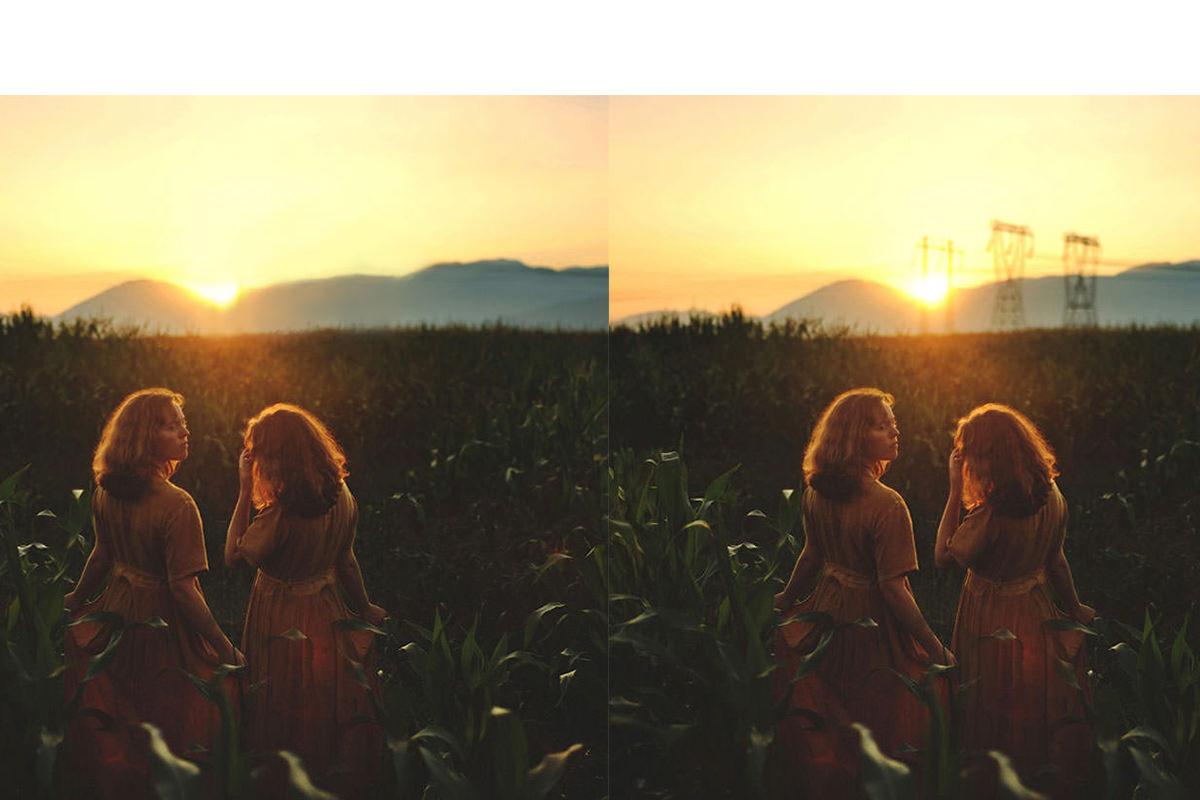

Removing Distractions
Sometimes everything comes together perfectly in a photo and there is no need to remove anything. In my experience this is a rare case. It is always better to move the object in person rather than in Photoshop if at all possible.
This image provides a great example for when it is really not possible to remove the distraction in person. The power lines in this image are the perfect thing to leave up to Photoshop. It is much easier to remove them in post than it would be in person.










Enjoying This Free Tutorial? Go Further with PRO.
Unlock Full Sample Files, PSDs, and Hundreds of Masterclasses!

Download full project assets, original PSDs, and RAW images for every lesson
Unlimited access to our complete library of PRO Photoshop & Lightroom courses
Instant 4K Ultra HD streaming on all devices, anytime, anywhere
Full access to our entire library of Photoshop Actions, Presets, and LUTs
Flexible monthly and annual membership plans
Cancel anytime with zero hassle or commitments