
Copying a lighting style you admire is one of the fastest ways out of a habit, and this breakdown shows the whole messy process rather than just the answer. Follow along as catchlights are read from a reference shot, three lighting setups fail in different ways, and a pair of strip boxes placed inches from the face finally produces the look, with a neutral density filter making a wide-open aperture possible.
We publish a new free tutorial every week, each one with sample images and PSDs you can download and follow along with. Sign up and they land straight in your inbox, along with early word on sales, events and subscriber-only offers.
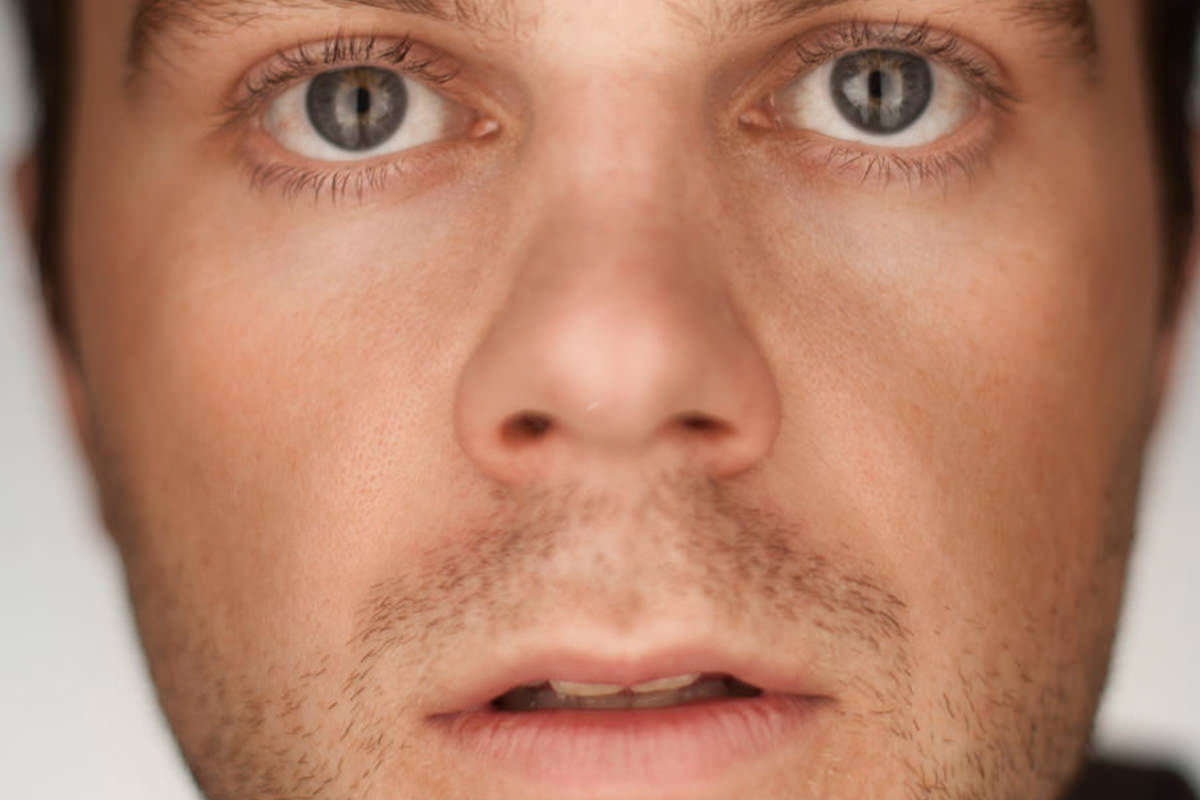
Martin Schoeller Inspired Portrait: Part 1 (Lighting)
Studying and imitating the lighting of a photographer whose work you admire, while giving them proper credit, is one of the best ways to push past a lighting style you have settled into out of habit. This behind-the-scenes breakdown covers the trial-and-error process of chasing a lighting look inspired by Martin Schoeller‘s close-up portrait style, including several setups that did not work before landing on one that finally did.
Reading a Portrait’s Lighting Through Its Catchlights
Before building any lighting setup, studying the reflections visible in a subject’s eyes in a reference photograph reveals a surprising amount about how that portrait was actually lit.
-
Study the Catchlight Position and Shape
Zoom into a reference portrait’s eyes and study the shape and position of the catchlight, which is the reflection of the light source. Its position tells you roughly where the light was placed, and its shape can hint at whether it came from a strip box, an umbrella, a softbox, or something else.
First Attempt: Two Strip Boxes From the Sides
The first lighting setup tried was based on where the reference image’s catchlights appeared to sit, right at the sides of the eyes.
-
Position a Strip Box on Each Side
Set up a strip box on both the left and right of the subject to recreate side-positioned catchlights.

Why This First Attempt Did Not Work
Lighting a subject purely from both sides created a dark, shadowed strip directly down the center of the face, which did not match the more evenly lit reference images. A setup that gets the catchlight position right can still miss the overall lighting quality if it introduces a problem the reference photo does not actually have.
Adding a Third Light for the Background
Comparing test shots against the reference revealed that the background needed its own dedicated light, since the reference portraits all had a noticeably lighter background than the early tests.
-
Add a Soft Box Aimed at the Background
Add a third light, such as a soft box, aimed specifically at the backdrop rather than the subject, to bring up the background’s brightness independently.
Repositioning Lights and Testing Different Focal Lengths
Several more rounds of adjustment tested different light placements and lens focal lengths before finding a combination that felt right.
-
Move the Strip Boxes Behind the Subject
Reposition the strip boxes further back and angle them around toward the front, testing whether a different angle solves the central shadow problem.
-
Test Different Focal Lengths
Try shooting at multiple focal lengths, such as a wider 50mm, a compressed 200mm, and something in between like 70mm, to see which perspective best matches the desired look, since focal length changes how much the face appears to compress or flatten. Here 200mm flattened the face too much and 70mm didn’t work either, so the shoot went back to the 50mm.
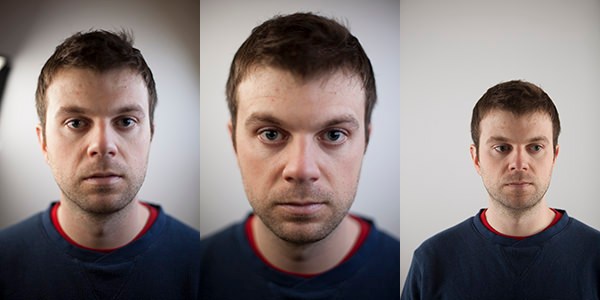
Why Focal Length Changes a Portrait’s Feel
A longer focal length compresses facial features and flattens depth, while a wider focal length exaggerates depth and can distort features closer to the lens. Since the goal was matching a specific reference look, testing multiple focal lengths side by side was necessary to find which one produced facial proportions closest to the original inspiration.
Using a Test Subject Before Photographing the Real One
Because a real shoot rarely allows time for five or six full lighting changes with the actual subject present, dialing in lighting on a stand-in first is standard practice.
-
Light a Stand-In With Similar Skin Tone and Wardrobe
Work out your full lighting setup on a test subject with similar skin tone and wardrobe to your actual subject, so the real subject only needs to step in once everything is already dialed in.
Switching to a Larger Parabolic Reflector
A larger light source was tested next, in place of the smaller soft boxes used earlier.
-
Replace Soft Boxes With a Parabolic Reflector
Swap in a large parabolic reflector as your primary light source in place of a smaller soft box, since a larger source produces softer, more even light across a face. Here it turned out too flat, without an interesting falloff, so the strip boxes went back on.
The Lighting Setup That Finally Worked
The breakthrough came from moving the strip boxes to a completely different position than either of the earlier attempts.
-
Position Strip Boxes Directly in Front, Close to the Face
Move both strip boxes so they point directly at the subject’s nose from the front, positioned very close to the face rather than off to the sides. They sat just outside the left and right of the frame, leaving a gap of only 2 or 3 inches to shoot through.

Why Close, Front-Facing Strip Boxes Solved the Problem
Lighting the sides of the face while both lights point at the nose creates a bright highlight right in the center of the face with a natural falloff toward the edges, the opposite tonal pattern from the earlier side-lighting attempt, and much closer to the reference portraits’ overall look.
Using a Neutral Density Filter to Shoot Wide Open
Getting the lights close enough to the subject’s face for this effect created a new problem: an enormous amount of light hitting the lens.
-
Add a Neutral Density Filter to the Lens
Attach a neutral density filter, a three-stop filter in this case, in front of the lens to cut down the amount of light reaching the sensor, allowing a wide-open aperture like f/1.4 even with very bright lights positioned close to the subject.
Why a Neutral Density Filter Was Necessary Here
Positioning strobes this close to a subject’s face produces far more light than a normal exposure at a wide aperture can handle, even at a fast shutter speed. A neutral density filter reduces the total light reaching the sensor without changing color or contrast, making it possible to keep both the close, bright lighting setup and the desired shallow depth of field.
Correcting Lens Distortion and Vignetting
Shooting this close with a wide-open aperture introduces its own optical side effects that need correcting afterward.
-
Enable Lens Profile Corrections
In Lightroom’s Lens Corrections panel, enable profile corrections to automatically fix perspective distortion and reduce the heavy vignetting that comes from shooting at a wide aperture and close focal distance.
-
Sync Settings Across the Entire Shoot
Select all the images from the shoot with Command + A and click Sync (leaving Crop unchecked in case you made custom crops) to apply the same lens correction, and any other consistent adjustments, across every photo at once rather than repeating the process image by image.
Continue With Part 2
With the lighting finally dialed in, the second half of this series covers the full Photoshop edit: Martin Schoeller Inspired Portrait, Pt. 2.
Why This Approach Works
What makes this behind-the-scenes breakdown valuable is not the final lighting setup alone. It is seeing every failed attempt along the way. Side-mounted strip boxes seemed like the obvious choice based on catchlight position, but only close, front-facing strip boxes aimed at the nose actually reproduced the reference portraits’ distinctive center-highlighted falloff. Testing on a stand-in first, trying multiple focal lengths, and accepting that several setups simply would not work before finding the right one reflects how real lighting problem-solving actually happens, rather than a single correct answer arrived at on the first try.
Final Thoughts
Imitating another photographer’s lighting style, with proper credit given, is a legitimate and often highly effective way to grow as a photographer, especially when it pushes you into lighting setups you would not have tried otherwise. The specific technique that worked here, positioning lights very close to the subject and using a neutral density filter to compensate, is worth remembering any time you want an especially strong, centrally falling highlight on a portrait subject.
Quick Reference: Settings and Tips
- Read the referenceZoom into the eyes and study the catchlights’ position and shape
- BackgroundA third light, a soft box on the right, aimed at the backdrop
- Lens50mm f/1.4 (200mm and 70mm were tried and dropped)
- Key lightsTwo strip boxes in front, very close, both aimed at the nose, a 2 to 3 inch gap to shoot through
- ExposureThree-stop neutral density filter on the lens to shoot at f/1.4
- Fix the lensLightroom Develop > Lens Corrections: Enable Profile Corrections
- Apply to the shootCmd/Ctrl + A, Sync, Crop unchecked, Synchronize
Schoeller-Style Portrait Lighting: Common Questions
Is it okay to imitate another photographer’s lighting?
Yes, as long as you credit the photographer. Repeating a look you admire pushes you past the setup you use out of habit, and the trial and error can land you on a style you have never tried.
How can I tell how a portrait was lit?
Zoom into the subject’s eyes. The reflections of the lights, the catchlights, show roughly where the lights were and what shape they were.
Why didn’t strip boxes on both sides work?
The catchlights looked right, but lighting from the sides left a dark strip down the middle of the face. The reference portraits don’t have that.
How was the background made lighter?
A third light, a soft box on the right, aimed at the background. With lights only on the subject the backdrop was too dark compared with the reference portraits.
Which focal length was used?
A 50mm f/1.4. The shoot tried 200mm, which flattened the face too much, and 70mm, then went back to 50mm.
How do you save time when the real subject has only a minute?
Set up the lighting on a test subject with a similar skin tone and similar clothes. When the real subject arrives, everything is already dialed in.
What lighting setup finally worked?
Two strip boxes right in front of him, very close to his face and both pointing at his nose, with a gap of 2 or 3 inches to shoot through. That gives a bright highlight in the center of the face that falls off toward the edges.
Why use a neutral density filter with strobes?
With the lights that close they were very bright, but the goal was a shallow depth of field. A three-stop ND filter on the lens allowed f/1.4 with a correct exposure; without it the frame was three stops overexposed.
How do I fix the distortion and vignetting from shooting close and wide open?
In Lightroom’s Develop module, open Lens Corrections and turn on Enable Profile Corrections. Then select all with Cmd/Ctrl + A and click Sync to apply it to the whole shoot.
From the Magazine View all
Stories, interviews and guides for photographers, new every week.
 EditingLightCraft vs Lightroom: I Edited the Same RAW Files in BothThe free clone on the same RAW files: what matches, what breaks and who should switch.
 InspirationRare Historical Photos: 13 of the Rarest Pictures Ever TakenFrom the earliest surviving picture of a person to the last passenger pigeon: who took each one and why it survives.
 EditingArtCraft: Photoshop Cloned by AI in Two Weeks. Is It Legal?ArtCraft cloned Photoshop and Lightroom with AI and gave them away. Any good? Legal? Safe?
Master Photoshop, Lightroom and Photography
Join PHLEARN PRO for $12.99 a month, or $99.99 a year (save 36%). Cancel anytime, with a 100% money-back guarantee.