

Download Assets
This tutorial includes 1 photoshop brush. Downloads are free with a PHLEARN account.
- Download the sample images and PSDs from every free tutorial on PHLEARN
- New free tutorials published every week
- One free account — sign up once, then download anything
description
This free Photoshop bird brush turns a single click into a bird silhouette, and scattering, size jitter, angle jitter and roundness jitter are already dialed in, so one stroke lays down a flock at varying sizes and orientations rather than the same shape stamped repeatedly. It paints in whatever foreground color is selected — near-black for a bright sky, a lighter gray against overcast or dusk.
Enjoying This Free Tutorial?
We publish a new free tutorial every week, each one with sample images and PSDs you can download and follow along with. Sign up and they land straight in your inbox, along with early word on sales, events and subscriber-only offers.
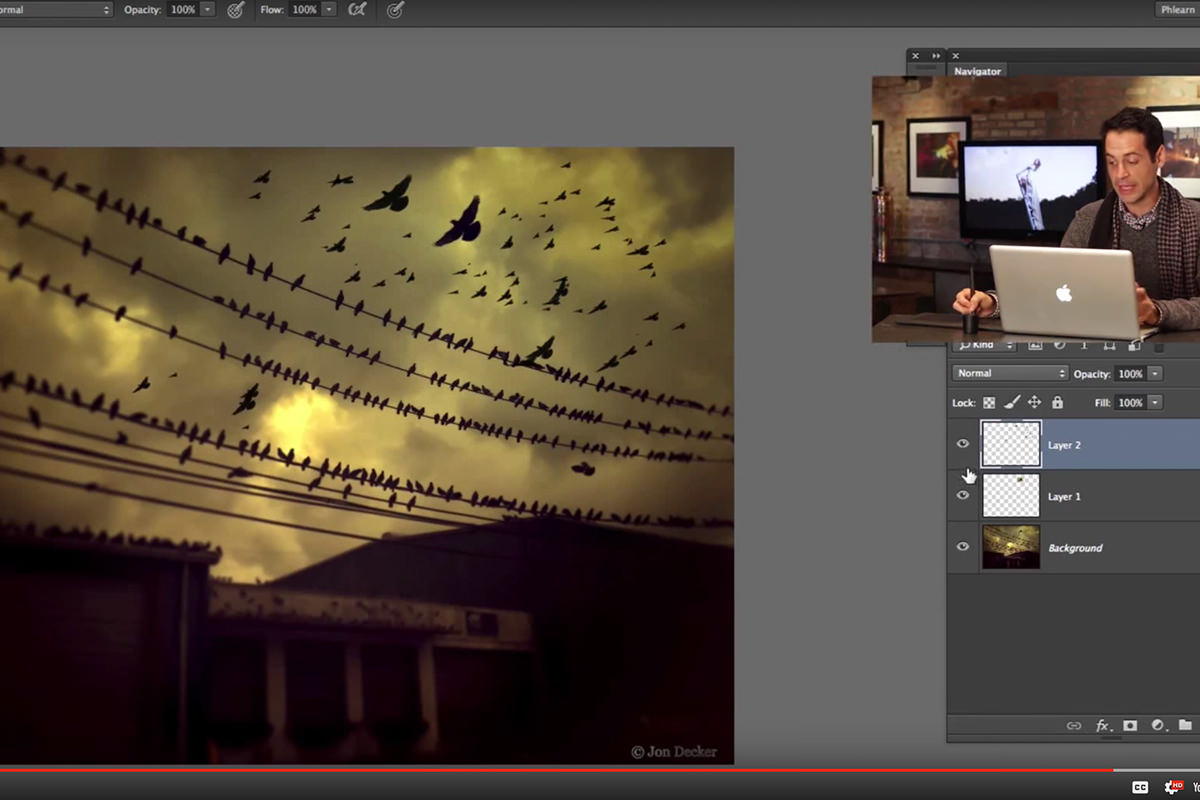
Free Photoshop Bird Brush
This free custom brush turns a single click into a bird silhouette, ready to scatter a convincing flock across any sky without compositing individual birds by hand. Its built-in scattering and size variation mean no two birds painted with it land identically, even across a dozen clicks in a row, which makes it a quick way to add life and movement to an otherwise empty sky.
What’s Included in This Download
The brush is defined from a real photographed bird, with scattering, size jitter, angle jitter, and roundness jitter already dialed in, so a single stroke produces several birds at varying sizes and orientations rather than one repeated, identical shape. Because it’s a standard black-on-transparent brush, it works at any size and paints with whatever foreground color is currently selected, so a nearly black silhouette works well for a bright daytime sky, while a lighter gray can read more naturally against an overcast or dusk background.
How to Load the Brush in Photoshop
Once downloaded, the brush installs the same way as any other Photoshop brush preset, and it works in any recent version of Photoshop without additional plugins.
-
Import the Brush File
Open the Brush panel (Window > Brush), click the panel menu in the top-right corner, and choose Import Brushes to load the downloaded file. Phlearn.com’s Install Guide covers the process in more detail if anything doesn’t load correctly.
-
Select It and Set Your Foreground Color to Black
Select the brush from your picker and set your foreground color to black, or a dark tone that matches the silhouette look you want your birds to have against the sky.
Tips for Getting a Natural Result
Because the brush already has scattering and jitter built in, a single click-and-drag lays down several birds at once with natural-feeling variation in size and angle. For an even more convincing flock, paint with a couple of shorter strokes rather than one long continuous drag, and vary your brush size between passes so some birds read as closer to the camera and others farther away. Painting on a separate layer from your background photo also makes it easy to reposition or delete individual clusters of birds later without affecting anything else in the image.
More Free Photoshop Tutorials
If you want to see exactly how this brush was built, or explore other custom brush effects, these free tutorials are a good next stop:
- How to Create a Bird Brush in Photoshop
- How to Create a Snowflake Brush in Photoshop
- How to Create a Kiss Brush in Photoshop
Related Tutorials
New Free Tutorials View All »



Enjoying This Free Tutorial? Go Further with PRO.
200+ PRO courses. 1,000+ practice files. One membership.

Unlimited access to every PRO course
New PRO courses every month
Layered PSDs and RAW files to follow along
100+ Lightroom Presets, LUTs, Actions and Brushes
Stream in up to 4K, with captions and chapters
Watch on any device: desktop, tablet or phone
4.93 average from 3,900+ reviews · 2M+ students