PRO CartCart
PRO Pinup Cola
Difficulty: Advanced , Length: 2:00 HR
• Re-Create a Classic
• Full Body Retouching
• Mimic a Painting
• Create an Amazing Style
• Color Perfectly
• Cut Subjects Out from Background

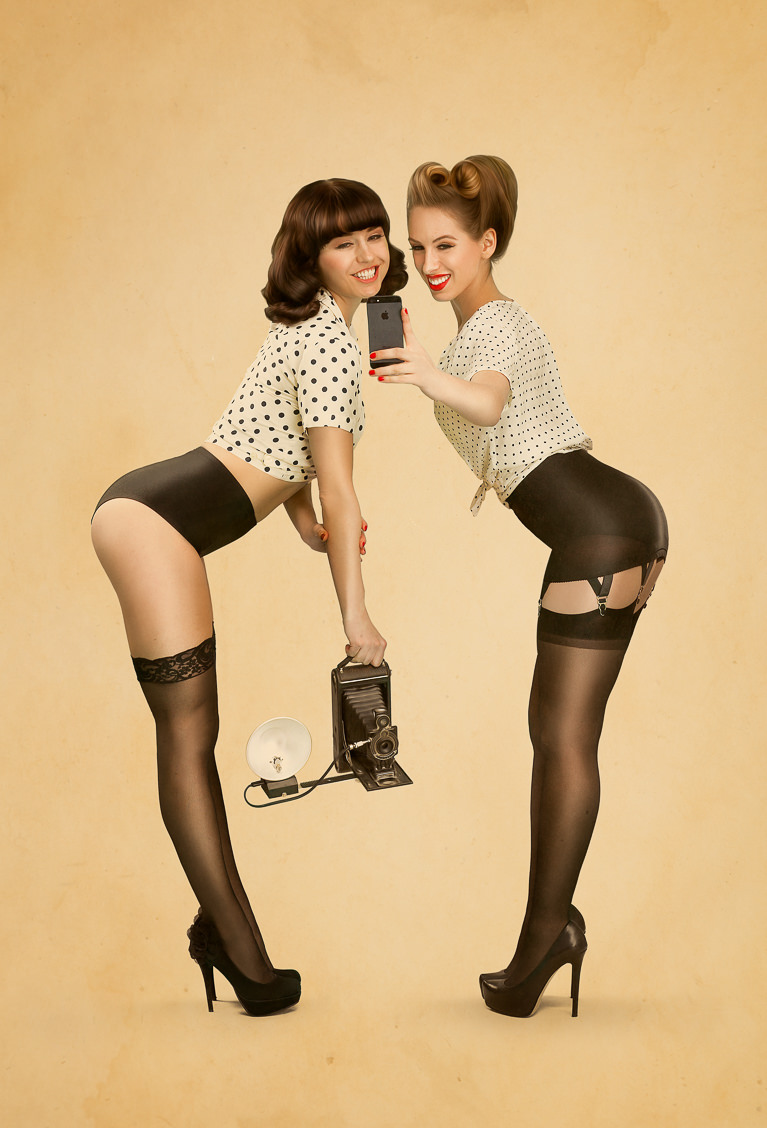
Creating a pinup image is a great way to learn retouching, dodging and burning, body shaping, coloring, texturing and more.

Join us for this advanced two part tutorial taking our image from camera to pinup!

$24.99
‹‹ View More PRO Photoshop Tutorials

Bundle and Save

+
Price for both: $34.99 $29.99
PRO Tutorial: Pinup Cola
PRO Texture: Distressed Paper

Before & After

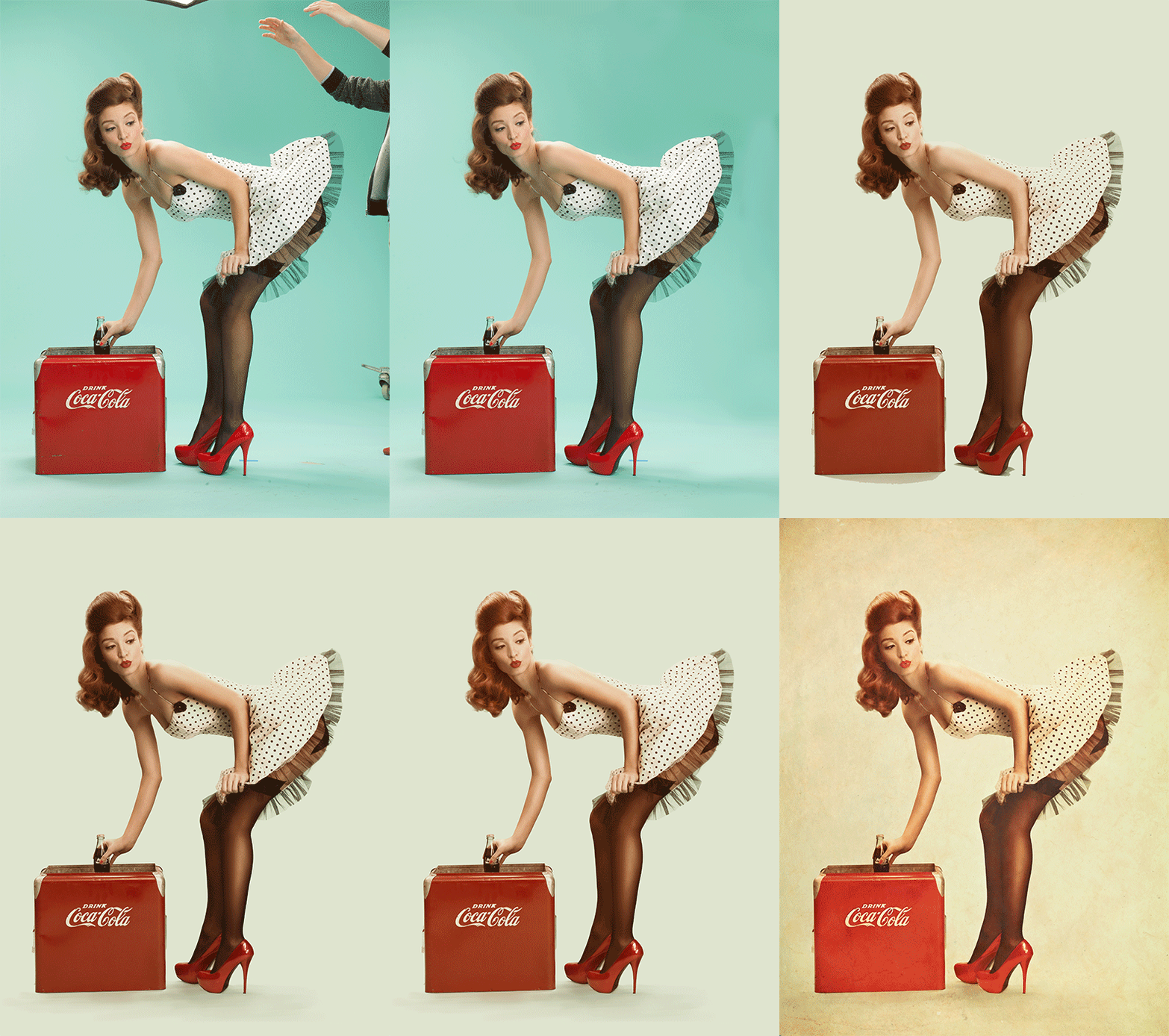
Phlearn PRO Pinup Cola Before After

Texture or None

Not all pinup photos are perfect with a texture, that is why we give you the option to include one or not. This tutorial goes through everything you need to make a pinup photo amazing. Then we add a texture to the image making it really stand out as a piece of art.

Phlearn PRO Pinup Cola Before After Texture

Included Textures

Included in this PRO Photoshop Tutorial are 5 high quality textures that may be used on any of your images to create amazing effects. Mix and match them for extra combinations of textures.

Phlearn PRO Photoshop Tutorial Pinup Cola

Keeping it Classic

Phlearn PRO Photoshop Tutorial Pinup Cola

Stylized Dress

We cover techniques on how to accurately cut out a dress from the background, even if it contains difficult areas like fringes. You will aslo learn how to match highlight color to the background, making it look as thought it was painted on to a blank piece of paper.

Phlearn PRO Photoshop Tutorial Pinup Cola

A Perfect Pinup Face

Learn to retouch a face to perfection in this tutorial while adding style. A bit of texture has been added to this photo, but you can keep your image perfectly clean. We even match the lipstick to the CocaCola bottles.

Phlearn PRO Photoshop Tutorial Pinup Cola

Pinup Hair

Original pinups were paintings which means the level of detail was quite a bit different than a photo. Hair should be styled and more of a shape than a highly detailed image. In this tutorial we cover how to make hair look like it was literally painted on, and add style at the same time.

Phlearn PRO Photoshop Tutorial Pinup Cola

Smooth Legs

All of the skin in this image has been completely transformed from its original state. After this tutorial you will be able to take any pair of legs and make them look amazing! We apply a special dodge and burn technique to really bring out the details and make them look smooth yet sharp.

Phlearn PRO Photoshop Tutorial Pinup Cola

Hot Shoes

We cover some amazing techniques to bring out the detail in the shoes and at the same time making them look stylized like a painting.

Phlearn PRO Photoshop Tutorial Pinup Cola

Final Image

Phlearn PRO Photoshop Tutorial Pinup Cola
$24.99
  • http://profiles.google.com/bkillillay Bill Killillay

    Two part? So if we buy one, do we have to come back and buy the second later?

    “Join us for this advanced two part tutorial taking our image from camera to pinup!”

  • Keith Stenhouse

    No, it is just that this tutorial is split into two one-hour long videos. They take you from the out of camera file to the final image.

  • http://profiles.google.com/bkillillay Bill Killillay

    ah, cool, thanks!

  • Phlearn. com

    That’s right, thanks for responding Keith

  • http://www.facebook.com/justin.grafton Justin Grafton

    I gave it a shot! Thanks for this tutorial I’ve had a lot of people ask me lately to shoot pinup stuff and I just couldn’t figure out how to edit them correctly! This came at an awesome time! I appreciate Phlearn more than you know!

  • Robert Huber

    This is excellent. I walked through the tutorial, and can’t wait to try shooting something similar on my own. One question I’m just curious about though… was there was there a deliberate reason from a planning perspective for shooting against the colored seamless background instead of something like white or gray?

  • http://twitter.com/_natashaleigh Natasha Leigh

    Just bought this and can’t wait to set up my own shoot. Love the pinup style but was never sure how to approach it in a way that was tasteful and classy. Thanks guys! x

  • http://www.facebook.com/wozniak1987 Jacek Woźniak

    This is the phirst time I purchased a PRO, as I’m a quite phresh phollower and I have to say that it was money well spent :) I did a pinup shoot with my girlphriend some time ago (http://jacekwphoto.blogspot.com/2012/09/czerwony-pin-up.html – content in Polish, but photos are in a universal language :) ) and I was struggling with a painterly pheel in post so I did a regular processing on them… But now when a have a minute or two(hundred) I will give it a try and make it more old school looking :) phanks!

  • http://www.facebook.com/lone.rose.16 Lone Rose

    is this only meant for the newest version of Photoshop?

  • Phlearn. com

    These techniques should work with most versions of Photoshop, for sure everything CS4 and newer

  • davechud

    Still working my way through the 2nd half of this Phlearn Pro, and liking it (thank you.) Constructive request though, you really pinned the idea that the detailed selection was absolutely key, but when the first method didn’t work great, you shifted very quickly to a different technique and mostly glossed over what/why/how you made the improved selection. Seems like a very strong method for getting a great selection, so any chance you can run the color range + masking details/concepts a little more slowly?

  • Guest

    This was a great tutorial! I’ve always wanted to do a pinup shoot but had no idea how to even start with editing it.

  • http://www.facebook.com/jay.hermosa Jason Hermosa

    This was a great tutorial! I’ve always wanted to do a pinup shoot but had no idea how to even start with editing it. I enjoyed this a lot.

  • http://www.facebook.com/jay.hermosa Jason Hermosa

    I’m assuming they shot it on a colored background to contrast it from the white dress.

  • Michael Gamilla

    Just watched it and loved it. cant wait to apply to my own. thanks Aaron and Phlearn Staff!

  • Wiwerer

    Just an awesome Tutorial. Love it! I learned a lot and it inspired me for my Bavarian-Pin-Up-Series.
    Thanks Phlearn

Included in your PRO
Video Tutorial
Each PRO Tutorial includes a full length video tutorial, most are over 2 hours long. Pause, rewind, and fast forward at your command.
Source Images
We provide you with all the images you will need to follow along with the tutorials. We even give you brushes and actions if necessary.
Download
All PRO Tutorials are available for download onto your computer. They don't expire, and you can take them wherever you go.
Delivery
After completing your payment securely via PayPal, Google Wallet, or Credit Card you will receive your download link instantly via e-mail.
Speed
Our Amazon S3 Servers are just waiting to send your tutorial. The best servers mean the fastest download speeds, getting you learning faster.
PRO Bestsellers
Testimonials

Mark Feliciano

I’ve been a Photoshop nerd since version 3, and I can tell you that I’ve had a love...
More I've been a Photoshop nerd since version 3, and I can tell you that I've had a love/hate relationship with PS since the very beginning. As powerful as it is, PS is also one if the most frustrating and difficult to learn pieces of software I have ever encountered. I used to think of myself as somewhat of a PS "guru", that is until I happened upon the Phlearn website. It was immediately obvious that despite his somewhat cavalier and funny exterior, Aaron was a guy who knew the in's and out's of PS like know one I had seen before.

After viewing countless free tutorials (hey, I'm cheap) I finally broke down and purchased several of the Pro Tutorials and let me tell you that I can unabashedly recommend these tutorials to anyone at any skill level. Anyone who wants to get the most out of PS and increase their productivity and creativity. I have rarely seen a person with a gift and passion for teaching like Aaron and I can honestly say that I have learned and applied something from almost every tutorial I have viewed: Something that cannot be said about every tutorial site I have used and there have been many!!

Thanks Phlearn, I'm better at what I love to do because of you guys!

Daniel Flores

I am from Mexico, i found out about Phlearn watching the [Framed] show staring Aaron Nace. What...
More I am from Mexico, i found out about Phlearn watching the [Framed] show staring Aaron Nace. What attracted me to the site was the creativity he injects in his projects. Actually, i was looking for something like that, a way to create cool ideas and translate them to a story through photography, and that's what i feel Aaron does with his work.

Also, i was looking for a tutorial on how to enhance skin dodge and burning, so i decided to buy the tutorial here. I found it very useful because it encourage you to use your hands to paing... almost literaly, paint with a tablet. So, so far, Phlearn is a site that i stop bye every day.

Keep the good work!!!

Ben Scott

I am currently a graduate student in Art and Design and Phlearn is my number one resource for P...
More I am currently a graduate student in Art and Design and Phlearn is my number one resource for Photoshop and Photography tutorials. When comparing Phlearn to other training sites, the first thing which stands out is Aaron's passion for the subject matter and teaching it to others. When I was in Chicago I stopped by to check out their studio. The staff at Phlearn couldn't have been nicer to take the time out of their schedule to give me a tour and talk to me.

The tutorials are much more than the technical way to create an image. They help you think about ways to solve and make your own photos. Where other sites teach about the tools. Aaron teaches how to use them in a successful manner. Although I have only been serious about photography for the last two years, I feel the biggest improvement in my craft started by watching Phlearn.

Bryan Dockett

It doesn’t matter if you’re new to Photoshop or if you’ve been using it for years...
More It doesn't matter if you’re new to Photoshop or if you've been using it for years Phlearn’s Pro tutorials will teach you something new and help you understand the how, when, why of using each technique taught.

I've been using Photoshop for more than 10 years and Phlearn’s Pro tutorial has been the absolute best learning resource I've encountered.

Anna Irving

Shortly after I started photography, I found Flickr. I started looking at loads of photo’...
More Shortly after I started photography, I found Flickr. I started looking at loads of photo's from really talented photographers. The ones that really stood out for me, however, were the pieces created by the photographers who were experts at photoshop and incorperated into their work with an expertise that took my breath away on many an occasion.

So, I bought photoshop, installed it and experimented. It was like walking uphill, in knee high mud. I bought books and scoured the internet for the many free tutorials but they the books were too mainstream and the internet stuff too extreme... it took an awful lot of sifting through irrelevant information, to get anywhere I needed to go with my work. I think I was trying to learn for about a year before I found Phlearn. I've learnt so much in the last 6 month that my peers have suggested, on occasion, that I should be training people!

I've invested in most of the Pro tutorials and have learnt so much from them that I am now confident creating pretty much anything my imagination can come up with. The pro turorials are worth every penny (or cent) and the free content, on this site, is pretty invaluable too. Aaron's great teaching style takes all the hard work out of learning photoshop and makes it a real pleasure. I'm proud to be part of the PHamily!

Jonas Forsberg

Phlearn serves great food for thought in the continuous strive to perfect the PS crafting What&...
More Phlearn serves great food for thought in the continuous strive to perfect the PS crafting ;)

What's most striking is the great bang for the buck. Quality equals those charging 5x for similar content...

Lia Niobe

Without Phlearn I would not be where I am now. I spent hours watching your tutorials, enjoying ...
More Without Phlearn I would not be where I am now. I spent hours watching your tutorials, enjoying the high quality and friendly atmosphere. If I need to know something Phlearn is where I look first. You have taught me so much and you guys are just incredible for sharing your knowledge with us, not asking anyting in return. You've showed me things I hadn't even considered to think about and I have to say THANK YOU for being just awsome! I'm very proud to be part of the Phlearn Phamily!

Steve Parker

I’ve been a photographer for a long time and have been using Photoshop since its first in...
More I've been a photographer for a long time and have been using Photoshop since its first incarnation. I thought I pretty much had it covered. Turns out, not so much. I'm pretty new to the site but I have learned so much from watching Aaron's free videos that it was a simple decision to purchase the PRO tutorials and I'm so glad I did. The quality of the production and level of content is awesome; in depth but clearly explained.

Aaron has such an easy, natural way of presenting information that you can't help but feel you're being personally tutored by someone who really knows and loves his craft.

Save your money on books, stop looking at 10 minute blurry Youtube clips and spend some time with PRO. You'll learn more from one PRO tutorial than you will from most books out there combined. Where can you possibly get between 2-3 hours of professional tutoring per video that you can refer to over and over again for under $25 (even cheaper when he has a sale)? 'Nuff said.

Ruben Chase

I have been a follower of that “aknacer” since I finded him on Flickr years ago. Hi...
More I have been a follower of that "aknacer" since I finded him on Flickr years ago. His photos was so surreal, provocative, and super, SUPER realistic. I didn't know how he did that. But I know now (just a little).

On the PRO tutorials, Aaron explains absolutely everything about the creation of one of his images. You choose what edition do you want to learn, you pay, you watch, and you know. Simply like that, better than a college class, and a lot cheaper. It's perfect!

Michael Woloszynowicz

Phlearn’s free courses trump most of the paid options that are out there and the PRO ones...
More Phlearn's free courses trump most of the paid options that are out there and the PRO ones absolutely destroy them. Phlearn is the only place where I've seen practical solutions and examples to the problems that photographers face on a daily basis.

Aaron's presentation of both photography and Photoshop techniques is clear, concise and enjoyable. The value you get from the texture packs and PRO courses is fantastic and they immediately take your finished products to a whole new level.

I love my weekly dose of Phlearn and look forward to the ambitious projects in upcoming PRO tutorials. Keep up the great work Aaron!
Random Tips

The lens is more important than the camera, but the subject is the most important of all.