Visual Effects Composites Learning Path
Seven of Aaron’s classic visual effects composites, in the order they were made. A green-screen athlete with wings, a liquid portrait, a fire portrait, a floating figure, a biker scene, a giant and The Flood.
What You’ll Learn
Visual effects composites put real people into scenes that could never be photographed, and make them believable. The Visual Effects Composites Learning Path collects seven of PHLEARN’s classic projects from 2014 to 2016, in the order they were released. Each one is a complete image from the shoot to the final color: subjects cut out with the Pen tool, perspective, light and color matched across many photos, and effects like fire, splashes and levitation built by hand.
- 1. Composite from a green screen Last Athlete: a sky and background built from scratch, the athlete cut out, light sources colored and wings added.
- 2. Build a liquid portrait Liquid Portrait: an arm composited in, a neck extended, skin and eyes retouched, and liquid splashes built around the subject.
- 3. Create a fire portrait Light My Fire: LAB color, textures, dodge and burn, color toning and Liquify for a stylized visual effects portrait.
- 4. Make someone float Rebirth: a person suspended in the air, cut out with the Pen tool, the stand removed, the ceiling patched and the hair blended back in.
- 5. Build a realistic scene The Outlaws: background photos stitched together, several subjects cut out, shadows, highlights and color matched, and fire added.
- 6. Change the size of a person A Giant Ego: a person scaled to giant size in a new place, with perspective, color, edge halos and hair all matched.
- 7. Composite a whole shoot The Flood: raw files culled in Lightroom, several photos combined in Photoshop, colors matched, skin retouched and the image sharpened.
Who This Path Is For
Photographers who shoot for composites, compositors who want believable rather than fantastical results, and anyone who learned with the AI tools and wants the hand techniques underneath them.
You should know layers and masks. The Flood at the end is the gentlest project and a good first composite if you are newer.
What You Need
- Photoshop Any recent version. The techniques are manual and work the same today.
- Lightroom Classic Used in The Flood for culling and raw processing.
- Sample files Included for every project, including the original shoots.
- A tablet Helpful for the hair and painted effects.
For believable composites with today’s tools, see the Everyday Compositing Learning Path.
How Long It Takes
Seven projects and 44 lessons, about 17 hours of video. Last Athlete is the longest at over three and a half hours; Light My Fire and Rebirth are under an hour and a half. At one project a week, plan on about two months.
Each project stands alone. If you are new to compositing, start with The Flood at step seven and work back.
Frequently Asked Questions
Do I need a PHLEARN PRO membership?
Yes. This is a PRO Learning Path, so all seven projects and their sample files are included with a membership.
Are these tutorials out of date?
The interface has changed, but the method has not. Cutting out, perspective, matching light and color, and painting effects work exactly the same today, with or without AI.
Why are they in this order?
They are in the order they were made, from 2014 to 2016, so the path reads as a tour of the projects. Each one stands alone.
Where should a beginner start?
With The Flood, the last step. It is the gentlest project and takes one composite from the raw files to the finished image.
Visual Effects Composites or Fantasy Composites?
Visual Effects Composites puts real people into impossible but believable scenes. Fantasy Composites builds imaginary creatures and worlds.
Where to Go Next
Start the Path
Start with Last Athlete, the first project in the series, or with The Flood if you are new to compositing.
On This Page
PHLEARN PRO
Every tutorial in this path, with sample files, plus the full PRO library.

Take your Photoshop knowledge to a whole new level with this advanced tutorial. Learn how to create an entire world from scratch, incorporating more than 20 photos, computer generated wings and lighting effects all with perfect perspective.
Photoshop | Compositing | Advanced | 3.75 hours
25 Sample Images | 2 Photoshop Brushes
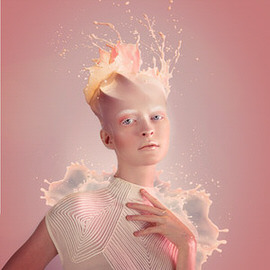
In this tutorial, you’ll learn how to do the photography and retouching necessary to add an amazing liquid splash effect to any portrait. Learn compositing, coloring, retouching, cutting subjects out, painting details, and dodging and burning.
Photoshop | Compositing | Advanced | 3.25 hours
10 Sample Images | 1 Photoshop Brush | 1 Photoshop Action

Learn to create stunning effects with light and fire in this compositing tutorial. We cover how to blend and composite multiple images, add textures, create blurs, dodge and burn, shape the body, and work in LAB Color Mode to create dynamic colors.
Photoshop | Compositing | Medium | 1.5 hours
7 Sample Images | 1 Photoshop Brush
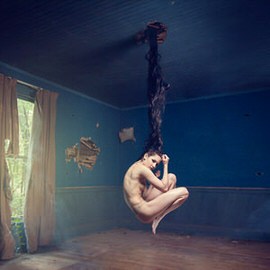
In this tutorial, you’ll learn all about how to cut out objects, custom brushes, match colors, step and repeat, composite theory and more. Elevate your compositing skill with this challenging lesson!
Photoshop | Compositing | Medium | 1.5 hours
7 Sample Images
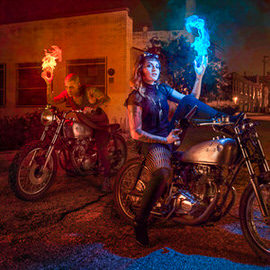
Learn how to calculate advanced perspectives, create shadows, cut out subjects, and add light sources to an image. We also cover how to photograph and composite your subjects into a new background so they really stand out.
Photoshop | Compositing | Advanced | 3.25 hours
20 Sample Images | 4 Photoshop Brushes | 1 Photoshop Action
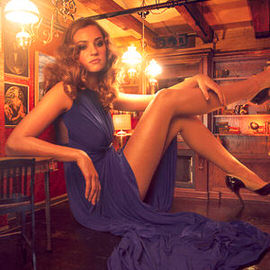
Watch as we show you how to make your subject appear larger than life! Go from photoshoot to Photoshop where we’ll practice the principles of compositing like color and light matching and placing your subject in a new background.
Photoshop | Compositing | Advanced | 2.75 hours
6 Sample Images | 1 Sample PSD | 3 Photoshop Brushes | 1 Photoshop Action
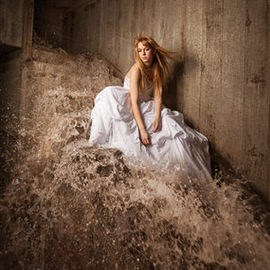
In this tutorial, we show you how to add and balance lighting in any situation to capture all of the images needed to make a perfect composite. Then we put it all together in Photoshop.
Lightroom, Photoshop | Compositing | Easy | 1.75 hours
18 Sample Images | 1 Photoshop Brush