Fantasy Composites Learning Path
Seven of Aaron’s classic fantasy composites, in the order they were made. An underwater scene with jellyfish, a glowing spirit island, a dragonfly portrait, a mermaid, a night fairy, a furry creature called Bakster and the original A Dark Force.
What You’ll Learn
Between 2014 and 2017 PHLEARN made a run of fantasy composites, each one shot for the purpose and built entirely by hand. The Fantasy Composites Learning Path collects seven of them in the order they were released, so you can watch the projects grow in ambition from a single underwater portrait to an alien world made from dozens of photographs. Every project goes from the source files to the final color, and the hand techniques underneath them, from painted textures to channel selections and fur cutouts, are the ones the newest tools still depend on.
- 1. Build an underwater scene Underwater Fantasy: a model turned into an underwater scene with lens blur for depth, flowing hair and clothing, and glowing jellyfish.
- 2. Light a fantasy scene Island of Morel: a glowing spirit orb from channel selections, several subjects masked in, fog and light effects, and a final color tone.
- 3. Make a graphic fantasy portrait A Dragon’s Heart: a subject given dragonfly wings, tail and legs with Liquify, Puppet Warp and custom hair brushes.
- 4. Paint a mermaid Banished Mermaid: scales painted onto skin, the subject placed in a built underwater world, light matched and details painted by hand.
- 5. Create a fairy Night Fairy: a fairy built from a portrait, cloud and texture backgrounds, reptile skin, water distortion and wings, start to finish.
- 6. Composite a creature Bakster: a background built from several camera angles, a furry creature cut out with refined edges, and the scene toned to match.
- 7. Build an epic world A Dark Force, the original 2017 version: alien terrain and a civilization built from many photographs, planets in the sky, subjects masked in and atmosphere over everything.
Who This Path Is For
Compositors who want to see how the big fantasy images are made by hand, digital artists building a fantasy portfolio, and anyone who learned with the AI tools and wants the techniques underneath them.
You should be comfortable with layers, masks and the selection tools. These are full projects, not introductions.
What You Need
- Photoshop Any recent version. The techniques are manual and work the same today.
- Sample files Included for every project, including the original shoots and textures.
- Layers, masks and selections Assumed knowledge. If not, start with the Cutouts & Backgrounds Learning Path.
- A tablet Recommended for the painting, hair and fur work.
For the same kind of images with today’s tools, see the Magical Compositing Learning Path.
How Long It Takes
Seven projects and 41 lessons, about 20 hours of video. A Dark Force is the longest at over four hours; the others run from under two hours to almost four. At one project a week, plan on about two months.
Each project stands alone, so you can pick the image you like best. Watching them in order shows how the methods build on each other.
Frequently Asked Questions
Do I need a PHLEARN PRO membership?
Yes. This is a PRO Learning Path, so all seven projects and their sample files are included with a membership.
Are these tutorials out of date?
The interface has changed, but the method has not. Painting, selections, matching light and color, and finishing a scene work exactly the same today, with or without AI.
Is A Dark Force the same as the 2026 edition?
No. This is the original 2017 course. The 2026 edition rebuilds the image with the current tools and is on the Magical Compositing Learning Path.
Why are they in this order?
They are in the order they were made, from 2014 to 2017, so the path reads as a tour of the projects. Each one stands alone.
Fantasy Composites or Visual Effects Composites?
Fantasy Composites builds imaginary creatures and worlds. Visual Effects Composites puts real people into impossible but believable scenes: giants, splashes, fire and floating subjects.
Where to Go Next
On This Page
PHLEARN PRO
Every tutorial in this path, with sample files, plus the full PRO library.

In this tutorial, you will learn the photography and Photoshop required to transform your images into an underwater world. Color correct highlights and shadows independently, create light rays, create flowing hair, and learn to light a subject.
Photoshop | Compositing | Advanced | 2.5 hours
30 Sample Images | 3 Photoshop Brushes
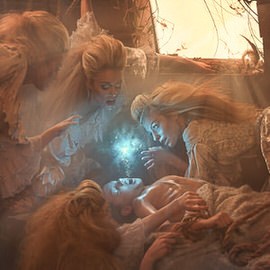
Create an extraordinary fantasy image in this in-depth tutorial. Learn to tell a story through images, build and shape lighting, dodge and burn, blend, and composite several images into a scene.
Photoshop | Compositing | Medium | 1.75 hours
6 Sample Images | 3 Photoshop Brushes
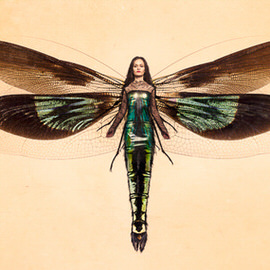
Follow along as we demonstrate how to composite intricate details, use Blending Modes, color tone, and create perfect cutouts with Refine Mask.
Photoshop | Compositing | Medium | 2 hours
6 Sample Images | 1 Photoshop Brush | 6 Custom Textures
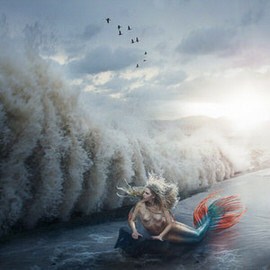
Master the Liquify Tool, matching color, matching light, and learn to completely recreate areas of an image with the Brush Tool. This tutorial is a great exercise for advanced Photopshop users.
Photoshop | Compositing | Advanced | 4 hours
28 Sample Images | 1 Photoshop Action
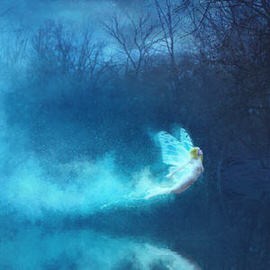
Follow along and create a beautiful fantasy scene in Photoshop! Learn to combine images, build depth, add atmosphere, create reflections, and create effects with light and color.
Photoshop | Compositing | Advanced | 3.5 hours
18 Sample Images | 1 Photoshop Brush
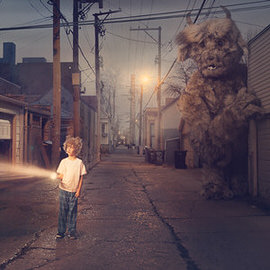
Compositing in Photoshop allows you to create impossible scenes. In this tutorial, we blend reality with fantasy as we teach you how to combine multiple exposures, composite a background, create light sources, and focus your viewer’s attention.
Photoshop | Compositing | Advanced | 3 hours
9 Sample Images | 3 Photoshop Brushes | 1 Photoshop Action
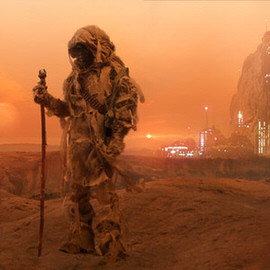
Create a sci-fi themed composite from start to finish. Learn how to photograph with a composite in mind. Then jump into Photoshop to build a background, create elements from scratch, and integrate subjects into the environment.
Photoshop | Compositing | Advanced | 4.25 hours
24 Sample Images | 1 Photoshop Action | 7 Photoshop Brushes