Denim Lightroom Presets for Classic & Mobile
-

-
Add to
favorites
-
Software
-
CompatibilityLightroom Classic & Mobile
-
Lightroom presets10 Denim Presets
-
Works in every Lightroom.xmp for Classic, Desktop & Mobile
-
Backup for older app versions.dng for Lightroom Mobile
-
In the download4 Sample Images + PDF Guide
Install Guide
How to Install Your Presets
A short PDF that walks you through installing this pack in Lightroom Classic, Lightroom desktop and Lightroom on your phone, plus three tips for better results.
DESCRIPTION
Colors that are as cool and comfortable as your favorite pair of jeans. Our Denim Lightroom Presets will add beautiful blue tones to your images, from deep navies to faded skies.
Every preset pulls back the highlights, nearly all lower the whites and add a little grain, and most raise the blacks, which suits casual street portraits, outfit shots and overcast city days. After you apply one, adjust Temperature or Tint until skin looks right.
One zip holds the 10 presets as .xmp files, which work in Lightroom Classic, Lightroom on your computer and Lightroom on your phone, plus .dng versions for older releases of the mobile app, each in its own labeled folder, with 4 sample images to practice on and the PDF install guide.
TRY THEM FOR FREE
Want to try our Presets before you buy? Check out our FREE Lightroom Presets Sample Pack with 10 of our favorite looks for Lightroom Classic and Mobile.


PHLEARN PRO · Lightroom Presets
Denim Lightroom Presets
10 presets4 sample imagesLightroom Classic & Mobile
Denim Lightroom Presets · 10 Looks
Blue Tones From Deep Navy to Faded Sky
Ten presets that cool your photos while keeping skin warm and natural. They work in Lightroom Classic and in Lightroom on desktop and mobile.


Glacier Blues
Glacier Blues cools the whole frame and calms the brightest parts of the photo. Here the white walkway and pillars turn a pale, icy gray, and the jeans read as a cleaner, truer blue. Blues shift slightly toward purple and get a little darker.
Highlights Held Back
Highlights and whites come down hard and the shadows lift a little, so bright pavement and white clothing keep their detail. A faint cool tint in the shadows and highlights gives the icy feel, with a touch of grain. White balance does not change, so the cool look comes from those tints.
Leather and Skin Stay Warm
Greens and yellows are muted while oranges get a little brighter, so skin, leather and wood stay warm. The brown bag and shoes still look rich. Contrast rises slightly and vibrance gets a small boost.
Best on: street-style and fashion details, denim outfits and bright city scenes with lots of white.


December Blues
December Blues turns bright, cheerful blues into something calmer and darker. The turquoise wall becomes a quiet slate blue and the sweater a deeper navy, while her skin stays natural. Reds and oranges gain a little saturation, which helps skin hold its warmth.
Deeper, Moodier Blues
Blues are darkened a lot and shifted toward indigo, and turquoise loses about a third of its saturation, which takes a sunny teal wall down to a wintry blue-gray. Greens lose most of their color. White balance does not change and there are no color tints.
Soft Contrast, Bright Accents
Lower contrast and softer whites give a gentle matte finish. Yellows get brighter, so a yellow accent, like these heels, stands out even more. Shadows go slightly deeper, and a light layer of grain adds texture.
Best on: colorful walls and backdrops, outfit photos with one bold accent color, and anything you want to feel quieter.


Cherry Blues
Cherry Blues keeps the blues in a photo but makes them calmer and more refined. The navy blazer and jeans settle into a muted blue, and the peeling white wall behind him goes clean and cool. Blues lose about half their saturation but get a little lighter.
A Cool Cast in the Highlights
Highlights and whites are pulled down and the shadows lifted, so bright walls hold their detail. A blue tint in the highlights and a faint violet in the shadows give a cool, polished finish. A very light grain adds texture.
Busy Backgrounds Go Quiet
Yellows are almost removed and greens and aquas muted, so busy backgrounds turn neutral. Oranges get a little more color, which keeps skin looking healthy against all that blue. Reds shift strongly toward orange, and oranges lean toward red and brighten.
Best on: menswear and tailored outfits, portraits against weathered or busy walls, and city street style.


Wild Aster Blues
Wild Aster Blues takes the punch out of a very saturated photo. The bright blue jacket and dark jeans fade to a washed, lived-in denim, and the whole scene gets a soft, airy look. There are no color tints.
One of the Flattest Looks in the Pack
Only Indigo Blues is more matte. Contrast drops by half and the blacks lift, so nothing in the frame is pure white or pure black. Blues lose more than half their saturation but get lighter, which turns deep indigo into faded denim. Whites come down hard, by 57.
Bright Skin, Quiet Background
Oranges get brighter, so skin and blonde hair glow while greens, yellows and blues step back. Greens also get lighter and shift toward yellow. The grain is the coarsest in the pack.
Best on: sunny portraits that came out too punchy, beach and waterfront photos, and anyone who likes a faded, film-like feel.


Skyline Blues
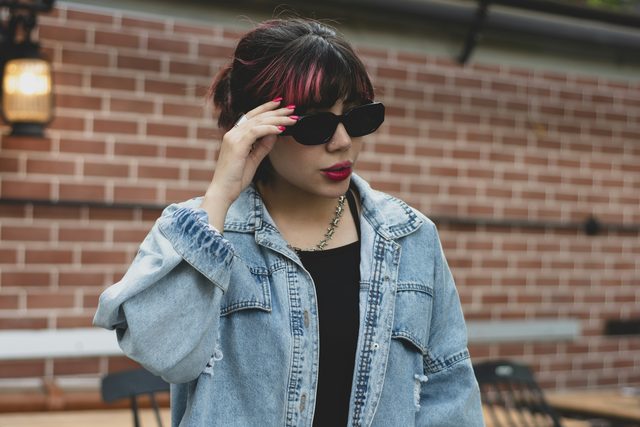
Skyline Blues mutes the color and calms the light for a cooler, more grown-up look. Here the denim jackets and jeans go a softer, grayer blue, and the rusty railing and bright sky settle down. Contrast drops and whites come down, which keeps the whole frame soft.
Muted Blues, Softer Sky
Blues are darkened, desaturated and shifted a little toward violet, and yellows and greens are pulled way down. Highlights come down too, so a bright sky keeps its detail, and the shadows get slightly deeper. White balance does not change.
Warmer, Brighter Skin
Reds and oranges get brighter and a little richer, so faces stay warm even as the rest of the photo cools. Oranges also lean toward red, yellows get lighter, and a light grain finishes the look.
Best on: couples and friends in denim, urban rooftops and industrial spots, and bright midday photos that need taming.


Pale Sky Blues
Pale Sky Blues cools a warm scene into soft blue-gray. Here the golden beach background turns a calm, misty blue, the black top fades to a soft charcoal and her skin keeps its warmth. White balance does not change.
Faded Blacks, Cool Highlights
No preset in the pack puts a stronger cool tint into the highlights, so bright areas pick up a pale sky blue. Blacks lift to a gentle charcoal and contrast eases for a light, washed look. Shadows open up and highlights ease down.
Color Pulled Back Around the Subject
Blues, yellows and greens lose most of their saturation, so the background goes quiet, while tanned skin and warm hair stay natural. Oranges gain a little color and shift toward red, and yellows shift toward orange.
Best on: beach and summer outfit photos, close crops of denim and clothing, and warm sunset light you want to cool down.
What’s in the Download
One zip, desktop and mobile
One zip with both versions in labeled folders: .xmp presets for Lightroom Classic, desktop and mobile, and .dng backups for older releases of the mobile app, plus 4 sample images to practice on. In Lightroom they show up under User Presets.
- ZIPPHLEARN Denim Lightroom Presets 2026.zipDesktop and mobile presets in one download, 8.0 MB
- XMPLightroom Classic, Desktop & Mobile (.xmp)10 presets for every Lightroom app
- DNGLightroom Mobile Backup (.dng)The same 10 for older releases of the mobile app
- JPG4 Sample ImagesFree-to-use practice photos
- PDFPHLEARN Lightroom Presets - Install Guide (2026).pdfClassic, desktop and mobile install steps
- PHLEARN-Denim-Buoyant Blues
- PHLEARN-Denim-Cherry Blues
- PHLEARN-Denim-December Blues
- PHLEARN-Denim-Glacier Blues
- PHLEARN-Denim-Indigo Blues
- PHLEARN-Denim-Mulberry Blues
- PHLEARN-Denim-Pale Sky Blues
- PHLEARN-Denim-Skyline Blues
- PHLEARN-Denim-Steel Blues
- PHLEARN-Denim-Wild Aster Blues
The 4 sample images



Lightroom Preset Questions, Answered
What’s included in the Denim Lightroom Presets?
The pack includes 10 presets: Glacier Blues, December Blues, Cherry Blues, Wild Aster Blues, Pale Sky Blues, Skyline Blues, Steel Blues, Mulberry Blues, Buoyant Blues and Indigo Blues. They come as .XMP presets for Lightroom Classic, Lightroom desktop and Lightroom on your phone, plus .DNG versions for older versions of the mobile app. Sample images are included too.
What kind of photos are the Denim Lightroom Presets made for?
They’re made for photos you want to feel cool, relaxed and calm, with colors as comfortable as your favorite pair of jeans. The presets add blue tones to your images, from deep navies to faded skies, and they work on both RAW and JPEG photos.
Will the Denim Lightroom Presets turn skin blue?
They’re designed not to. Blues can often take away from the natural skin tones of the people in a photo, so these presets give the image a cool feel while targeting and protecting the natural reds and oranges in skin. The featured look, Steel Blues, shows that steely blue with warm skin.
Are Lightroom Presets included in my PHLEARN PRO subscription?
Yes. A PHLEARN PRO membership includes every Lightroom Preset pack, plus PRO Tutorials, LUTs, Photoshop Actions and Photoshop Brushes.
Which version of Lightroom do I need?
The .XMP presets work in Lightroom Classic 7.3 and newer, in Lightroom on your computer and in Lightroom on your phone. For older versions of the mobile app, use the .DNG files in the download. We recommend the latest version.
How do I install Lightroom Presets?
In Lightroom Classic, open the Develop module, click the + in the Presets panel, choose Import Presets and select the .XMP files. The PDF install guide in your download covers Lightroom on your computer and your phone too, and every method is on our Lightroom Presets install guide.
I imported the pack, but I can’t see it.
The new group arrives collapsed and sits in alphabetical order. Scroll the Presets panel, find the group named after the pack and click its arrow.
Do I have to install the presets on my phone separately?
Not if you import them into Lightroom on your computer: within a few minutes they show up in Lightroom on any device signed in to the same Adobe account. If you use Lightroom Classic, import the .XMP files in the mobile app: open a photo, tap Presets, then Yours, then the three-dot menu and Import Presets.
Do the presets work on RAW and JPEG photos?
Yes. Every preset is built to work on both RAW and JPEG files, and each one can be adjusted after you apply it.
The preset looks too strong. What do I do?
Lower the Amount slider at the top of the Presets panel, then adjust White Balance and Exposure for that photo. Every photo starts from different light.
Do you offer refunds?
Because these are downloadable products, all sales are final and we are not able to offer refunds.
Terms of Use
These Presets are licensed for personal and professional use by the individual who purchased or downloaded them. The license does not extend to companies or partnerships, and the files may not be resold, loaned, gifted, shared, copied or redistributed. All PHLEARN Presets are copyright protected.
Master Photoshop, Lightroom and Photography
Join PHLEARN PRO for $12.99 a month, or $99.99 a year (save 36%). Cancel anytime, with a 100% money-back guarantee.