Rustic Wedding Presets for Classic & Mobile
-

-
Add to
favorites
-
Software
-
CompatibilityLightroom Classic & Mobile
-
Lightroom presets10 Rustic Wedding Presets
-
Works in every Lightroom.xmp for Classic, Desktop & Mobile
-
Backup for older app versions.dng for Lightroom Mobile
-
In the download4 Sample Images + PDF Guide
Install Guide
How to Install Your Presets
A short PDF that walks you through installing this pack in Lightroom Classic, Lightroom desktop and Lightroom on your phone, plus three tips for better results.
DESCRIPTION
Give your wedding photos a vintage, magical look with our Rustic Wedding Lightroom Presets. Soften contrast, warm up skin tones, and give images an old-school feel with beautiful, muted color grading.
Most presets pull down the highlights and whites while opening the shadows, so lace, string lights and dark suits hold their detail at vineyard, garden and backyard weddings. After you apply one, adjust Temperature to match lamplight indoors or open shade outside.
One zip holds the 10 presets as .xmp files, which work in Lightroom Classic, Lightroom on your computer and Lightroom on your phone, plus .dng versions for older releases of the mobile app, each in its own labeled folder, with 4 sample images to practice on and the PDF install guide.
TRY THEM FOR FREE
Want to try our Presets before you buy? Check out our FREE Lightroom Presets Sample Pack with 10 of our favorite looks for Lightroom Classic and Mobile.


PHLEARN PRO · Lightroom Presets
Rustic Wedding Lightroom Presets
10 presets4 sample imagesLightroom Classic & Mobile
Rustic Wedding Lightroom Presets · 10 Looks
Muted Greens and Warm, Creamy Whites
Ten presets that mute greens, soften the light and keep skin warm for barn, forest and mountain weddings. They work in Lightroom Classic and in Lightroom on desktop and mobile.


Comfort White
Comfort White softens the contrast on this barn wedding. The gray wood looks gentler, the string lights keep their warm glow, and the dress and veil stay a clean white against the darker doors. Highlights and white balance are both left unchanged.
Contrast Cut by More Than Half
Contrast drops by 55 and Whites ease down, while the shadow range of the tone curve is lifted, so dark wood and the suit keep detail without looking heavy. Shadows and Blacks each come down by 10, and the curve’s lights and highlights regions dip slightly.
Cool Shadows, Brighter Skin
A blue tint sits in the shadows and greens lose much of their color, while red and orange luminance go up to keep faces bright. Greens also shift strongly toward yellow, and yellows get much darker, with luminance down by 44.
Best on: barn and farm weddings, couple portraits against wood or stone, and evenings with string lights.


Vintage Brown
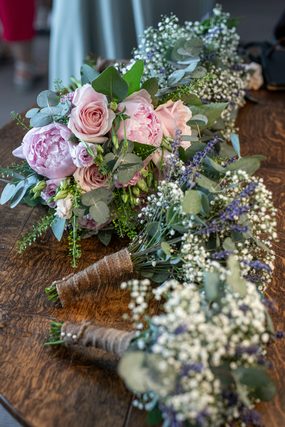
Vintage Brown gives the bouquet a dried, earthy look. The eucalyptus and leaves fade to a dusty olive-sage, the white flowers and dress turn a soft cream, and her hair keeps its warm brown. White balance does not change, so the color comes from toning and HSL.
Low Contrast, Lifted Blacks
Contrast drops by 67 and Blacks rise by 26, so the deep shadows inside the bouquet turn soft and matte. Shadows come down by 12, while Highlights and Whites rise slightly, by 7 and 10.
Greens Shifted and Muted
Greens and yellows both shift hue and lose color, and a yellow tint in the highlights with a blue tint in the shadows gives the vintage color. Blues lose about a third of their saturation. Yellows also get darker, with luminance down by 31, while blues get lighter.
Best on: bouquet and flower details, boho and rustic styling, and photos with greenery and dried grasses.


Soft Trellick
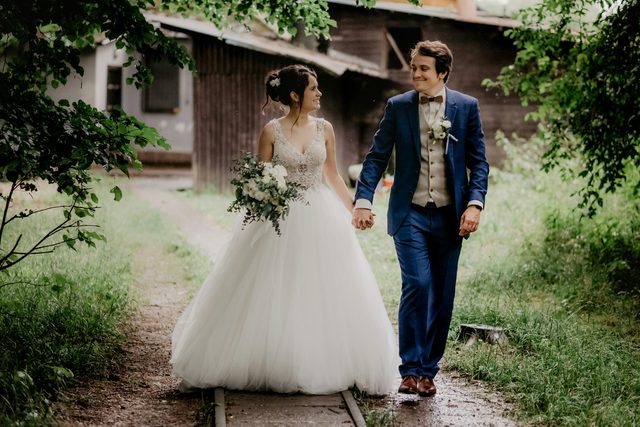
Soft Trellick warms the light and quiets the background. The trees and grass fade to a soft, muted green, skin picks up a gentle peach, and the black vest and dark hair stay rich for contrast. Contrast rises by 12, and luminance noise reduction at 5 smooths fine noise.
Warm Split Toning
Split toning adds yellow to the shadows and orange to the highlights, and the white balance itself is left alone. Whites come down by 33 for a softer top end. Highlights drop by 38, while Shadows and Blacks both lift by 19.
Greens Lose Half Their Color
Green saturation drops by 56 and yellows are muted and darkened, so bright foliage turns calm. Oranges shift toward red and reds get brighter, which keeps skin warm. Blues get much lighter, by 42, and aquas shift toward blue.
Best on: outdoor couple portraits, forest and meadow weddings, and bright, hazy daylight.


Orchid Glow
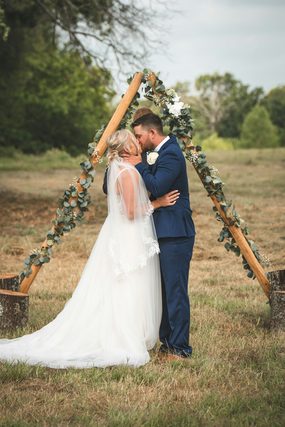
Orchid Glow tones down the strong blue of the sky and mountains and brightens skin. The grass turns a muted olive, the cream sweater stays soft, and the embrace in the foreground stands out against a calmer background. Contrast rises by 12, and Highlights are left unchanged.
Quieter, Darker Blues
Blue saturation drops by 33 and blue luminance by 22, so a bright sky and distant hills turn deeper and grayer. Greens shift toward yellow and lose some color. On the tone curve, the highlights region drops by 30 and the shadows region rises by 20.
Brighter, Warmer Faces
Orange and red luminance rise, and a light orange tint sits in the shadows, which keeps skin glowing even on an overcast day. Reds shift slightly toward orange as well. A stronger yellow tint sits in the highlights.
Best on: mountain and hillside elopements, overcast days, and close embraces outdoors.


Dove Quartz
Dove Quartz softens this bright bridal detail. The balloon and lace stay clean and white, the green trees behind her darken toward olive, and her skin and hair take on a slightly deeper, warmer tone. White balance moves just 2 points warmer.
Soft, Lifted Contrast
Contrast drops by 40, Highlights come down and Blacks lift, so sunlit white fabric holds its detail and the darkest areas turn matte. Clarity rises a little to keep lace detailed. Whites ease down by 18, and Shadows lift by 10.
Greens Pushed Toward Yellow
Green and yellow hues both shift toward warmer colors, and greens get darker and less saturated, so a busy green background turns into a muted, earthy backdrop. Blues lose 24 points of saturation, and aquas get darker by 31. Reds and oranges get darker too, by 12 and 16.
Best on: bright bridal details, balloons and decorations, lace and hair pieces, and sunny outdoor shots.


Crisp Spire
Crisp Spire warms this bridal updo and quiets the greenery behind it. The background greens turn a muted olive, the curls take on a golden tone, and the roses in the flower crown soften to a dusty pink. White balance and exposure do not change.
Matte Blacks, Gentle Whites
Blacks lift by 32 while Whites and Highlights come down by 29 and 30, giving a soft, matte finish. Shadows are pulled down by 19 and Contrast drops by 24, so the curls keep their shape.
Warm Shadows, Darker Greens
An orange tint fills the shadows, and greens lose saturation and get darker, which pushes foliage back so hair and flowers lead. Yellows lean toward orange, which adds gold to blonde hair. Blues get much lighter, by 40, and a faint yellow tint sits in the highlights.
Best on: bridal hair and flower crowns, back-of-the-head details, and outdoor shots against greenery.
What’s in the Download
One zip, desktop and mobile
One zip with both versions in labeled folders: .xmp presets for Lightroom Classic, desktop and mobile, and .dng backups for older releases of the mobile app, plus 4 sample images to practice on. In Lightroom they show up under User Presets.
- ZIPPHLEARN Rustic Wedding Lightroom Presets 2026.zipDesktop and mobile presets in one download, 10.6 MB
- XMPLightroom Classic, Desktop & Mobile (.xmp)10 presets for every Lightroom app
- DNGLightroom Mobile Backup (.dng)The same 10 for older releases of the mobile app
- JPG4 Sample ImagesFree-to-use practice photos
- PDFPHLEARN Lightroom Presets - Install Guide (2026).pdfClassic, desktop and mobile install steps
- PHLEARN-Rustic Wedding-Absolute Cream
- PHLEARN-Rustic Wedding-Comfort White
- PHLEARN-Rustic Wedding-Crisp Spire
- PHLEARN-Rustic Wedding-Dove Quartz
- PHLEARN-Rustic Wedding-Modern Sage
- PHLEARN-Rustic Wedding-Orchid Glow
- PHLEARN-Rustic Wedding-Rose Quartz
- PHLEARN-Rustic Wedding-Shoji White
- PHLEARN-Rustic Wedding-Soft Trellick
- PHLEARN-Rustic Wedding-Vintage Brown
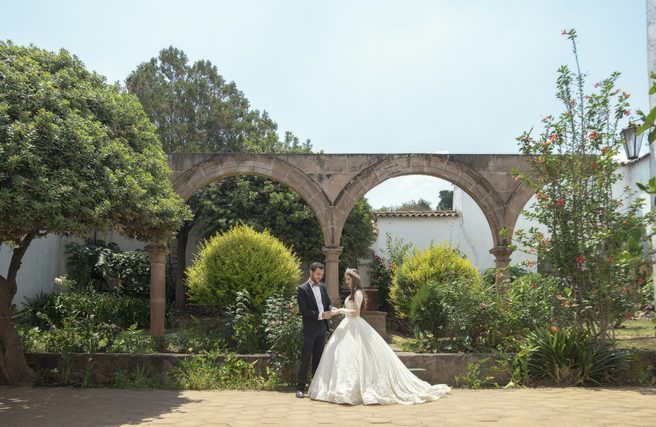
The 4 sample images
Lightroom Preset Questions, Answered
What’s included in the Rustic Wedding Presets?
The pack includes 10 presets: Absolute Cream, Comfort White, Crisp Spire, Dove Quartz, Modern Sage, Orchid Glow, Rose Quartz, Shoji White, Soft Trellick and Vintage Brown. They come as .XMP presets for Lightroom Classic, Lightroom desktop and Lightroom on your phone, plus .DNG versions for older versions of the mobile app, and the download includes sample images to practice on.
What kind of photos are the Rustic Wedding Presets made for?
They are made for wedding photos that call for a vintage, magical look. The presets soften contrast, warm up skin tones and add beautiful, muted color grading for an old-school feel that helps your most important memories look timeless.
What inspired the colors in the Rustic Wedding Presets?
The soft whites, muted colors and rich color toning are inspired by clean fabrics, fine wood and warm skin tones. The featured look is Comfort White, and the examples also show Crisp Spire, Dove Quartz, Orchid Glow, Soft Trellick and Vintage Brown.
Are Lightroom Presets included in my PHLEARN PRO subscription?
Yes. A PHLEARN PRO membership includes every Lightroom Preset pack, plus PRO Tutorials, LUTs, Photoshop Actions and Photoshop Brushes.
Which version of Lightroom do I need?
The .XMP presets work in Lightroom Classic 7.3 and newer, in Lightroom on your computer and in Lightroom on your phone. For older versions of the mobile app, use the .DNG files in the download. We recommend the latest version.
How do I install Lightroom Presets?
In Lightroom Classic, open the Develop module, click the + in the Presets panel, choose Import Presets and select the .XMP files. The PDF install guide in your download covers Lightroom on your computer and your phone too, and every method is on our Lightroom Presets install guide.
I imported the pack, but I can’t see it.
The new group arrives collapsed and sits in alphabetical order. Scroll the Presets panel, find the group named after the pack and click its arrow.
Do I have to install the presets on my phone separately?
Not if you import them into Lightroom on your computer: within a few minutes they show up in Lightroom on any device signed in to the same Adobe account. If you use Lightroom Classic, import the .XMP files in the mobile app: open a photo, tap Presets, then Yours, then the three-dot menu and Import Presets.
Do the presets work on RAW and JPEG photos?
Yes. Every preset is built to work on both RAW and JPEG files, and each one can be adjusted after you apply it.
The preset looks too strong. What do I do?
Lower the Amount slider at the top of the Presets panel, then adjust White Balance and Exposure for that photo. Every photo starts from different light.
Do you offer refunds?
Because these are downloadable products, all sales are final and we are not able to offer refunds.
Terms of Use
These Presets are licensed for personal and professional use by the individual who purchased or downloaded them. The license does not extend to companies or partnerships, and the files may not be resold, loaned, gifted, shared, copied or redistributed. All PHLEARN Presets are copyright protected.
Master Photoshop, Lightroom and Photography
Join PHLEARN PRO for $12.99 a month, or $99.99 a year (save 36%). Cancel anytime, with a 100% money-back guarantee.