Achieve the impossible.
Even Hipsters Clean Up

Phlearn's mission is to provide the skills, confidence and encouragement for creative individuals to pursue their dreams, overcome their fears, and live their passions.

We want to provide you with the technical knowledge to make your vision become a reality AND the confidence to craft your art true to your vision. And we want to do it all with a huge smile, because having fun is fun.

Over
250,000 People
Watch Phlearn Every Month
Over
400 FREE Episodes
Photoshop + Photography
Fashion Portrait To create this fashion portrait we used a 3 light setup and shot behind a pane of glass. To add a bit of texture and interest to the glass we added baby oil (thicker than water) and lit it from behind. We used a l...
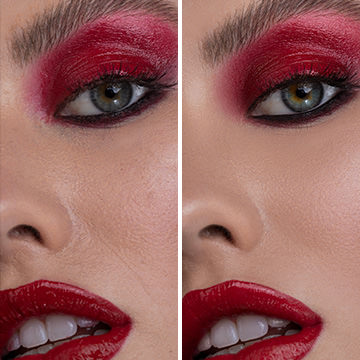
Skin retouching is an essential part of your workflow.
This is one of our most requested images for Phlearn PRO. This is a great class covering many advanced topics, and some hard Photoshop Techniques. We go over the lighting behind the images and the concept from beginning to end.

Learn how to take an image from straight out of the camera to a final concept in this INTERMEDIATE Photoshop Tutorial. You will learn how to color every part of an image independently, add textures and lighting effects, dodging and burning, sharpening, color theory and more!

This amazing 3:00 Hour guide explains everything a photographer needs to know about Photoshop!

This special 3:30 hour Photoshop Tutorial is guaranteed to launch your knowledge to a whole new level! Join us as we create an entire image from scratch, incorporating over 20 photos, CG wings, lighting effects and perpective creation.

Categories
Simply find what you are looking for.
Search
Popular Episodes
Wouldn't it be great if you could see all of our best content in the same place? Guess what, you can!
Make your dreams a reality.
Transform any image into 1970s vintage style with this PRO Action. As simple as a few clicks, we take care of all the details.

Quickly choose from one of 8 different looks or combine them together to create a completely new style!

Make any set of eyes look amazing with this simple action! We provide everything you need in one step to bring excitement and beauty to your portraits.

Jeremy Cowart
There are a lot of photographers that are teaching these days. But none of them have the combined creativity/photography/photoshop skills that Aaron Nace has.

He is one-of-a-kind and legit as they get. When it comes to learning about all things digital photography, look no further than Aaron and Phlearn.
Sami Saxon
I have been a photographer for almost 12 years, currently in grad school and have yet to encounter tutorials that blow my mind like Phlearn's. I am addicted to downloading tutorials, even if it's material I have learned at the academy.

Aaron's easy to follow videos are perfect for serious artist. I am currently a finalist in Canon Project imagination because of the material I have learned on this site.
Dean Bradshaw
The internet is a wonderful thing. Without it, it would have been difficult for me to learn everything that I have.

Aaron has created an amazing resource for people to learn Photoshop. It's a new world, and Phlearn is leading the way in teaching the next generation of image makers. Never stop learning!
Are the skies a little boring in your images? We created this special Sky pack full of amazing vivid images that are perfect for dropping into your existing photos.

Make any photo look aged in seconds by adding these distressed paper textures to them.

Use smoke and fog to add depth to your images. Use it to add steam to a photograph of food, make a cigarette look lit, create an explosion, surround a person in smoke and more.

These HD Textures make it easy to add bokeh to any image. Simply place the texture over the image and change your blending mode to screen. Done.

Join us from photo shoot to Lightroom and into Photoshop for the entire process.

Categories

Adding-Sprinkles!
Aug 01, Episode 99 Photoshop, Styling
Congrats to Steven Rosen for winning this week’s Phearn PRO contest with his great aged portrait! Blake sent over this image and wanted to extend the sprinkles more over the model. I thought this was a really cool image and am happy to help out today on ...
40 Comments
Photo-shoot-in-1800
Jul 29, Episode 98 Photoshop, Styling
Today we have an awesome episode as well as a challenge for over the weekend. We are recreating an image that could have been taken two hundred years ago. Here are the textures for the image...
56 Comments
How-to-Make-Someone-Older-in-Photoshop
Jul 28, Episode 97 Enhancing, Photoshop
We had so much fun making old people young, people asked if we could do the opposite. Today we are adding wrinkles to a young woman!...
29 Comments
Remove-wrinkles-and-be-young!
Jul 27, Episode 96 Photoshop, Post-Production, Retouching
Today we are getting rid of wrinkles, mostly because they suck. They offer a crevass for light to get traped in, and allow the darkness to set it. Making your face look less bright, and looking older....
20 Comments
10-Minute-Tuesday-–-Egg-Head
Jul 26, Episode 95 Compositing, Photoshop
Today we are working on an image by Petter Haugen. He submitted an image, and asked if I could make his face on an egg. Petter gets his wish. To do this, first we need a quick tool that will copy over most of his head, and make sure to blend it as well. A [......
17 Comments
5-Quick-tips-–-Age-a-Photo-–-Episode-#94
Jul 25, Episode 94 Photoshop, Post-Production, Styling
Today we are going over some great ways to make a photo look more aged! In just a few minutes, your images will go from modern to ancient! Link to Textures...
38 Comments
Publishing-your-website-–-Episode-#93
Jul 22, Episode 93 Business, Motivation, Production
Today we talk publishing your website, as well as some cool things you can do with social media to make sure everyone and their dogs see it....
58 Comments
Making-things-easy----Episode-#92-Thursday
Jul 21, Episode 92 Business, Production
There are a ton of options out there for people to make a website. Today we are talking about a few different ways to get your site online. You can use templates other people create, and modify them. There are services which will turn your PSD into HTML. You c...
13 Comments
Coding-a-Website-–-Episode#91-Wednesday
Jul 20, Episode 91 Business, Production
Today we are getting into the real meat of the site, the coding. There is so much that can be done here, so I have kept it as simple as possible....
18 Comments
Image-sizing-–-Episode-#90
Jul 19, Episode 90 Photoshop, Production, Tools
Today we are talking about a really important part of putting image on the internet. Covering sizing as well as saving your images out to the best ratio between quality and size. To do the sizing we create a quick action to size multiple images quickly. Then w...
30 Comments
Designing-a-website-–-Episode-#89
Jul 18, Episode 89 Business, Production
Congrats to Aaron Bennett for winning this week's Phlearn PRO Challenge. You win a FREE Phlearn PRO of your choosing. This week is really exciting, we are covering building a website from start to finish. Each day we are covering something different. Today ...
39 Comments
Gradient-Blur-and-texture---Episode-#88-Phriday
Jul 15, Episode 88 Photoshop, Post-Production, Styling
Hey Everyone, thanks to thePandaBare we are adding a gradient blur and and a textured vignette. I see a lot of people reaching for their gaussian blur, and then adding a layer mask to achieve this effect. The only problem with that method, it adds the same amo...
70 Comments
How-Phlearn-is-made-–-Episode-#-87
Ever wonder how a Phlearn episode is made? No? Well I am going to show you anyway. I go over everything from camera settings, lighting, audio, screen recording, and compiling everything together....
44 Comments
Making-Eyelashes---Episode-#84
Thanks to Stef for sending over this image as well as asking us to add eyelashes. To add eyelashes to this image, we are copying existing eyelashes from another image. To do this we use select color range to select out the darks from the eyelashes, and on a ne...
99 Comments
Creating-a-Vignette-–-Episode-#83
Today we are creating a vignette on a photo thanks to Tony. Basically we are create a curves adjustment layer making the image darker. Then we add a marquee selection around the center of the image, and invert the layer mask. Then we blur the layer mask to sof...
36 Comments
Fairy-Dust-–-Episode-#82-–-Wednesday
Thanks to Chloe who asks how to make fairy dust. Today we are adding some sparkles of light in a forest. To do this we are doing a little bit of prep to our image by darkening it with levels, and changing the saturation with a hue/sat adj layer....
39 Comments
Free PRO Tutorial
Sign up for our newsletter and instantly receive a free PRO Tutorial!
Over 10,000 people
are already signed up.
PRO Bestsellers