The Golden Ratio in Photography and Design: What It Is and How to Use It
The golden ratio is a number, 1.618, that photographers and designers turn into a grid and a spiral. Here is what it is, how to put it over your own photos, how it differs from the rule of thirds, and which of the famous stories about it are myths.
Originally published February 17, 2020, by Stephen Harker. Updated October 14, 2026, by PHLEARN Staff: rewritten from the ground up, with the spiral and phi grid drawn over real photographs, a section for designers, and a plain account of which famous golden-ratio claims are myths.
- Phi1.618
- Grid lines at38.2 % and 61.8 %
- Overlays inPhotoshop, Lightroom Classic, Camera Raw
Press C in Photoshop and press O a few times. The crop overlay cycles through its guides: the rule of thirds, a grid, diagonals, triangles, and then a set of nested rectangles called Golden Ratio and a curl called Golden Spiral. Most people stop at the rule of thirds because they know what it means. The last two are the golden ratio, and they are easier to use than they look.
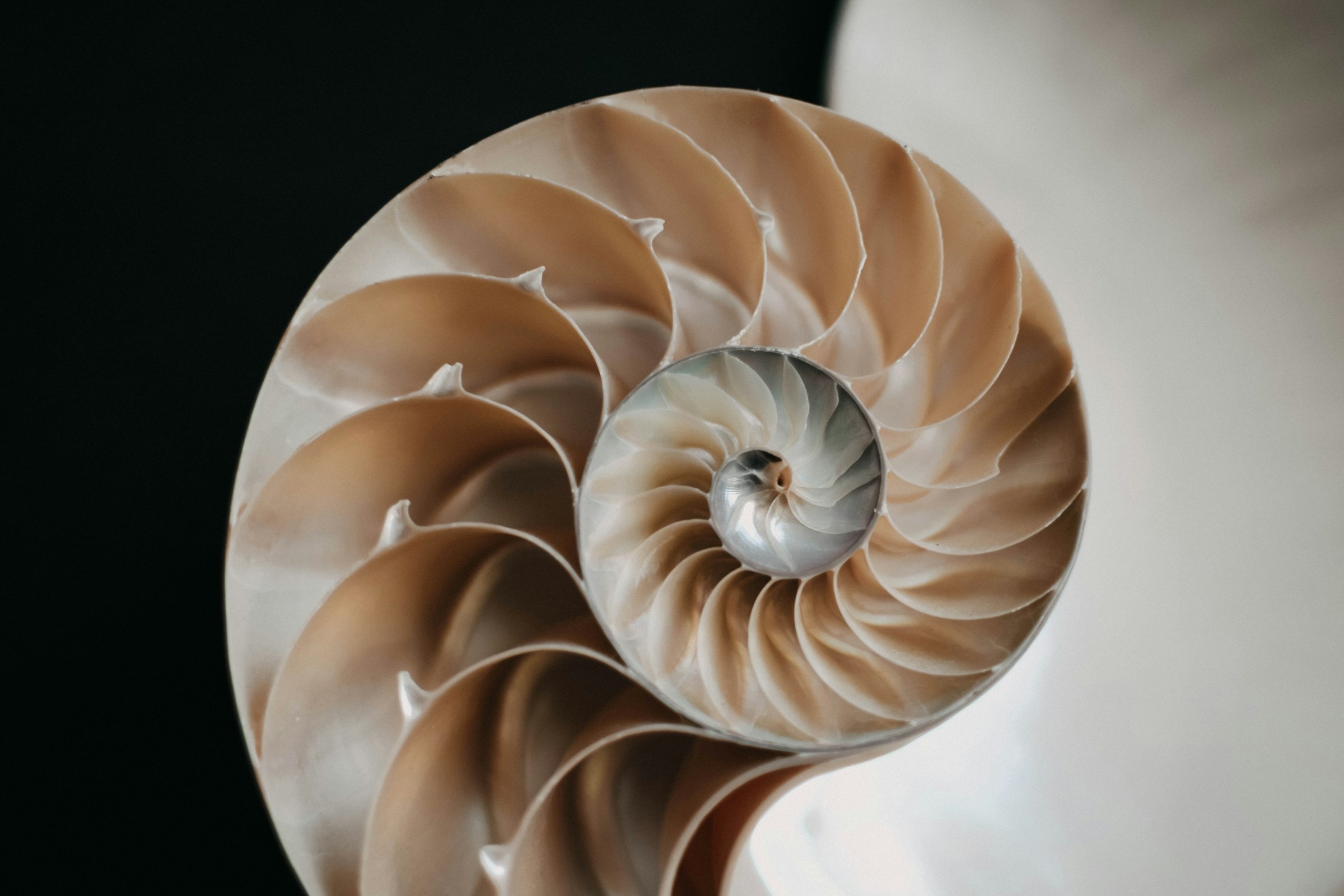
This article explains what the golden ratio is, where the Fibonacci sequence comes in, how to use the spiral and the phi grid on your own pictures, and how both differ from the rule of thirds, with a short section for designers. Because the golden ratio comes with more myths than any other idea in composition, it also says plainly which of the famous claims hold up. The nautilus shell at the top of this page is the most famous example of all, and it isn’t one.
What the Golden Ratio Is
Take a line and cut it in two, so that the whole line divided by the long part equals the long part divided by the short part. There is only one place to make that cut, and the ratio you get is the golden ratio: 1.6180339…, usually rounded to 1.618 and written with the Greek letter phi (φ). The two parts come out at 61.8 % and 38.2 % of the whole.
That is the entire definition. Euclid wrote it down around 300 BC, and Luca Pacioli called it the divine proportion in a 1509 book that Leonardo da Vinci illustrated. Everything else people say about it, including most of the claims about beauty, nature and famous buildings, was added later, and we get to those below.
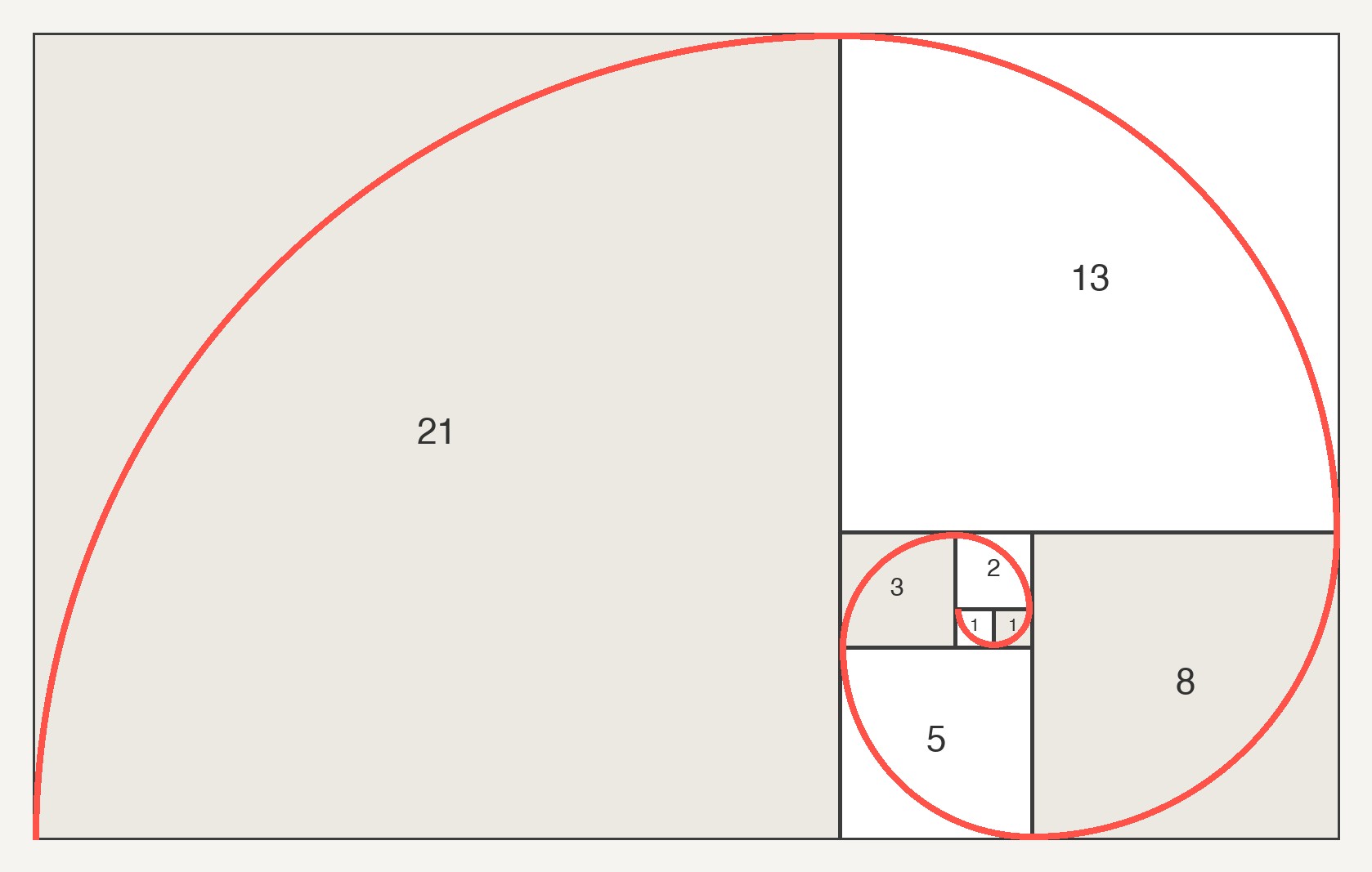
A golden rectangle is one whose sides are in that ratio: 1,000 pixels by 618, for example. Cut a square off one end and the leftover is another golden rectangle. Keep cutting squares and you get smaller and smaller golden rectangles spiralling inward. That is where the overlays come from.
Where Fibonacci Comes In
The Fibonacci sequence is a list of numbers where each one is the sum of the two before it: 1, 1, 2, 3, 5, 8, 13, 21, 34, 55 and so on. Divide any number in the list by the one before it and the answer gets closer to 1.618 as the numbers grow: 8 ÷ 5 is 1.6, and 21 ÷ 13 is 1.615. So the sequence and the ratio describe the same proportion, which is why photographers use the names interchangeably and why the spiral is called both a Fibonacci spiral and a golden spiral.
Strictly, they are slightly different curves. The spiral built from Fibonacci squares, as in the diagram above, is made of quarter circles, while a true golden spiral grows smoothly by a factor of phi every quarter turn. On a photo the difference is about 1 % of the frame, too small to matter. What matters is the shape: a curve that tightens toward one point in the frame.
The Two Overlays: Phi Grid and Golden Spiral
Photoshop, Lightroom Classic and Camera Raw all draw the golden ratio two ways.
The phi grid (called Golden Ratio in the overlay menus) is a three-by-three grid like the rule of thirds, except the lines sit at 38.2 % and 61.8 % of the frame instead of 33.3 % and 66.7 %. The middle row and column are narrower, so the four intersections sit closer to the centre.
The golden spiral is the curl from the diagram, stretched to fit whatever shape your crop is. Each quarter turn tightens by phi, and the spiral ends at a point roughly 28 % in from two edges of the frame. That end point is what you use: put the thing you want people to look at there, and let the rest of the picture carry the eye round to it.
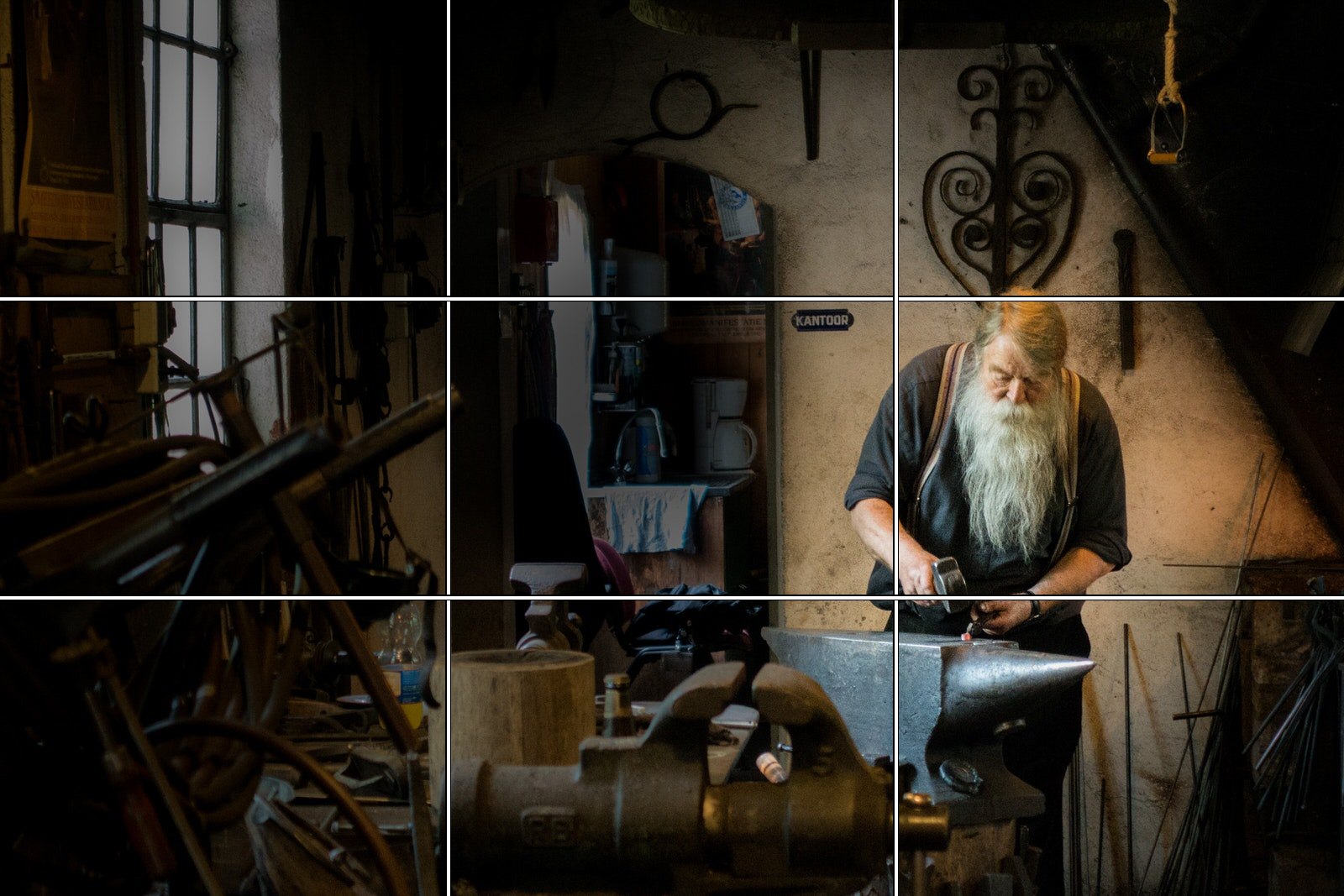
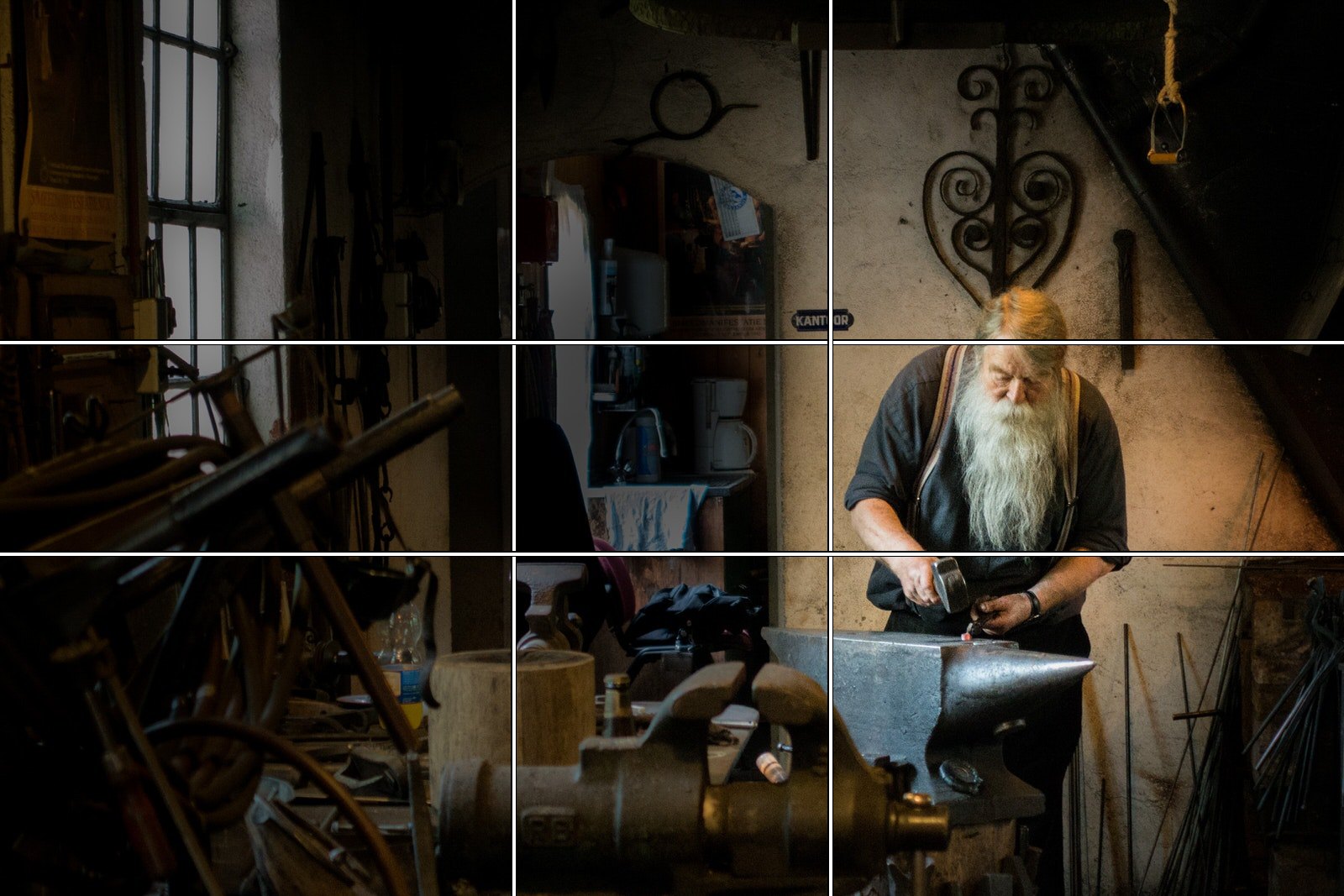
Golden Ratio vs. Rule of Thirds
The rule of thirds puts your subject a third of the way into the frame. The golden ratio puts it 38 % of the way in. That is the whole difference between the two grids: about 5 % of the frame width, or 80 pixels on a 1,600-pixel photo.
In a finished photo, nobody can tell which grid you used, so be a little sceptical when someone says a photo “uses the golden ratio rather than the rule of thirds”. What both grids do is get the subject out of the centre, and that’s the part that changes a picture. Which one you pick is a matter of taste:
- Thirds suits strong, simple subjects and horizons. A horizon on a thirds line leaves a clean two-to-one split of sky and land.
- The phi grid suits subjects that need a little more presence, because it keeps them nearer the middle without putting them dead centre.
- The spiral is different in kind. The grids only tell you where to put the subject; the spiral also suggests a route for the eye, so it’s most useful on photos with a curve or a line already in them: a road, a shoreline, an arm, a shadow.
We usually leave the overlay on the rule of thirds, because it’s the quickest guide and it works on most photos. The golden spiral is the one to try when a photo has a clear focal point and some movement toward it.
How to Use the Golden Ratio on Your Own Photos
There are two moments to use it: when you frame the shot, and when you crop. Cropping is the easier place to learn, because the overlay does the drawing for you.
In Photoshop: press C for the Crop tool, click the overlay icon in the options bar and choose Golden Ratio or Golden Spiral. Press O to cycle through the overlays and Shift + O to cycle the spiral’s orientation, so it winds toward whichever corner you need. Then drag the crop edges until the end of the spiral lands on your subject.
In Lightroom Classic and Camera Raw: press R for the Crop tool in Lightroom Classic and find the guides under Tools > Crop Guide Overlay; O and Shift + O work the same way. Camera Raw’s Crop tool has the same set, Golden Ratio and Golden Spiral included.
Three photos cropped that way, with the spiral left on so you can see the fit. In each one the crop was moved, not the subject.

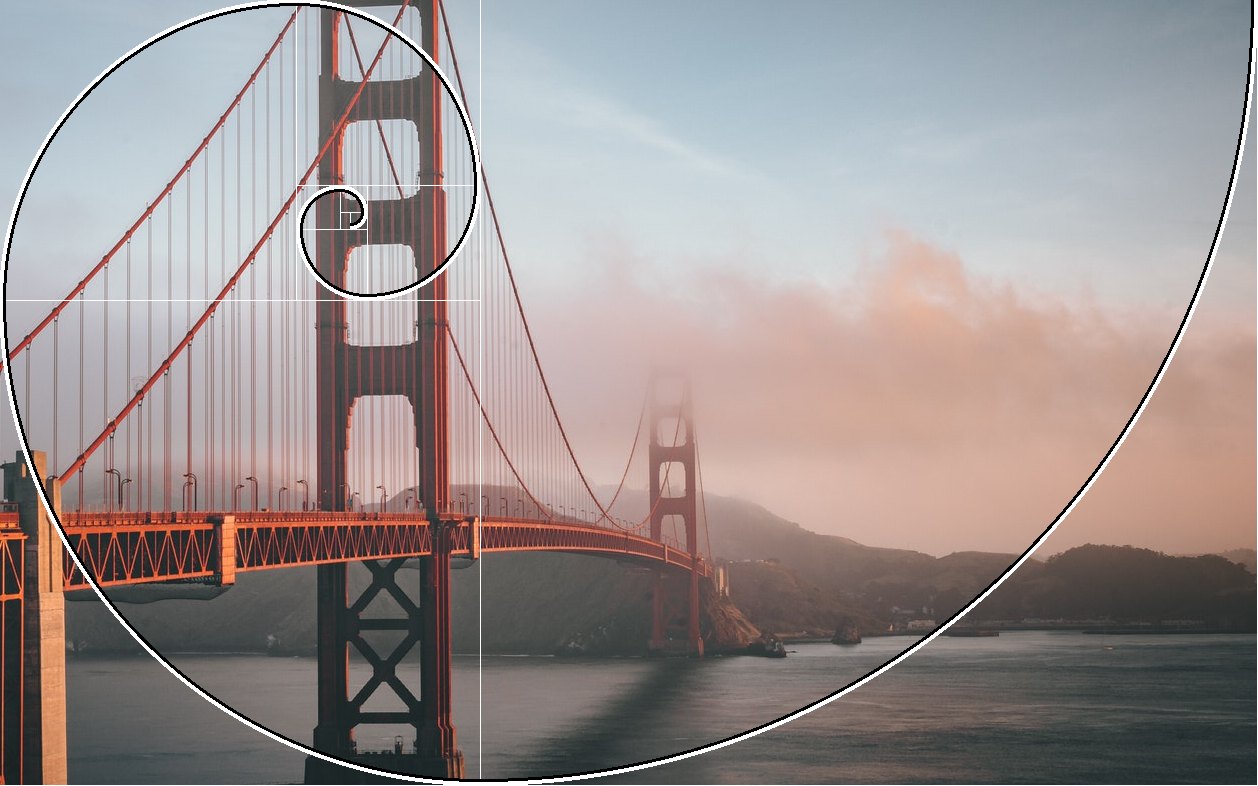

The fit is never exact: the road leaves the curve and comes back, and the cables cross the spiral rather than follow it. That’s normal. The crops also lost some picture to make the spiral land, which is a real cost. If a crop throws away something you care about, the overlay isn’t worth it on that photo.
Using it when you shoot is the same idea without the drawing. Look for a curve or a line that leads somewhere, put the thing it leads to a bit less than a third of the way in from two edges, and leave the space on the other side for the line to travel through. Most cameras can show a thirds grid in the viewfinder but not a spiral, so you compose roughly and finish the fit in the crop.
Golden triangles are the third overlay in the same family. The frame is split by one diagonal, and the other two corners send a line to meet it at right angles. It suits photos with a strong diagonal, such as a shadow, a staircase or a beam of light.
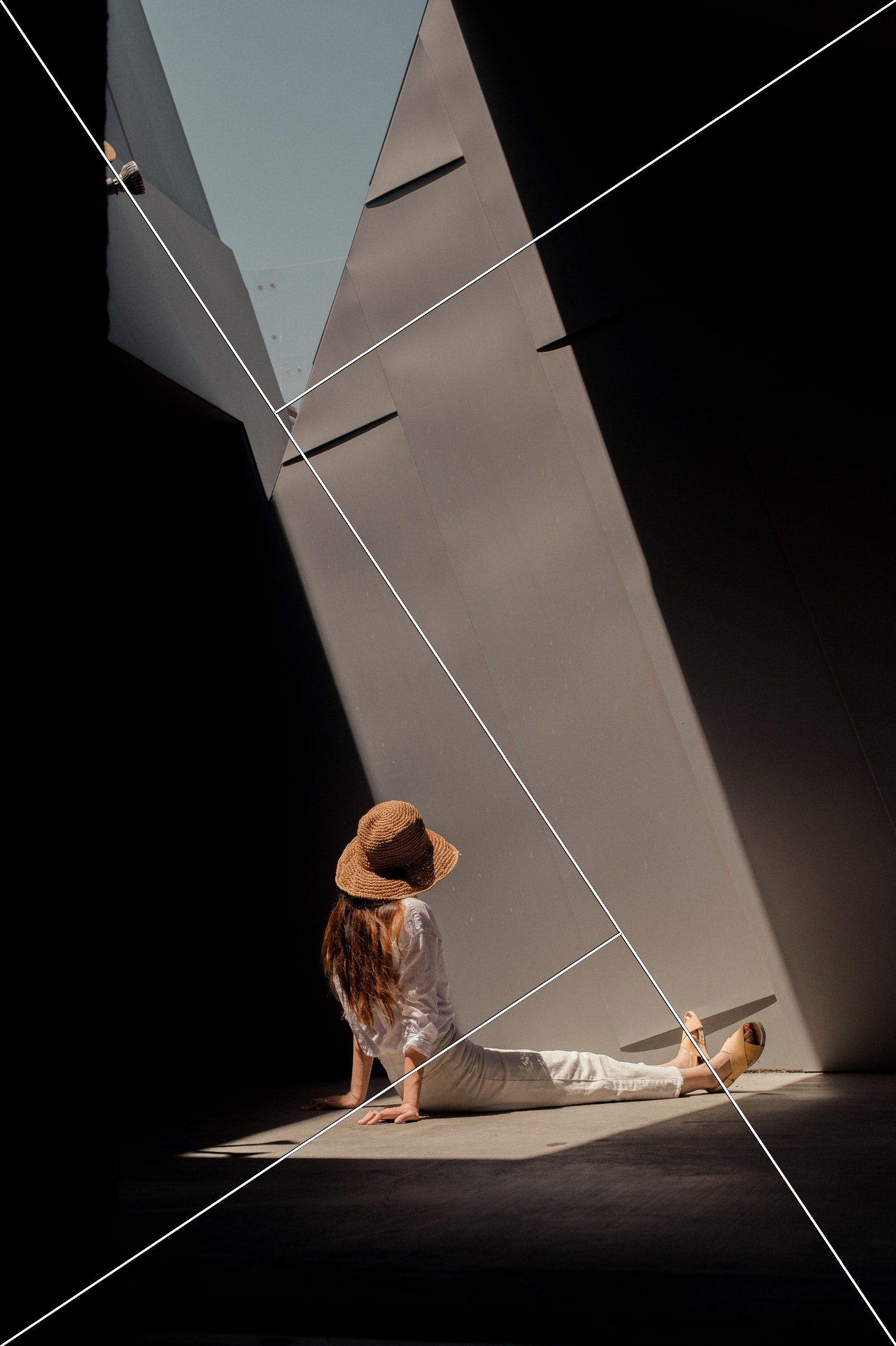
Our free lesson Crop Tool in Photoshop: 5 Easy Framing Moves works through the overlay menu, golden spiral included, on a sample photo, then crops outward with Generative Expand. The PRO course Color Theory and Composition in Photoshop covers the rule of thirds, the golden ratio and spiral, triangles, symmetry, negative space and leading lines before moving on to colour.
Where the Golden Ratio Really Appears in Nature
Real: spirals in sunflower heads. Count the spirals of seeds curling one way across a sunflower, then the other way, and you usually get two neighbouring Fibonacci numbers, such as 34 and 55. In the largest study of this, 657 sunflowers grown by volunteers for Alan Turing’s centenary, about three quarters of the spiral counts were Fibonacci numbers and most of the rest were near misses, though some heads had no Fibonacci structure at all. Leaf and petal arrangements follow related rules, which is why a succulent seen from above looks the way it does.


Myth: the nautilus shell. The nautilus is the poster child for the golden spiral. Its shell is a logarithmic spiral, which means it keeps the same proportion as it grows, but that proportion is not phi.
Measurements of 80 shells in the Smithsonian’s collection put the ratio of a shell’s length to its height at 1.31 on average, where a golden spiral would give 1.618. The shell on this article’s cover is a real chambered nautilus, cut in half (photo by Content Pixie on Unsplash). Any spiral that keeps its shape as it grows will look “golden” if you draw the overlay loosely enough, and that is the trap with most of the nature examples.
1.618
phi, the golden ratio
38.2 %
where the phi grid’s lines sit, against 33.3 % for the rule of thirds
1.31
average length-to-height ratio of 80 measured nautilus shells, not 1.618
74 %
of the spiral counts in a 657-sunflower study were Fibonacci numbers
Famous Art and Architecture: What’s a Myth
Most of the modern “golden ratio in art” claims trace back to Adolf Zeising, who argued in 1854 that the ratio was a universal law of beauty and set about finding it everywhere. Most of the famous examples haven’t survived measurement.
- The Parthenon. The claim that its façade is a golden rectangle is, in the words of the mathematician Keith Devlin, “not supported by actual measurements”. The Greeks who built it left no mention of the ratio, and a 2014 study of 95 Greek monuments found the proportion absent in the Parthenon’s century and almost absent in the six centuries after.
- The Great Pyramid. Its proportions can be made to fit a golden-ratio triangle if you measure generously, but Egyptologists consider the idea unlikely and there is no record of it.
- The Mona Lisa and the Vitruvian Man. Leonardo illustrated Pacioli’s book, so the connection sounds plausible. But nothing in his own writing says he composed with the ratio, and the Vitruvian Man’s proportions, which he labelled himself, don’t match it.
- “People prefer golden rectangles.” Gustav Fechner reported that preference in the 1870s. Later, more careful tests have come out inconclusive, and a 1999 survey of 565 paintings found an average canvas proportion of 1.34, nowhere near 1.618.
What does hold up are the cases where the artist said so. Salvador Dalí painted The Sacrament of the Last Supper on a canvas close to a golden rectangle, with a giant dodecahedron, a shape built on the ratio, hanging over the table. Le Corbusier built his Modulor system of architectural measurements on the golden ratio and Fibonacci numbers and used it in buildings. The rest is mostly pattern-matching after the fact.
The Golden Ratio in Logo and Layout Design
Designers use the ratio more deliberately than photographers, because they are drawing the shapes rather than finding them. Three ways it turns up:
Layouts. Split a page or a screen at 61.8 % and 38.2 % and you have a main column and a sidebar in golden proportion: 742 and 458 pixels on a 1,200-pixel-wide page. It looks balanced without being symmetrical, which is why “golden ratio grid” templates exist for every design app.
Type scales. Pick a body size and multiply by 1.618 for each bigger size: 16, 26, 42, 68 pixels. Tim Brown’s 2011 article More Meaningful Typography made this way of building a type scale common on the web; he used the golden ratio for his own example, and his Modular Scale calculator offers it alongside musical ratios.
Logos. A 2008 design document attributed to Pepsi’s agency, Arnell Group, leaked the following year, tied the new mark to the golden ratio at length. The Apple logo is often shown with golden circles drawn over it, but Apple has never said so and the fit is loose. As with the paintings, trust the cases where the designer documented it.
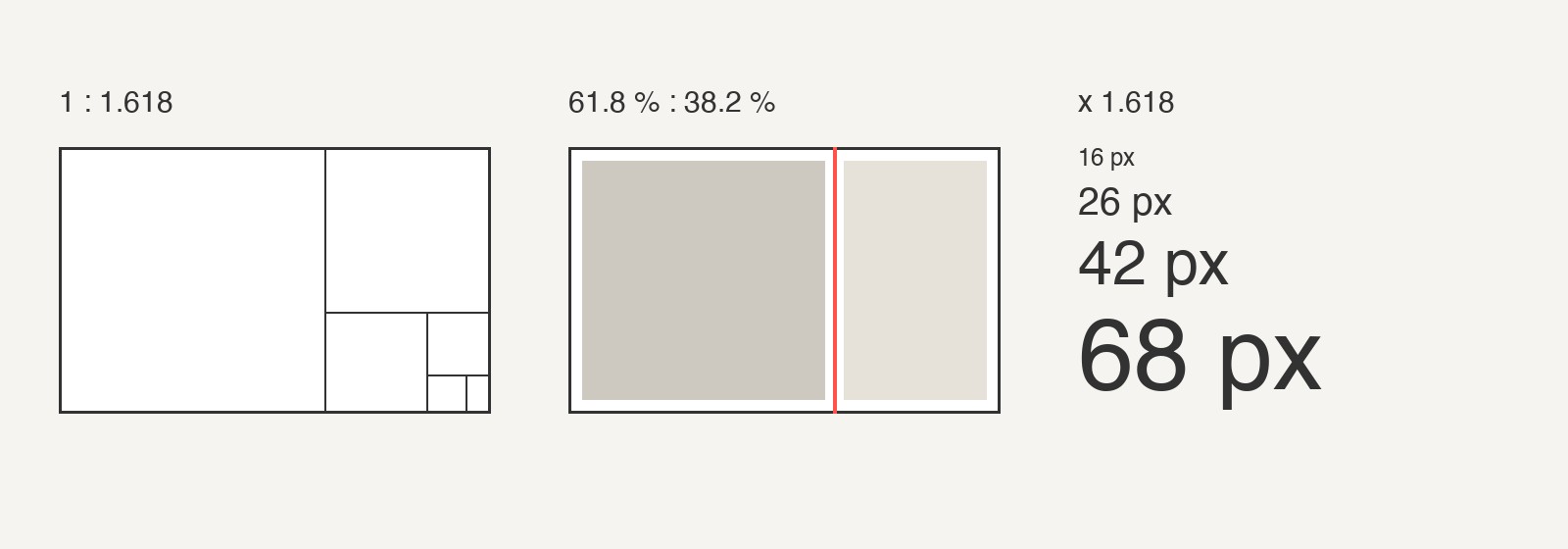
If you’re a photographer building a portfolio site, the column split is the one to try. It gives a wide image column and a narrow one for captions and navigation.
Common Questions About the Golden Ratio
What is the golden ratio in simple terms? A way of dividing something into a bigger and a smaller part so that the big part relates to the small part the same way the whole relates to the big part. The number that describes it is 1.618, and the parts come out at about 62 % and 38 %.
Is the golden ratio the same as the Fibonacci sequence? Not the same thing, but the same proportion. Dividing each Fibonacci number by the one before it gets you closer and closer to 1.618, so in photography the two names are used for the same spiral overlay.
Is the golden ratio better than the rule of thirds? No. The lines are 5 % apart, and the two grids do the same job. Use whichever you find easier to read; the spiral is the one that does something different.
Mistakes People Make With the Golden Ratio
Treating it as a rule. This is a guideline. A centred subject with symmetry behind it beats a golden-ratio crop that leaves the subject stranded. If the photo looks better without it, it is better without it.
Drawing the spiral after the fact. A spiral traced loosely over a finished photo, a painting or a shell proves nothing, because a loose spiral fits almost anything. If you want to use the ratio, use it while composing or cropping, with the overlay at its real proportions.
Forgetting the subject. Grids and spirals put things in the frame. Light, expression and timing are what people look at once they are there. Our 25 composition tips cover the other tools that work alongside it: framing, leading lines, symmetry, depth and motion.
In this article
- What the Golden Ratio Is
- Where Fibonacci Comes In
- The Two Overlays: Phi Grid and Golden Spiral
- Golden Ratio vs. Rule of Thirds
- How to Use the Golden Ratio on Your Own Photos
- Where the Golden Ratio Really Appears in Nature
- Famous Art and Architecture: What’s a Myth
- The Golden Ratio in Logo and Layout Design
- Common Questions About the Golden Ratio
- Mistakes People Make With the Golden Ratio
Free with PHLEARN
Follow along, freeCrop Tool in Photoshop: 5 Easy Framing Moves