Light Rays Photoshop Actions
-

-
Add to
favorites
-
Software
-
CompatibilityPhotoshop CS6 & Newer
-
Photoshop actions13 Light Ray Actions
-
To practice on5 Sample Images
-
In the downloadPDF Guide & Action List
-
Built withEditable Smart Filters
Photoshop Action Downloads
Install Guide
How to Install Your Actions
A short PDF that shows three ways to install this action in Photoshop, how to play it on your photo, and three tips for better results.
DESCRIPTION
Turn a bright sky or a gap in the trees into beams of light. The rays come from the bright parts of your own photo, from six directions, soft or strong, or from any spot you click, and stay editable as a smart filter.
Pick one of six directions in a soft or strong version, or use Light Rays Choose Direction and click where your light comes from. The rays are built from the brightest parts of your own photo, so they match its light.
Tested in Photoshop 2026 and built from steps that work in Photoshop CS6 and newer, with 5 sample images to practice on and a PDF guide in the download.

PHLEARN PRO · Photoshop Actions
Light Rays Photoshop Actions
13 light ray actions5 sample imagesPDF guidePhotoshop 2026
Light Rays Photoshop Actions
Realistic Light Rays in Just a Click
Turn a bright sky or a gap in the trees into beams of light that look like sun shining through haze, on portraits and landscapes.


Add Light Rays to Portraits
Light Rays Top Left Strong sends beams of sunset light across the frame from the top left, through her hair and over the hills. The golden backlight gets brighter and more defined while her face and the poncho stay clear. The rays come from the bright parts of the photo and sit in their own group at the top of the layers.
Start With Real Backlight
Rays look believable when they come from a light that is already in the photo. Here the sun sits behind the hills, so the rays come from that corner. Strong gives defined shafts; Soft gives a gentle glow. To aim them exactly, play Light Rays Choose Direction and click where the sun is in the Radial Blur preview. To keep rays off a face, add a mask to the group and paint black over it.
Best On
Backlit portraits at sunset, golden-hour fields and hair lit from behind.
Add Light Rays to Landscapes
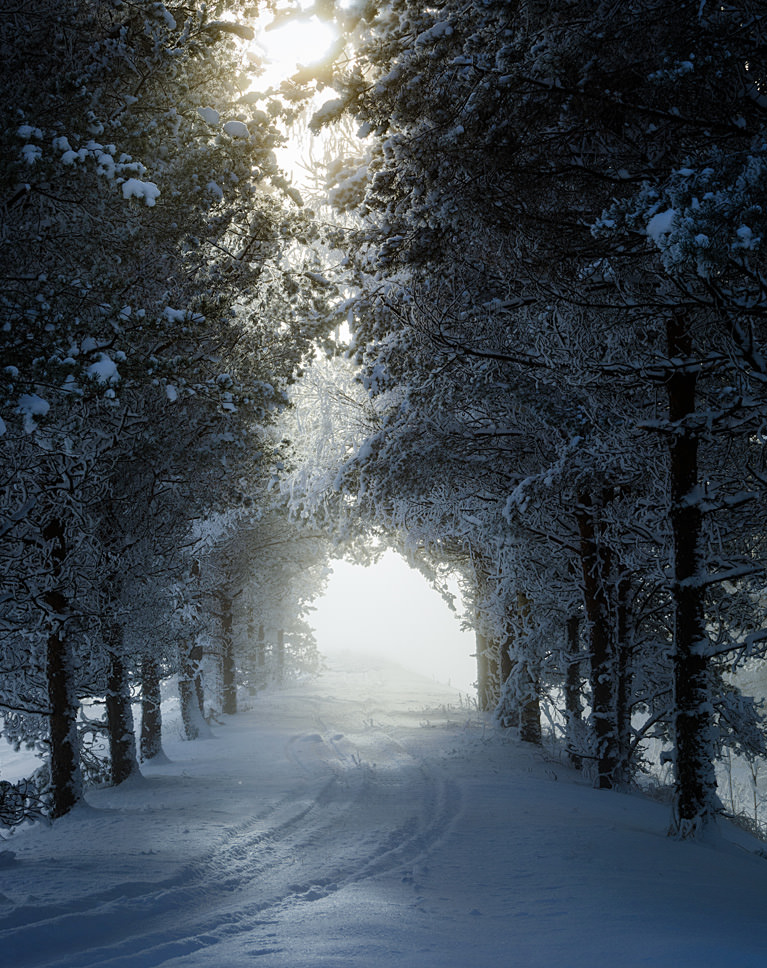
Light Rays Top Soft breaks the bright sky at the top of the frame into soft rays shining down through the snowy pines toward the path. The shadows brighten and the forest gains a misty depth. To shift the rays or change their length later, double-click Radial Blur under the Rays layer and move the blur center.
Light Needs Something to Hit
In real life you only see rays when light passes through mist, dust or gaps in branches. Forests and tree-lined paths give the beams something to pass through, so the effect reads as real. The rays are built from the bright areas of the photo, so a bright sky behind the trees gives the clearest beams. Light Rays Center Soft sends them out from a light inside the frame instead, like a sun in the sky.
Best On
Forests, tree-lined paths, misty mornings and window light.


Create Subtle Light Rays
Light Rays Top Left Soft adds a faint, blurred glow and soft beams from the bright sky behind the couple, lifting the shadows a little. The couple stays the focus and the rays read as natural sunlight. If the beams spread onto the people, add a mask to the group and paint black over them.
Less Is More
On a wide view the rays only need to suggest sunlight. The Soft actions add a light blur so the beams stay gentle; lower the layer opacity for even less, or duplicate the layer for more. Double-click Gaussian Blur under the Rays layer to make the Soft beams softer or sharper. To move the rays or change their length, double-click Radial Blur and move the blur center. For a sunny look, pair the rays with a flare from the Sun Flare pack.
Best On
Travel photos, city views at sunset and lifestyle portraits.
What’s in the Download
One action set, 13 light ray actions
Unzip it and load the set in the Actions panel. Pick the direction your light comes from, or Choose Direction to click it.
- ATNPHLEARN Light Rays 2026.atn1 action set with all 13 actions
- JPG5 Sample ImagesPractice photos
- PDFPHLEARN Light Rays – Guide (2026).pdfInstall steps, every action explained, fixes
- Light Rays Top Left Soft
- Light Rays Top Left Strong
- Light Rays Top Soft
- Light Rays Top Strong
- Light Rays Top Right Soft
- Light Rays Top Right Strong
- Light Rays Left Soft
- Light Rays Left Strong
- Light Rays Right Soft
- Light Rays Right Strong
- Light Rays Center Soft
- Light Rays Center Strong
- Light Rays Choose Direction
The 5 sample images




Photoshop Action Questions, Answered
What’s included in the Light Rays Photoshop Actions?
The download includes 13 Photoshop actions: rays from the Top Left, Top, Top Right, Left, Right and Center, each Soft or Strong, plus Light Rays Choose Direction, which lets you click where the light is. You also get 5 sample images and a PDF guide with install steps and every action explained.
What kind of photos do the Light Rays Photoshop Actions work on?
It works on almost any photo where you can see a light source, whether it’s the sun or a bright neon sign, shining through objects, dust or atmosphere. Look for images with light coming through trees, clouds, buildings, dust or fog, anywhere you might see light rays in real life. It can add light rays, lens flare and haze.
Does the Light Rays action look realistic when the sun is high?
Light rays are more visible when the sun is lower in the sky, so the action suits sunrise and sunset photos best. For maximum realism, avoid adding rays to photos where the sun is high overhead. You can also change the color and intensity, from warm red sunset light to cool blue winter morning light.
Are Photoshop Actions included in my PHLEARN PRO subscription?
Yes. A PHLEARN PRO membership includes every Photoshop Action pack, plus PRO Tutorials, Lightroom Presets, LUTs and Photoshop Brushes.
What version of Photoshop do I need?
These actions work in Photoshop CS6 and newer, on Mac and Windows. We recommend the latest version. Photoshop on the iPad and on the web cannot run actions.
How do I install Photoshop Actions?
Unzip the download, open Photoshop, then double-click the .ATN file. Photoshop shows no confirmation, but the set is now at the bottom of the Actions panel. The PDF guide in your download shows every install method and explains each action, and there is more help on our Photoshop Actions install guide.
Where do the actions show up after I install them?
At the bottom of the Actions panel, as a set named after the pack. Open the panel with Window > Actions, or press Option + F9 on a Mac or Alt + F9 on Windows.
Photoshop says “Command not currently available.” What do I do?
The photo is in a mode Photoshop can’t add these layers to: Indexed Color, Bitmap, Multichannel or 32-bit. Set Image > Mode to RGB Color and 8 or 16 Bits/Channel, and if Quick Mask is on, press Q to turn it off. Then play the action again. The rebuilt 2026 actions work with any layer selected and in CMYK, Lab and Grayscale photos too.
The action stopped and showed a message. Is something wrong?
The 2026 actions don’t stop with messages any more: each one builds its layers in one go, and the layer and group names tell you what to do next. A few actions open a Photoshop window on purpose (Choose Direction, Custom, Choose Blur and the movable vignettes) so you can set the effect yourself; click OK when you’re done.
How do I undo an action?
Open the History panel (Window > History) and click the state from before the action ran. You can also hide or delete the group the action built in the Layers panel.
Do you offer refunds?
Because these are downloadable products, all sales are final and we are not able to offer refunds.
Terms of Use
These Actions are licensed for personal and professional use by the individual who purchased or downloaded them. The license does not extend to companies or partnerships, and the files may not be resold, loaned, gifted, shared, copied or redistributed. All PHLEARN Actions are copyright protected.
Master Photoshop, Lightroom and Photography
Join PHLEARN PRO for $12.99 a month, or $99.99 a year (save 36%). Cancel anytime, with a 100% money-back guarantee.





