
Download Assets
This tutorial includes 9 sample images and 1 PDF guide. Downloads are free with a PHLEARN account.
- Free sample files with every tutorial on PHLEARN
- New tutorials published every week
- Unlimited downloads with your free PHLEARN account
Free PDF Guide · 2 Pages
This Tutorial as a Step-by-Step PDF
The 2-page guide explains how shutter speed controls brightness and motion: the doorway analogy, the swinging snowspeeder shot from 1/500 to 1 second, the two kinds of motion, the four-step LEGO shoot from f/4 at ISO 100 to f/22, 1/15 and ISO 800, and which speed to reach for. Keep it in your camera bag.
description
Shutter speed is the measure of how long light is allowed through to the sensor, and it is the one exposure control that changes what a photograph is of rather than just how bright it is. This episode uses Star Wars LEGO to explain how the shutter works alongside aperture and ISO, what fast and slow speeds do to motion, and which range to reach for from 1/1000 of a second down to exposures a second or longer.
Enjoying This Free Tutorial?
We publish a new free tutorial every week, each one with sample images and PSDs you can download and follow along with. Sign up and they land straight in your inbox, along with early word on sales, events and subscriber-only offers.
What Is Shutter Speed? Understanding It with Star Wars LEGO
Photography is both an art and a science. Combine instinct and creativity with a solid technical understanding of the craft and you find yourself taking great images more often. Creativity is a difficult thing to teach, but anyone can learn the fundamentals of how a camera works, and mastering those fundamentals leaves you better equipped to work out how you want to express your ideas.
LEGO works much the same way. So what better way to teach the principles of photography than by using LEGO to recreate our favorite scenes from Star Wars? Allow me to answer that: there is not a better way. This episode, the last in our series after ISO and aperture, takes on shutter speed.
The Two Mechanisms That Control Exposure
There are two mechanisms in a camera that physically control the amount of light entering to create an exposure. If you’ve watched our episode on aperture, you know one of them is the size of the opening in the lens: the larger the opening, the more light gets through and the brighter the exposure. Where aperture measures the size of the opening, shutter speed measures the time light is permitted through.
The Doorway Analogy
Imagine sitting in a pitch black room facing a doorway, with a bright light on the other side. When someone opens the door, light floods the room. That person can control how far the door opens, whether just a crack or all the way, and that is a good stand-in for aperture: the wider the opening, the more light gets in. They can also control how long the door stays open, whether a split second or a minute. The shutter in a camera works the same way.
Aperture and shutter speed both work together with ISO, an electronic component that affects the brightness of an image, to determine how a photo is exposed. The settings you choose come down to a combination of creative intent and how much light you have to work with.
Freeze Time or Capture Dynamic Motion
What creative choices does shutter speed open up? If you’ve ever seen an epic sports photo where the player is seemingly frozen mid-leap, a fast shutter speed is at work. If you’ve seen a dramatic night sky with long strands of light trailing the motion of the stars, that’s long shutter speeds. Between them, those two examples cover what shutter speed does: freezing motion, conveying motion, and showing the passage of time in a single frame.
Fast Shutter Speeds
Shooting faster than 1/1000 of a second captures very fast moving objects with little to no motion blur, because the sensor is only exposed for a tiny fraction of the subject’s movement. Picture a spaceship: in a 1 second exposure it travels a big distance and you see it for that whole distance, but at 1/4000 of a second it is still moving and barely gets anywhere, so it appears frozen in time.
Slow Shutter Speeds
Shooting at 1 second or slower produces significant motion blur from anything moving in the frame. With the sensor exposed far longer, the camera records the subject’s travel from point A to point B and every step in between.
Camera Movement Counts Too
Shutter speed also determines how much movement of the camera itself shows up. At longer shutter speeds you’ll almost always want stabilization, whether a sturdy tripod or stabilization built into the camera or lens. At faster shutter speeds you can shoot handheld without worrying about blur.
Shutter Speed Ranges and What Each One Is For
Fast shutter speeds freeze motion and long ones capture it, but how does that translate into actual numbers?
1/1000 of a Second or Faster
Great for shooting handheld and capturing fast-moving action with no motion blur. Aim here for sports, or fast-moving children and animals. It does not let much light into the camera, so you’ll need to compensate with aperture and ISO, or shoot somewhere with a lot of ambient light.
Around 1/250 of a Second
Slowing down to 1/250 gets more light into the camera, which is great for shooting indoors when you simply don’t have as much light. It is still fast enough for most subtle movement.
1/60 of a Second
Motion starts to become much more apparent, so think about a tripod or built-in OIS. More light reaches the sensor, which makes this a more comfortable range at night or indoors.
1/15 of a Second
Any motion becomes clearly noticeable, which is exactly what you want if you’re after dynamic movement and blur. It also lets a lot more light in, so grab a tripod or a sturdy surface to hold the camera steady.
1 Second or Longer
This is where the striking effects live: stars in the night sky, long trails of traffic lights along a road, flowing water rendered smooth and creamy. Stabilization is your best friend, and sometimes it’s best not to touch the camera at all, so consider a remote to avoid any camera movement whatsoever. Aaron’s own night sky in California was a 45-minute exposure, long enough to see the Earth’s rotation blur the stars.
Keep in mind this is a general guide. The shutter speeds you actually use will depend on the light in the scene and the look you’re going for. Most importantly, get out there and experiment.
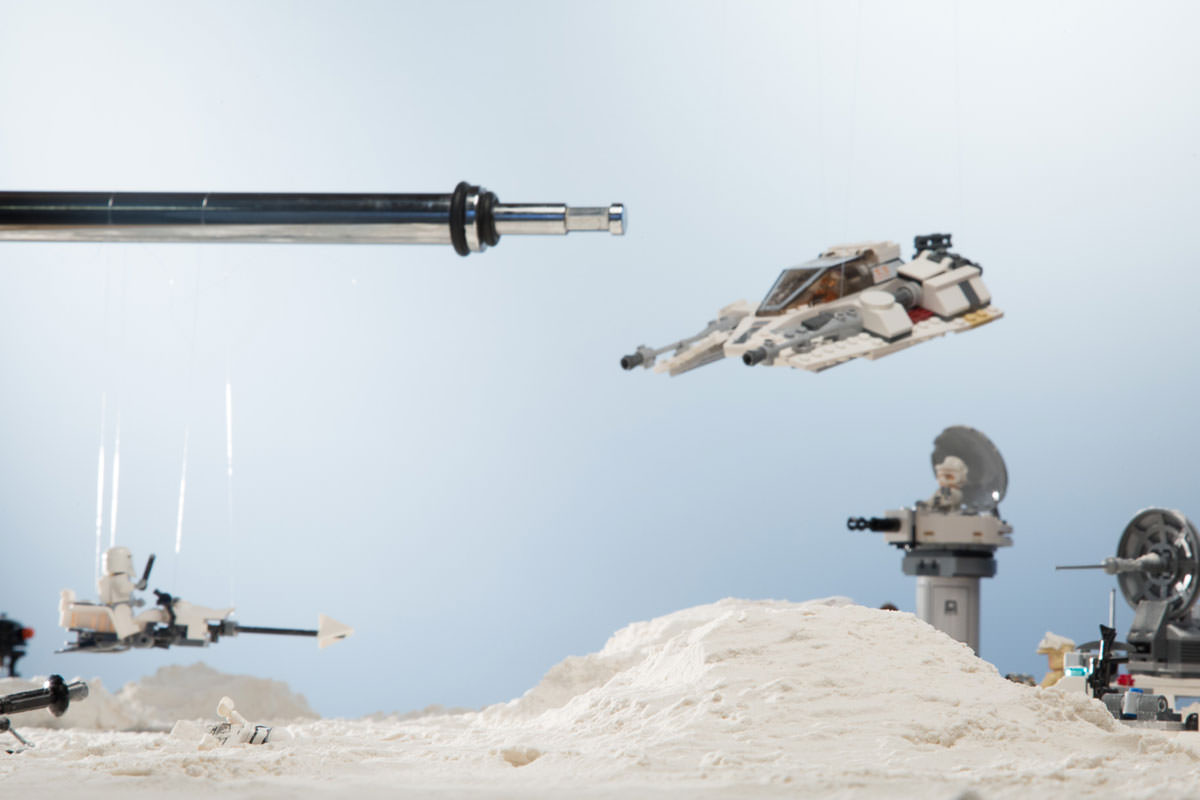
The LEGO shoot in the video shows how the settings trade off. The scene is a battle on the ice planet Hoth, with the snowspeeder and speeder bikes hanging from fishing wire so they can swing, and because these are miniatures the depth of field had to be very wide. Starting at the native ISO of 100 for low noise meant a wide open aperture (f/4 at 1/60), so very little was in focus. Closing the aperture down to f/22 widened the depth of field but let in less light, so a slow 0.5 second shutter brought the exposure back, with so much motion blur that no detail was left. A faster shutter (1/15) cut the blur, and raising the ISO to 800 made up the lost light for an exposure that was spot-on.
Why Shutter Speed Is Worth Learning First
Shutter speed is the one exposure control that changes what the photograph is of, not just how bright it is. Aperture and ISO adjust the amount and sensitivity of light; shutter speed decides whether a moving subject arrives as a frozen instant or as a streak of movement. That makes it a creative decision as much as a technical one, which is why it repays experimenting with far more than it repays memorizing.
Final Thoughts
Shutter speed is the length of time light is allowed to reach the sensor. Go faster than 1/1000 of a second to freeze action, slow to around 1/250 for more light indoors, and drop to 1 second or longer for star trails, light trails and smooth water, with stabilization whenever the shutter slows down.
Quick Reference: Settings and Tips
- Freeze fast action1/1000 of a second or faster; compensate for the lost light with aperture and ISO
- More light indoorsAround 1/250, still fast enough for most subtle movement
- Blur starts to show1/60 and lower: put the camera on a tripod
- Star and light trails1 second or longer, stabilized, with a remote; Aaron’s star trails took 45 minutes
- Two kinds of motionSubject moving and camera moving; a long shutter blurs both
- LEGO shoot, step by stepf/4, 1/60, ISO 100; f/22, 1/60; f/22, 0.5 sec; f/22, 1/15, ISO 800

Free Downloads
Follow Along on the Same Photos
Get the 9 sample images from the Star Wars LEGO shutter speed tutorial and the 2-page PDF guide to fast and slow shutter speeds. Free with a PHLEARN account.
Shutter Speed: Common Questions
What is shutter speed?
It is the amount of time a physical shutter inside your camera stays open, exposing the sensor to light. The number is the exposure time: at a 1 second shutter speed, the sensor sees light for 1 second.
Does a slower shutter speed make the photo brighter?
Yes. The longer the shutter stays open, the more light comes into the camera and the brighter the image. A shorter shutter speed lets in less light and gives a darker image.
What shutter speed freezes motion?
Faster than 1/1000 of a second freezes fast motion in place, and it is easy to reach outside. At 1/4000 a moving spaceship barely travels, so it looks frozen. The cost is less light, so compensate with your aperture and ISO.
What shutter speed should I use indoors?
Around 1/250 of a second gets more light into the camera, which Aaron says is great indoors when you don’t have as much light. It is still fast enough for most subtle movement.
Why are my photos blurry at slow shutter speeds?
There are two kinds of motion: your subject moving in front of the camera, and the camera itself moving. A long shutter speed blurs both. Use a stabilized lens if you have one, a tripod, and ask your subject to stand still.
When do I need a tripod?
At 1/60 of a second and lower you start to introduce a little blur, so take precautions like putting the camera on a tripod. At 1 second or longer, stabilize the camera and consider a remote so you don’t touch it at all.
How long an exposure do star trails need?
A very long one. Aaron’s night sky in California used a 45-minute shutter speed, long enough to see the Earth’s rotation blur the stars.
What settings did the LEGO shoot use?
It started at ISO 100 and f/4, with too little in focus, then closed down to f/22. A 0.5 second shutter brought the light back but blurred everything, so the shutter went faster to 1/15 and the ISO went up to 800 to keep the exposure right.
How does shutter speed work with aperture and ISO?
Think of a doorway into a dark room: how far the door opens is aperture, and how long it stays open is shutter speed. Both work with ISO to decide the exposure, so changing one means another has to make up the light.
Are the sample files free?
Yes, with a free PHLEARN account. You get 9 sample images and 1 PDF guide: photos from the Star Wars LEGO tutorial and the 2-page shutter speed guide.
Master Photoshop, Lightroom and Photography
Join PHLEARN PRO for $12.99 a month or $99.99 a year. Cancel anytime, with a 100% money-back guarantee.





