PRO CartCart
PRO Underwater Fantasy
Difficulty: , Length: 2:30 HR
• FREE Light Ray Brush
• Lighting Technique
• Create Depth
• Changeable Blur
• Adding Light Sources
• Create Flowing Hair

The BIG selling point on any image like this is always how much depth you can create. If you look at an image and it really seems to go off into the distance, you are far more likely to believe it.

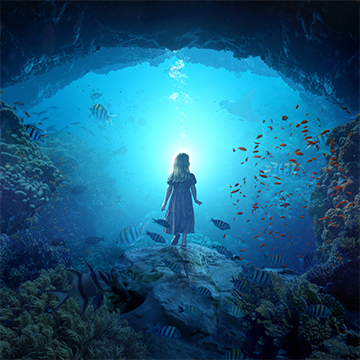
It would have been hard enough to make an image of a girl underwater with jellyfish, but we wanted to take it a step further and do something that no one has ever done. Make the jellyfish actually LIGHT the model.

$24.99
‹‹ View More PRO Photoshop Tutorials

Bundle and Save

+
Price for both: $34.99 $29.99
PRO Tutorial: Underwater Fantasy
PRO Texture: Smoke and Fog

PRO Photoshop Tutorial

In this advanced Photoshop Tutorial, you will literally be transported into an underwater world, and shown how to do exactly that with your photography. Using what we cover in this Photoshop Tutorial, you will be able to create just about anything you can imagine. We even use a bowl of cranberry sauce for a very important part of this image!The FREE CUSTOM BRUSHES that are included with this tutorial are the best ways to make atmosphere and LIGHT RAYS.

pro photoshop tutorial jellyfish progress

Photo Shoot

Thanks to some very special Phamily members who assisted on this shoot – Zach, Syed, & Scot. What an amazing time we had setting up and shooting. When you are trying to make someone look as though they are underwater, you have a TON of obstacles in your way. One of the biggest challenges we had to overcome during the shoot was the fact that we didn’t want to fill the entire room with smoke until just before the shoot. That meant that testing the lighting was pretty much out of the question, as it would react totally differently with the fog.

Getting someone to look like they are floating underwater is also very difficult, and we tried a number of poses and camera angles to get the best result. In the end we have to use a little Photoshop trick to make it look as though her legs aren’t on the ground.

How to Add Light Sources

It would have been hard enough to make an image of a girl underwater with jellyfish, but we wanted to take it a step further and do something that no one has ever done. Make the jellyfish actually LIGHT the model. Half of this had to be done in camera during the photo shoot, and the other half in Photoshop.

The main light sources that were there from the photo shoot remain relatively untouched, but all of the others are added in. When doing this, careful attention has to be paid in order to assure you don’t get BANDING in your photo. Something we have developed a technique for. Also in calcualting depth, a light source that is further into the deep is going to look a lot different than one right next to the camera.

pro photoshop tutorial jellyfish light

How to Create Flowing Hair

Anyone can photograph a model in a room with fog. The difficult part of this image involves making all the small details ALSO say UNDERWATER. One of the biggest ways you can tell is by looking at a person’s clothing and hair. In this tutorial, we cover both how to make hair look like it is floating, and piecing together clothing to do the same.

pro photoshop tutorial flowing hair

How to Add Depth

The BIG selling point on any image like this is always how much depth you can create. If you look at an image and it really seems to go off into the distance, you are far more likely to believe it. Creating depth is done in a number of ways, and we cover the principles behind doing this successfully. We also teach an AMAZING method that will make this SO MUCH EASIER for you.

The ability to change how much blur something has at any point in time. That is VITAL in making something look as though it is farther into the deep. A blur that is off by .5 pixels could mean the difference between something that looks amazing, and something that looks horribly fake.

photoshop tutorial pro jellyfish depth

Subject Interaction

If you really want to sell the idea that a person is in their environment, they should interact with it. In this tutorial we take a simple and elegant solution. One of the tentacles wraps around the girl’s arm. We teach you how to make that too.

photoshop tutorial pro Jellyfish Arm

$24.99
  • http://www.facebook.com/rjavierphotos Rafael Javier

    I’m a little confused?!?!
    Today is NOT Monday…but there’s a Pro release.  Are the PRO releases going to be available going forward on Friday’s until the end of Monday?

  • http://www.facebook.com/profile.php?id=100001436136016 Daniel James T. Cook

    Rafael, yes and no. You see, today WAS Friday but Aaron has been working on being able to apply his Photoshop skills to the space-time continuum. He’s made a custom brush that can erase days. Not sure why he would choose the weekend to use the brush on though. 
    :p Sorry… Friday is my day to be King of the Dorks and this was my chance. … just ignore me. 

  • http://phlearn.com Aaron Nace

    We are releasing them on Fridays from here on out to give you more time to watch them. They will also be 1/2 price all weekend. Thanks Rafael!

  • http://pascaledouglas.com Pascale Douglas

    So amazing!! I’ve always wanted to know how to make a person appear underwater!!! This way I don’t have to build a GIANT tank! Although… that would still be cool…

  • http://www.flickr.com/photos/morphicx Paula

    Happy B-Day Aaron!

    Just bought some jelly-pro as a birthday gift….
    That way we both have something ;)

    (I can’t wait to see this tut… looks so cool!)

  • http://phlearn.com Aaron Nace

    Thanks so much Paula!

  • http://www.facebook.com/people/Shahram-Rad/100000624217158 Shahram Rad

    Happy Birth day to  Aaron. 

    To celebrate with him, i got myself the jelly episode + wacom infus smal (naked as Aaron suggested).

    Seems family getting bigger , just saw a picture from Aaron on the front page of a dutch photography magazine.

    Now jelly time :)

  • Anonymous

    That was me who bought you the TENDERCRISP® Chicken Sandwich On Artisan Bun. Happy birthday. Will be enjoying my second phlearn toot today.  

  • Jenny Su

    This model is sooo beautiful, lo♥e her look…

  • Cliff Workman

    Aaron, just downloaded the Jelly tutorial and love the new downloadable format. It’s great for offline viewing and I’ll no longer be frustrated with bandwidth and buffering issues. With no longer being limited to the one year time frame I see myself purchasing a lot more pro tutorials. Great job and thanks for the Jelly tutorial, it’s awesome.

  • Oscar the photographer

    dude, happy bday man, you should had say something!!! great site i like it!! i just got a text from a girl that wants to be shot with another girl, would that be porn? lol.
    btw still own me 500 bucks, send some tutorials my way and we call it even.

  • Doe

    I just bought this and I’m super excited for it, but I’m not sure if I got all the emails yet and I’m having a minor issue. I only got a link to download something (and the receipt email of course) and it was just an empty zip file and a .zip.part file my computer can’t open. The last Pro I bought I got a link to the video and the password. Do I need to wait for another email? (yes i checked the spam folder.)

  • http://phlearn.com Aaron Nace

    Doe, can you try the download again, the ZIP should not be empty..
    If so, contact me using the contact form on Phlearn, and I will fix this
    Thanks!
    Aaron

  • Jay Stebbins

    This is an excellent Phlearn Pro. a fantastic lesson in creating depth which can be applied to much more than jellyfish in a fantasy world. Awesome job Aaron. 

  • http://phlearn.com Aaron Nace

    haha, great hanging out Oscar :)
    I am sure I will see you soon. may be porn…

  • http://phlearn.com Aaron Nace

    Thanks so much Cliff!
    I am really glad the Downloads are working out so well for you. Keep the good suggestions coming :)

  • Rksrks100

    I purchased this PRO tutorial recently and highly recommend it.  There are probably not very many tutorials on how to make an underwater scene look realistic without getting wet so this one is great. Aaron is very generous with his time and the pace of this tutorial is just right- holds the attention but does not go so fast that one has to repeatedly pause and rewind.  I’m definitely going to try to create something novel using these techniques. Thanks again Aaron !  Oh, and I don’t mean to be cheap but I’m waiting for you to put on a sale again soon so I can pick up another few tutorials.  I think I’ve learned more from you about how to use Photoshop than from any other resource.  Keep up the great work !!!!

Included in your PRO
Video Tutorial
Each PRO Tutorial includes a full length video tutorial, most are over 2 hours long. Pause, rewind, and fast forward at your command.
Source Images
We provide you with all the images you will need to follow along with the tutorials. We even give you brushes and actions if necessary.
Download
All PRO Tutorials are available for download onto your computer. They don't expire, and you can take them wherever you go.
Delivery
After completing your payment securely via PayPal, Google Wallet, or Credit Card you will receive your download link instantly via e-mail.
Speed
Our Amazon S3 Servers are just waiting to send your tutorial. The best servers mean the fastest download speeds, getting you learning faster.
PRO Bestsellers
Testimonials

Adam Elmakias

Phlearn got me out of my own slump. I was looking to learn some new PS skills but all the resou...
More Phlearn got me out of my own slump. I was looking to learn some new PS skills but all the resources online seemed to just be rehashed and reposted, then I found Aaron/ Phlearn.

I have learned a great deal from the site, but my favorite part is referring other people in a similar situation to the site.

Josh Cripps

Thanks for putting out some of the most accessible, interesting, and informative tutorials on t...
More Thanks for putting out some of the most accessible, interesting, and informative tutorials on the web. I am simply in awe of your Photoshop knowledge and techniques. I've been a working landscape photographer since 2008 and I thought I knew my way around the program. How wrong I was! In every Phlearn tutorial I've watched I've learned one, or two, or ten new things about Photoshop. But I'm not just talking about tips, tricks, and shortcuts. Your techniques are fantastic as well. I had no idea you could accomplish so much with the simple brush tool.

But of course, technical Photoshop knowledge alone doesn't create great images. I've really gotten a lot out of hearing your theories and ideas on color and light matching for composites. It makes all the difference in the world. I can honestly say that even though I've only watched a handful of Phlearn tutes so far my portrait images are light years ahead of where they were only a few months ago.

Thanks much and keep up the great work.

Dru Lester

To start, Phlearn is amazing! I have searched the web over and over trying to find good photosh...
More To start, Phlearn is amazing! I have searched the web over and over trying to find good photoshop tutorials that actually went into depth on the tools and techniques for creating the type of photos I see in my head. About six months ago I found Phlearn and am so glad I did. I'm only on my 3rd Pro Tutorial, but have already learned more than I could have imagined in that short time.

Aaron Nace is such a good, fun teacher and really breaks down every step and tool used to create his photos. Not only that, but he shows you how to do things several different ways so you can pick the one that is most comfortable for you. If you're questioning wether or not to get a Pro Tutorial or if Phlearn is right for you, the answer is YES! Thanks for all you do Aaron and all the others who make Phlearn what it is.

Steve Parker

I’ve been a photographer for a long time and have been using Photoshop since its first in...
More I've been a photographer for a long time and have been using Photoshop since its first incarnation. I thought I pretty much had it covered. Turns out, not so much. I'm pretty new to the site but I have learned so much from watching Aaron's free videos that it was a simple decision to purchase the PRO tutorials and I'm so glad I did. The quality of the production and level of content is awesome; in depth but clearly explained.

Aaron has such an easy, natural way of presenting information that you can't help but feel you're being personally tutored by someone who really knows and loves his craft.

Save your money on books, stop looking at 10 minute blurry Youtube clips and spend some time with PRO. You'll learn more from one PRO tutorial than you will from most books out there combined. Where can you possibly get between 2-3 hours of professional tutoring per video that you can refer to over and over again for under $25 (even cheaper when he has a sale)? 'Nuff said.

Willard Chivers

People generally dont like being wrong, even worse we dont like admitting we were wrong. I had ...
More People generally dont like being wrong, even worse we dont like admitting we were wrong.

I had been watching Phlearn for about a month or so before I bought my first Pro Tutorial. I had learned and grown so much just from the free daily shows I felt like I was getting way to much for free so I decided i wanted to support Aaron by buying a tutorial. So i picked one that looked interesting, thinking that for the price i would maybe learn a few extra tricks that didn't happen to make it in the daily show (or had been done in the archives). I was wrong. Very wrong and I will happily admit it!

I still use what i learned in that first tutorial in a large portion of my images along with all the other tips and techniques I've learned in all the other tutorials I've purchased since. In fact, there isn't an image I've made recently that hasn't had a touch or more of Phlearn influence and i couldn't be more grateful. Phlearn continues to help me get my images to where I want them to be, and also shows me where I've never thought of taking them.

I really can't express how valuable these Pro Tutorials are, at any price!

Jack Temple

I can’t say enough about Phlearn. It’s the single most important resource for the d...
More I can't say enough about Phlearn.

It's the single most important resource for the development of my photography. But it doesn't stop there. Aaron has taught me not only how to take a good photo, but he's taught me a new way of viewing art, and the world for that matter. Anybody can explain the nuances of aperture, shutter speed, and iso, but it takes a special person to infuse creativity, change the perspective of others, and build a community.

Aaron's achieved this is the last two years, and I cannot wait to see what he has in store for the future! Thanks for the invaluable gifts of art and PHamily!

Jeff Whitlock

I appreciate the quality/thoroughness of the pro tutorials here at Phlearn. They are a phenomen...
More I appreciate the quality/thoroughness of the pro tutorials here at Phlearn. They are a phenomenal value for the money. I should know -- so far I've purchased 11 of them.

I've purchased many photoshop tutorials and PHLEARN is (in my opinion), are the best value for the money by FAR.Love the entire Phlearn site as well. If there is time in my day to only check out one site, It’s going to be PHLEARN.

Thanks to you and your team for all you do!

Jeff Thomas

Several years ago, when I first got into photography I looked online for tips, tutorials and so...
More Several years ago, when I first got into photography I looked online for tips, tutorials and so on, but there was very little good information out there. Then I took Aaron's class that he used to teach and I started watching Phlearn when it came out and my skills dramatically improved in the whole understanding of photography, along with my photoshop abilities.

I have been using photoshop for 8 years now and ever since I took Aaron's class and watched some of the Pro tutorials, I have become significantly more fluent in photoshop. It's funny because when I feel I understand how most conceptual images are put together and edited, Aaron comes out with a new technique that changes my whole perspective.

Jesse Gross

I am quite new to the Phlearn Phamily (only about 2 weeks), but since I found Phlearn I haven&#...
More I am quite new to the Phlearn Phamily (only about 2 weeks), but since I found Phlearn I haven't stopped. I've watched ever episode from the most current going back MONTHS and am still going. The wealth of knowledge within the free content has already lead me to purchases a couple Pro content just within the last week. The transparency of Phlearn coupled by the opportunity to free involved really does give this website/service a community feel.

Thanks for everything that the entire Phlearn team does and I'm happy to be a part of the Phamily.

Jesse

Michael Woloszynowicz

Phlearn’s free courses trump most of the paid options that are out there and the PRO ones...
More Phlearn's free courses trump most of the paid options that are out there and the PRO ones absolutely destroy them. Phlearn is the only place where I've seen practical solutions and examples to the problems that photographers face on a daily basis.

Aaron's presentation of both photography and Photoshop techniques is clear, concise and enjoyable. The value you get from the texture packs and PRO courses is fantastic and they immediately take your finished products to a whole new level.

I love my weekly dose of Phlearn and look forward to the ambitious projects in upcoming PRO tutorials. Keep up the great work Aaron!
Random Tips

Start a Facebook Fan Page for your photography, it is a great way to build a presence.