PRO CartCart
PRO Professional Skin Retouching
Difficulty: Beginner , Length: 1:20
• Painting Skin
• Body Shaping
• Makeup in Photoshop
• Removing Blemishes
• Skin Coloring
• Pen Tool

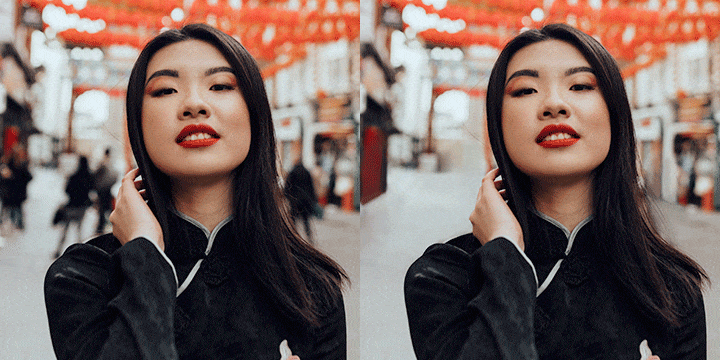
This tutorial covers everything you need to retouch a portrait. Often clients will want an image retouched to represent the best side of the subject.

If you are not doing it yourself, you may have to pay someone to do it. That gets really expensive..Save time and money by learning retouch for yourself.

$24.99
‹‹ View More PRO Photoshop Tutorials

Bundle and Save

+
Price for both: $34.99 $29.99
PRO Tutorial: Professional Skin Retouching
PRO Texture: Distressed Paper

PRO Photoshop Tutorial

In this advanced Photoshop Tutorial, you will learn how to retouch a person’s face while retaining important skin details. Not only do we cover how to do each step in the process, but we also talk about the WHY behind the steps. We cover the essential things that make a huge difference is retouching. It is common for people to retouch skin, but leave other important things undone, simply because they don’t know what is important to make a portrait look better. Not anymore.

pro photoshop tutorial retouch skin detail

Keeping Details

It is far easier to take someone’s face and blur it to oblivion and call it “retouched” than to take what exists and mold it into a smoother version of itself. One of the biggest telling points between a poorly done retouch, and a professional job, is the amount of detail. Keeping details in skin is probably the most important part of retouching. A person without any details left in their skin will come out looking like a mannequin. How to avoid that plastic blur is what we teach in this Advanced Photoshop Tutorial. We go over all the great methods used by professional retouchers to keep detail, while smoothing and reshaping a face.

pro photoshop tutorial retouch skin detail

Sculpting the Face

Skin retouching goes beyond smoothing the details that exist in the photo. In this tutorial, we cover how to actually sculpt a person’s face in order to make them appear more photogenic. These techniques are used in magazines and professional portfolios, and often photographers pay thousands to have their images retouched. We are not going to get into the morals of skin retouching here. Most clients want it done, and it will help keep you competitive. Most people don’t want to see the before image of themselves, but shown an image after a good retouch, and they will glow. Just be sure to ask your subject what they are comfortable with, and listen.

pro photoshop tutorial retouch sculpt

Staying True

As you can see here, the goal of a good retouch job is to make the person look like themselves. The subject should look at the end result and think to themselves “I look good in this photo”. If they are thinking “Who is THAT! Not Me!”, we are not doing our jobs correctly. There is a lot that can be done to clean up an image, with keeping the person looking like themselves. Retouching is often made up of many small details. On their own, they don’t have too much of an impact, but brought together can dramatically change a photo.

pro photoshop tutorial skin retouch process

Final Image

Skin retouching is a very delicate process, and doing it a few times is the best way to get the best result. Most people (including Aaron) have the tendency to over-do any effects or retouching done on a photo. This photo for example, is a bit more retouched than I would prefer. It is important here to show how far you can take a retouch, and from there allow you to decide how much to scale it back.

photoshop tutorial pro retouch final

$24.99
  • Tom

    I bought this tutorial having watched a quite a few of Aaron’s free episodes, figuring it’d be nice to support him and that I could learn some ‘awesome’ stuff.
    IMHO, it’s well worth the £12 or so. For me, it’s very useful not only to learn techniques, but also to see how a retouching pro approaches something like this.
    Thanks Aaron, may you have continued success with Phlern.

  • http://phlearn.com Aaron Nace

    Thanks Tom!

  • Reem

    I won this tutorial and I’m so happy I did!
    tons of useful info
    and here’s a before and after

  • http://www.facebook.com/sadi.junior Sadi Junior

    This was the first time I paid for a Tutorial and worth every penny!  Thank you Aaron, and cos for your incredible work!

  • Thomas

    Im trying to buy your pro tutorial but i cannot get through paypal.. Any other way to pay?

    Paypal :
    “If you were making a purchase or sending money, we recommend that you check both your PayPal account and your email for a transaction confirmation after 30 minutes.
    If you came to this page from another website, please return to that site (don’t use your browser’s Back button) and restart your activity.
    If you came from PayPal’s website, click the PayPal logo in the upper-left corner to return to our home page and restart your activity. You might have to log in again.”

  • Thomas

    This is what I see the second I hit checkout.

  • Elo

    can’t get through paypal, keep getting an error message :(

  • Lonneke

    Hi! 
    I really would like to buy this tutorial but my pay pal account is giving an error message… Can I buy it with credit card?

    Best regards,
    Lonneke Musch

  • http://www.facebook.com/profile.php?id=1793526500 Nihan Güven

    very nice ;)

  • Dave4321

    Can you list what topics are covered.  Does this teach frequency separation and dodge and burn techniques?

  • Timranby

    The price is still $24.99 when checking out with paypal??

  • http://www.facebook.com/profile.php?id=100003063172652 Isaiah Vaba

    Thatd be cool if you did a discount on all of them for one day.  For the last few weeks its been discounts on ones ive purchased already :(

  • http://phlearn.com Aaron Nace

    Fixed it, thanks Tim!

Included in your PRO
Video Tutorial
Each PRO Tutorial includes a full length video tutorial, most are over 2 hours long. Pause, rewind, and fast forward at your command.
Source Images
We provide you with all the images you will need to follow along with the tutorials. We even give you brushes and actions if necessary.
Download
All PRO Tutorials are available for download onto your computer. They don't expire, and you can take them wherever you go.
Delivery
After completing your payment securely via PayPal, Google Wallet, or Credit Card you will receive your download link instantly via e-mail.
Speed
Our Amazon S3 Servers are just waiting to send your tutorial. The best servers mean the fastest download speeds, getting you learning faster.
PRO Bestsellers
Testimonials

Eduardo Perez

I met Aaron at B&H in NYC for a free lesson on retouching a portrait and I was completely ...
More I met Aaron at B&H in NYC for a free lesson on retouching a portrait and I was completely blown away by his skills, his style and -of course- enthusiasm! Then I follow the guy on twitter and he announces that he's launching "something" called Phlearn! I give it a try and I became addicted to "phlearn" something new almost every day. Then, he launched the first Phlearn PRO and I became addicted once again. Nothing is left out, he tells you EVERYTHING he knows while he's doing it! You see him doing the stuff step by step, explaining it to you and then you do it and magic happens!! I actually keep notes with the minutes and seconds of the videos of stuff I like to keep for future references (like how to apply some make up or how to put light on a fairy's wings) :D

Phlearn PRO tutorials are phenomenal. Almost all I know in photoshop is thanks to those tutorials. I was completely lost before this, I had some skills but without direction and since Phlearn I've been able to apply Aaron's techniques to my own style and I'm more than satisfied with the results.

I gotta warn you, you'll get used to Aaron's energy and style and it's going to be hard for you to go back other tutorials from another artist.

Julia Kuzmenko McKim

I remember having Aaron’s images in my collection of inspirational artwork on my laptop w...
More I remember having Aaron's images in my collection of inspirational artwork on my laptop when I came to Australia to study Photography in 2008. I had no idea how that awesomeness could be created and was dying to find out. Needless to say, when Phlearn was born it was like a dream come true!

I absolutely love how Aaron is laid back and fun in his video tutorials, it just makes you feel like you're hanging out with a friend, who's teaching you some cool stuff - it's easy to comprehend, it's not tiring and every video is jam packed with golden nuggets of priceless information. The entire website is full of brilliant educational materials.

I wish Phlearn was created 5 years ago, it would have saved me a lot of time learning Photoshop!

Great job! The entire Phlearn team, you guys are amazing! Keep up the great work!

Nick Silvester

The Phlearn Pro Tutorials have completely changed the way I approach projects in Photoshop. Not...
More The Phlearn Pro Tutorials have completely changed the way I approach projects in Photoshop.

Not only have I learned so much new material, I've now seen how the tools I used to use on a regular basis used in completely different fashions rendering amazing results. The icing on the cake is all the extras you get with the purchase; the patterns, textures, brushes, actions, etc.

You guys have really built something great here. Thanks a lot!

Eleazar Paradise

Aaron Nace and his wonderful team at Phlearn are doing some amazing things for all of us. They ...
More Aaron Nace and his wonderful team at Phlearn are doing some amazing things for all of us.

They always come up with great and inspiring ideas and tutorials for us to learn from. Aaron is probably the best and funniest Photoshop Master on the internet right now.

I tell all of my friends about Phlearn because I know that the wealth of knowledge you will get from them will help you 10 fold.

Sami Saxon

I have been a photographer for almost 12 years, currently in grad school and have yet to encoun...
More I have been a photographer for almost 12 years, currently in grad school and have yet to encounter tutorials that blow my mind like Phlearn's. I am addicted to downloading tutorials, even if it's material I have learned at the academy.

Aaron's easy to follow videos are perfect for serious artist. I am currently a finalist in Canon Project imagination because of the material I have learned on this site.

Jandrie Lombard

Hi, my name is Jandrie, and I am a phlearnoholic. I have downloaded a total of 30 Phlearn pro&#...
More Hi, my name is Jandrie, and I am a phlearnoholic. I have downloaded a total of 30 Phlearn pro's, and every single one of them has been great. They go into detail, from start to finish. They don't only show the cool things, but also take you through the less exciting bits of making a great image. I have learned to take my time, and think about the image, does the image make sense.

The Pro Tutorials also showed me what was possible in photoshop, which is very handy when doing a shoot, so you know what you can fix afterwards. It also shows a great attention to detail. Since watching phlearn, my images have improved out of sight, and it's all down to Aaron and the team. I would say it's almost like having an unfair advantage. I can thoroughly recommend Phlearn PRO.

Ron Ibarra

The amount of knowledge you learn from the Pro videos is invaluable. I would encourage it to an...
More The amount of knowledge you learn from the Pro videos is invaluable.

I would encourage it to anyone who is just starting out - or for anyone that wants to take their craft to another level, this is the place to start. Right here at Phlearn. You will learn techniques that you had no idea existed in Photoshop!

Lia Niobe

Without Phlearn I would not be where I am now. I spent hours watching your tutorials, enjoying ...
More Without Phlearn I would not be where I am now. I spent hours watching your tutorials, enjoying the high quality and friendly atmosphere. If I need to know something Phlearn is where I look first. You have taught me so much and you guys are just incredible for sharing your knowledge with us, not asking anyting in return. You've showed me things I hadn't even considered to think about and I have to say THANK YOU for being just awsome! I'm very proud to be part of the Phlearn Phamily!

Scott Allan

As far as photoshop is concerned I’m very much in the early stages, but the way Aaron tea...
More As far as photoshop is concerned I'm very much in the early stages, but the way Aaron teaches even an old non-techie beginner like myself can follow along with plenty to learn in a very understandable way no matter how much, or little, they know.

Someday maybe I'll actually get decent at this stuff, but for now at least I found a place where I can find plenty to keep me going without feeling overwhelmed or intimidated... Proud to be part of the Phamily!!!

Guillaume Megevand

I discovered Phlearn not so long ago. And I have to say I got totally addicted. I’v been ...
More I discovered Phlearn not so long ago. And I have to say I got totally addicted. I'v been watching all the Photoshop episodes since from the beginning. I learned so much new stuff. And I like the 10 minutes format. Easy to digest!

Today I got my 1st Phlearn Pro, the Film Noir. Can wait to watch it...

You rock Phlearn!
Random Tips

Having trouble cloning out fly away hairs on a complicated background? Duplicate your layer. On the bottom layer, use the liquify tool to shrink the head, which extends the background into the head (make sure to try and keep the background looking good and not warped around to much) . Now on top layer, use a mask to reveal the extended background, hiding the fly away hair.