Rule of Thirds in Photography: How to Use It and When to Break It
The rule of thirds in photography, shown with before and after crops on the grid: where to put the horizon, where to put the eyes, how to fix it afterwards in Photoshop or Lightroom, and the three situations where the centre of the frame wins.
- Rule of thirds in photography2 lines across, 2 down
- Put on ithorizons, eyes, the subject
- Fix itCrop tool, overlay set to Rule of Thirds
- Break itsymmetry, one subject, tension
Originally published November 26, 2018, by Maggie King. Updated October 14, 2026, by PHLEARN Staff: rewritten with before and after crops on the grid, current camera and Photoshop settings, the history of the rule, and when centring or the golden ratio works better.
You pick the Crop tool, the grid appears over the photo, and you nudge the frame until the subject sits where two lines cross. The photo gets better. A week later you try the same move on a different photo and it gets worse, and nobody told you why.
That is the rule of thirds in photography as most people learn it: a grid in the camera, a grid in the Crop tool, and no explanation of what the grid is for. This guide shows the rule on before and after crops so you can see what changes, then goes through the three places where ignoring it is the better call. Everything here applies in the camera, on a phone, and in the Crop tool afterwards.

What the Rule of Thirds Says
Divide the frame into thirds both ways. That gives you two horizontal lines, two vertical lines and four points where they cross. The rule says to put the important things on the lines or on the points, instead of in the middle.
In practice that comes down to three habits:
- Horizons go on a line. Sky in the top third and land in the bottom two, or the other way round. Not across the middle.
- Subjects go on a point. A person, a boat, a building, a flower. One of the four crossings, with the empty space on the other side.
- Eyes go on the top line. In a portrait, the eyes are the subject, so they get the line and the face follows.
Close counts. You don’t need the eye exactly on the crossing. A little off the lines reads the same as on them, and a photo where everything snaps to the grid can look stiff. The grid is a guide to keep the subject out of the dead centre, and that is all it has ever been.
Before and After: Two Crops of the Same Photo
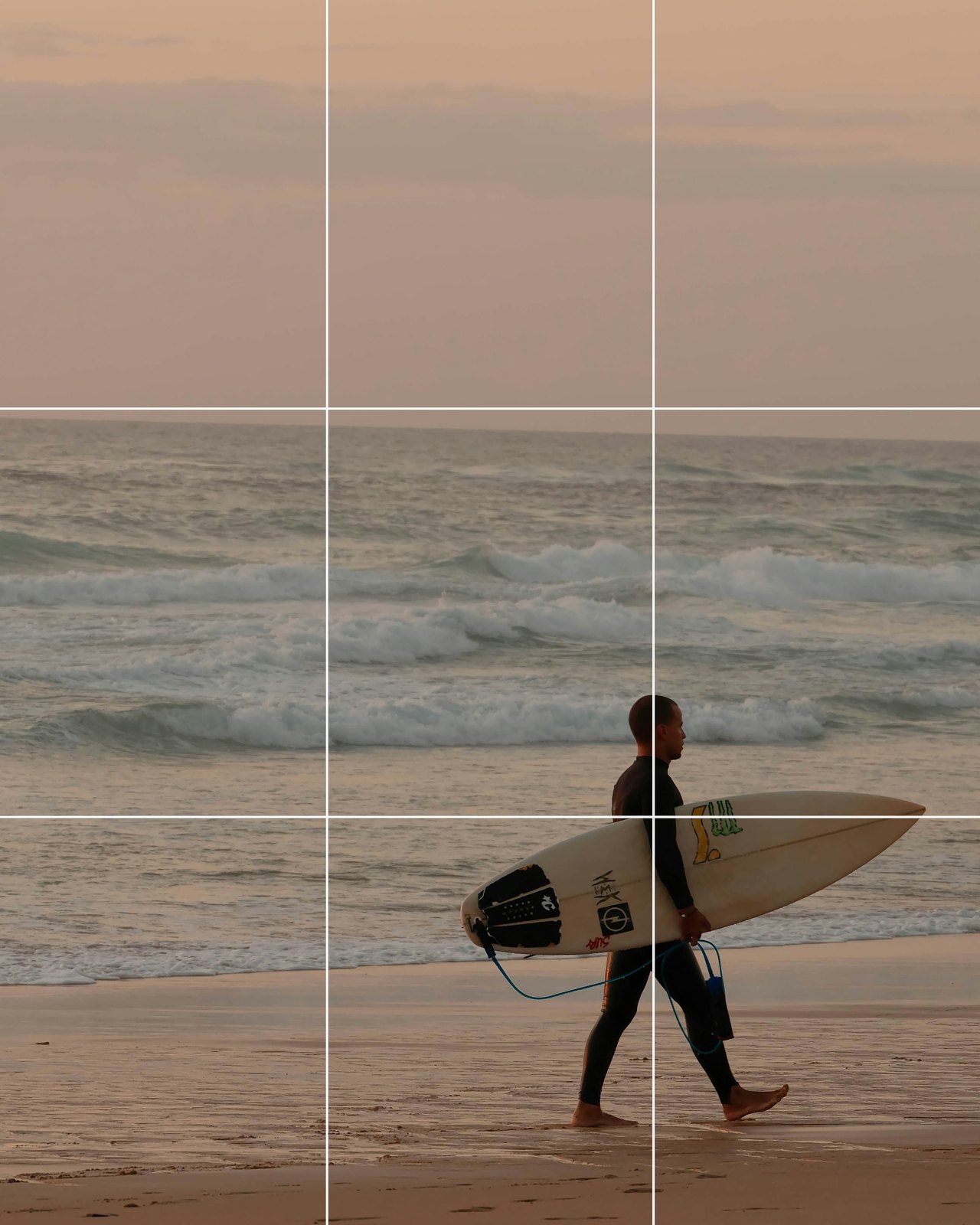
The quickest way to see the rule of thirds in photography is to take one frame and crop it twice. Here the only change is where the horizon falls.

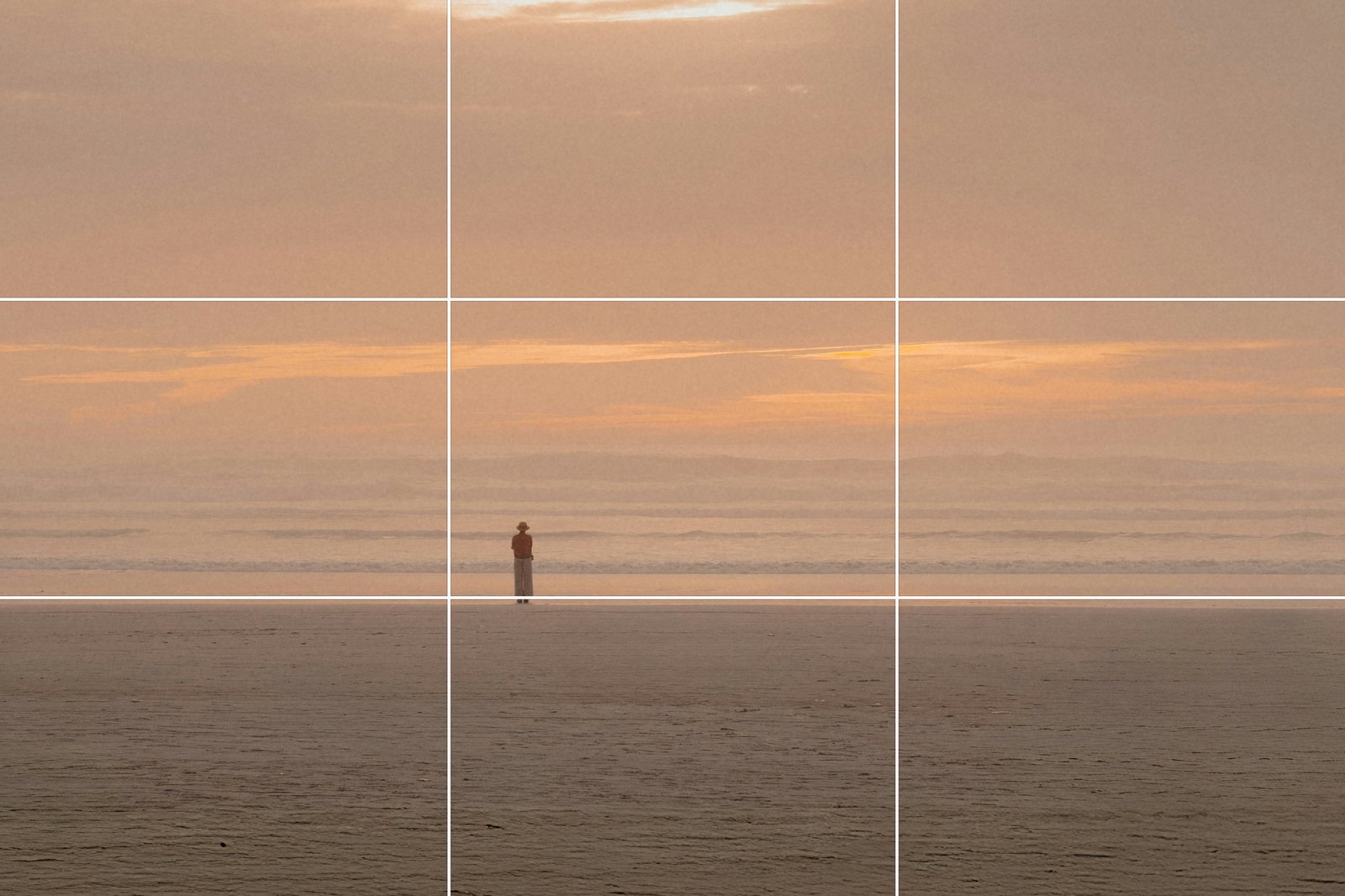
A centred horizon makes the viewer choose between the sky and the sea. Moving it to a line decides for them. Which line depends on where the interest is: a blank sky gets one third, a sky full of cloud at sunset takes two.
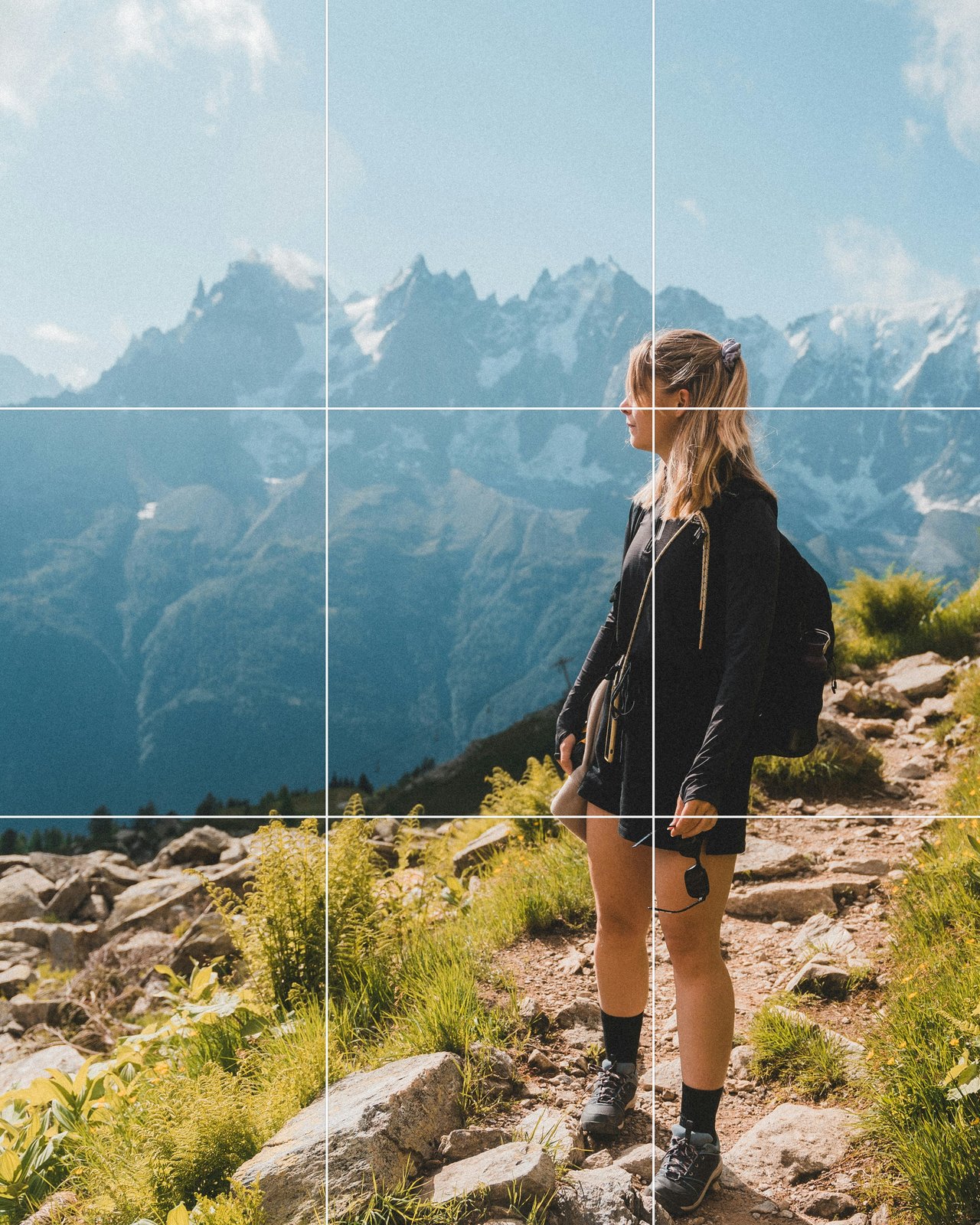
The second pair is a portrait. The subject is her face, so the crop moves the eyes to the top line and leaves room on the side she faces.


Nothing in the photo changed. The crop gave her somewhere to look, and the picture went from a snapshot of a person to a person in a place.
Where the Rule Came From
The phrase is older than photography. John Thomas Smith, a London engraver who later ran the prints department at the British Museum, used the words “rule of thirds” in a short book called Remarks on Rural Scenery, published in 1797. His rule was about proportion rather than a grid: about two thirds of a landscape to sky and one third to land, or the reverse, and about two thirds of a picture in shadow and one third in light. He was building on a note by the painter Joshua Reynolds about the balance of light and dark, though Reynolds worked in quarters.
The nine-box grid came later, and nobody has pinned down who drew it first. By 1845 the colour theorist George Field was already pushing back on the rule for colour, writing that it “does not supply a general law”, so the argument about whether to follow it is as old as the rule. If you want the original, the 1797 text is on the Internet Archive; the chapter is “Of Light and Shade”.
Turn On the Grid Before You Shoot
The easiest way to learn the rule of thirds in photography is to look through it for a month. Almost every camera and phone can draw the grid in the viewfinder, and the setting is free.
- iPhone: Settings > Camera, then turn on Grid. It sits under the Composition heading. The lines show on screen and never on the photo.
- Sony: on current bodies, MENU > Shooting > Shooting Display, turn on Grid Line Display, then set Grid Line Type to Rule of 3rds Grid. Older bodies have it at MENU > Camera Settings2 > Grid Line.
- Fujifilm: Set Up > Screen Set-up > Framing Guideline, and choose Grid 9. It only shows once Framing Guideline is ticked in Screen Set-up > Disp. Custom Setting.
- Canon: Grid display (or Grid when shooting), choose 3×3.
- Nikon: on current Z bodies, Custom Settings > Grid type, pick the 3×3 picture, then tick Grid in the Custom monitor shooting display list. Older Z bodies have Framing grid display, On or Off.
Once it is on, the habit is simple. Find the horizon first and tilt the camera until it lands on a line. Then move sideways until the subject lands on a point. Then take the photo. After a few weeks you will put things on the lines without looking at them, and you can turn the grid off.
People, Movement and Where to Leave the Space
With people the rule of thirds in photography has two extra parts that the grid can’t show you.
Room to look into. Put the subject on the line that leaves the empty space in front of their face, not behind their head. A person on the right third looking right is pushed against the edge; the same person looking left has the whole frame in front of them. The grid says which line; the direction of the gaze says which side.
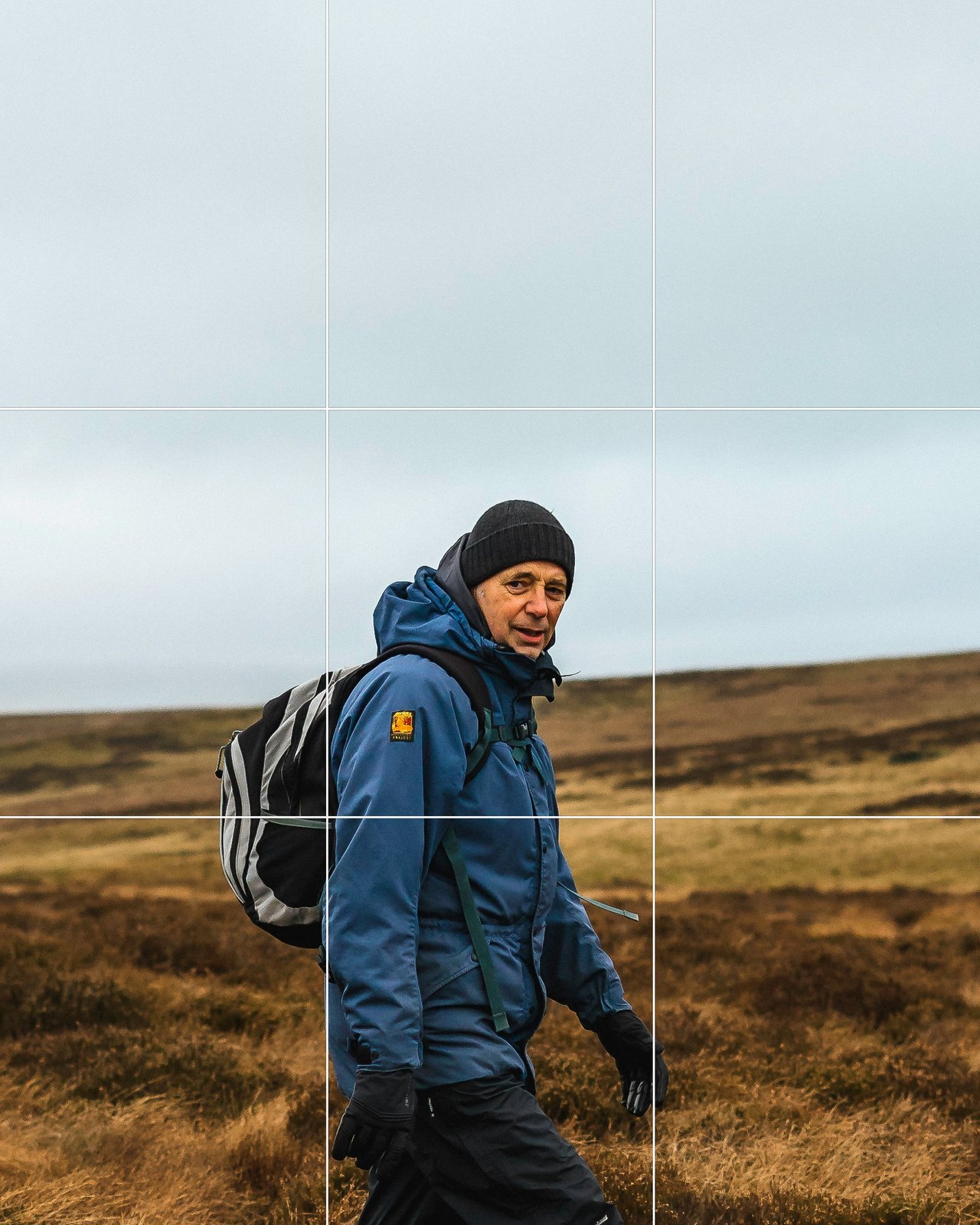
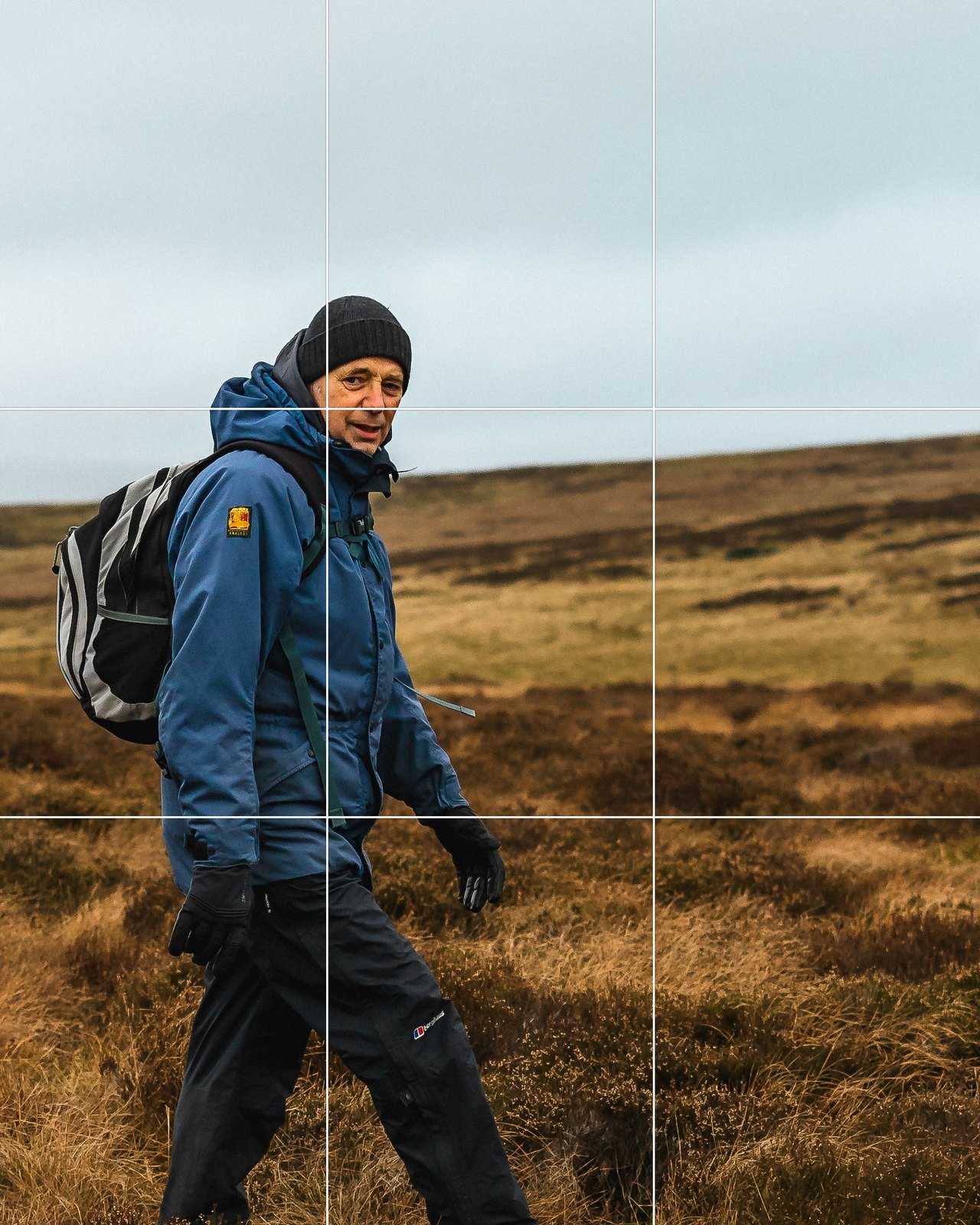
Room to move into. The same thing for anyone walking, running, riding or driving. Place them on the line they are moving away from. The viewer reads the empty space as where they are going, and the photo feels like it has time in it.
For two people, put them on a diagonal: one on the upper left point, the other near the lower right. Two on the same line compete. For a group, stop counting. Get the whole group on one side and leave the other side to the setting.
How to Fix It Afterwards in Photoshop and Lightroom
You will miss the lines in the moment. Everyone does, which is why the rule of thirds in photography is applied in the Crop tool as often as in the camera. The Crop tool is the second chance, and it has the grid built in.
In Photoshop: press C for the Crop tool. Rule of Thirds is the default in the overlay menu in the options bar, and Golden Ratio is in the same list; press O to cycle through them. Then drag the frame until the horizon sits on a line and the subject on a point, and press Return.
Two settings matter more than the overlay. Leave Delete Cropped Pixels unchecked, so the crop stays a window you can move later instead of a cut. And if there is no room to put the subject on a line because it is already near the edge, drag the crop frame past the edge and use Generative Expand to fill the new space (it needs an internet connection and uses generative credits). Every crop throws pixels away, and chasing a crossing point with a tight crop on a 24-megapixel file leaves you with a 6-megapixel one, so place the subject in the camera where you can and expand when the room isn’t there. Our Crop tool guide walks through the overlays, straightening and the expand step with a sample photo.
In Lightroom Classic: press R for the Crop tool, then O to cycle the overlays and Shift+O to rotate the one you are on. Thirds and Golden Ratio are both under Tools > Crop Guide Overlay, and Camera Raw has the same list in its crop overlay menu.
Straighten before you place anything. A horizon that is on the line but half a degree off level still reads as a mistake. In Photoshop the Straighten tool in the Crop options bar does it in one drag along the horizon. Straighten and extend a crop covers the cases where straightening leaves empty corners.
One more thing the grid will not tell you: the shape of the crop. A 16:9 crop and a square one put the lines in different places on the same photo. Decide which aspect ratio the photo is for, set it in the Ratio box, and then place the lines.
When Centring Works Better
The rule of thirds in photography is a rule against accidental centring. Deliberate centring is a different thing, and there are three cases where it usually beats the grid.
Symmetry. A path straight down the middle, a reflection, a building face-on, a doorway. Symmetry only works when the axis is in the centre. Put it on a third and the picture looks like it slipped.
One subject and nothing else. A face filling the frame, a single object on a plain background, a product shot. There is no second element for the empty space to balance against, so the empty space just looks empty. Centre it and crop tight.
Tension or stillness. A centred subject feels fixed and calm. A subject on a third feels like it has somewhere to go. If the photo is about stillness, a church in fog, a person alone in a room, the centre says it better.

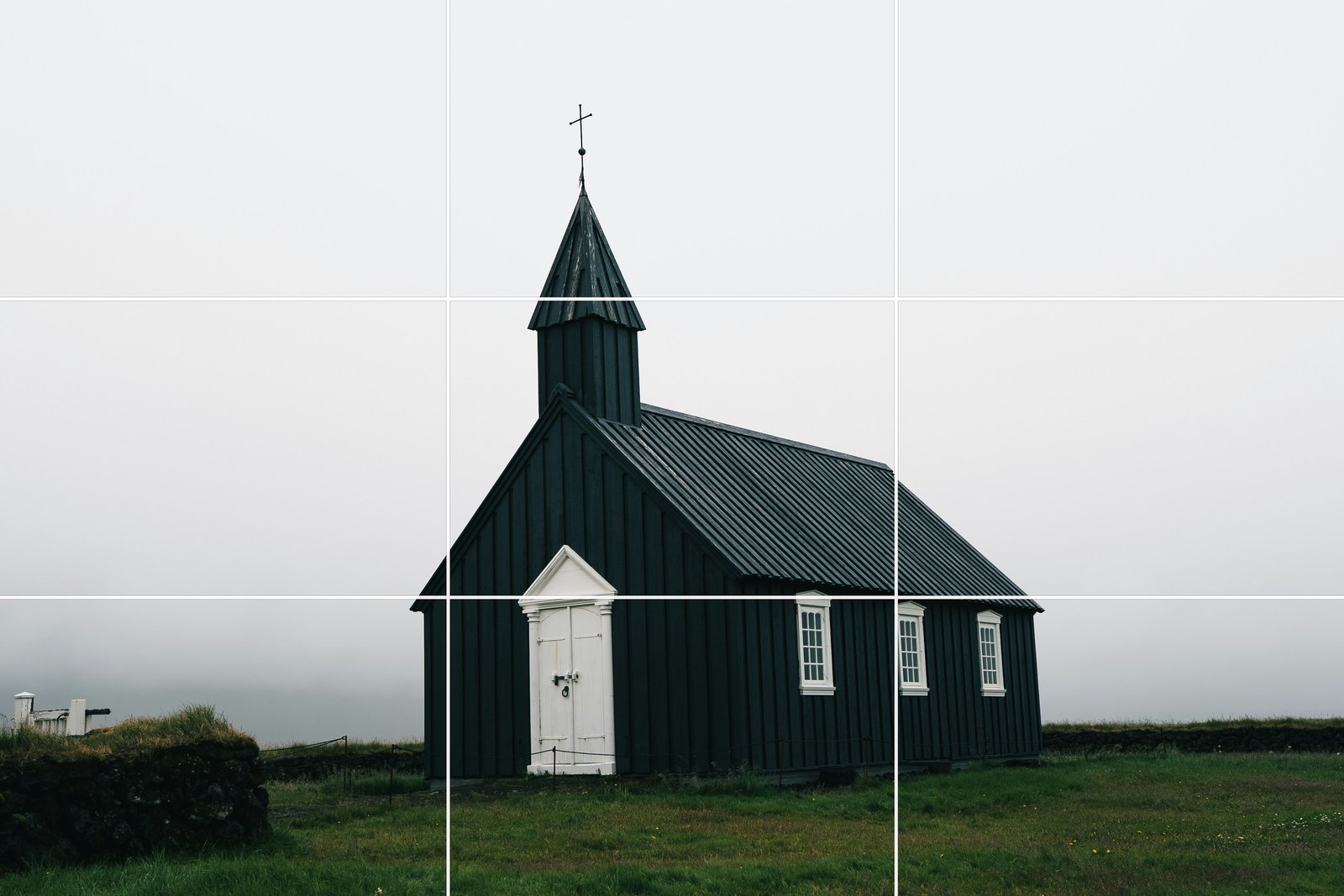
The test is simple. Cover the photo with your hand except for the subject and ask what the rest of the frame is doing. If the answer is “balancing the subject”, the subject belongs on a third. If the answer is “nothing”, centre it.
Rule of Thirds vs the Golden Ratio
You will see the golden ratio offered as the grown-up version of the rule of thirds. It is a different grid, and the difference is small. The golden ratio is about 1.618 to 1. A golden ratio grid puts its lines at about 38% and 62% of the frame instead of 33% and 67%, so the four crossing points move toward the centre by about one twentieth of the frame’s width. On a 1600-pixel-wide photo that is about 80 pixels.
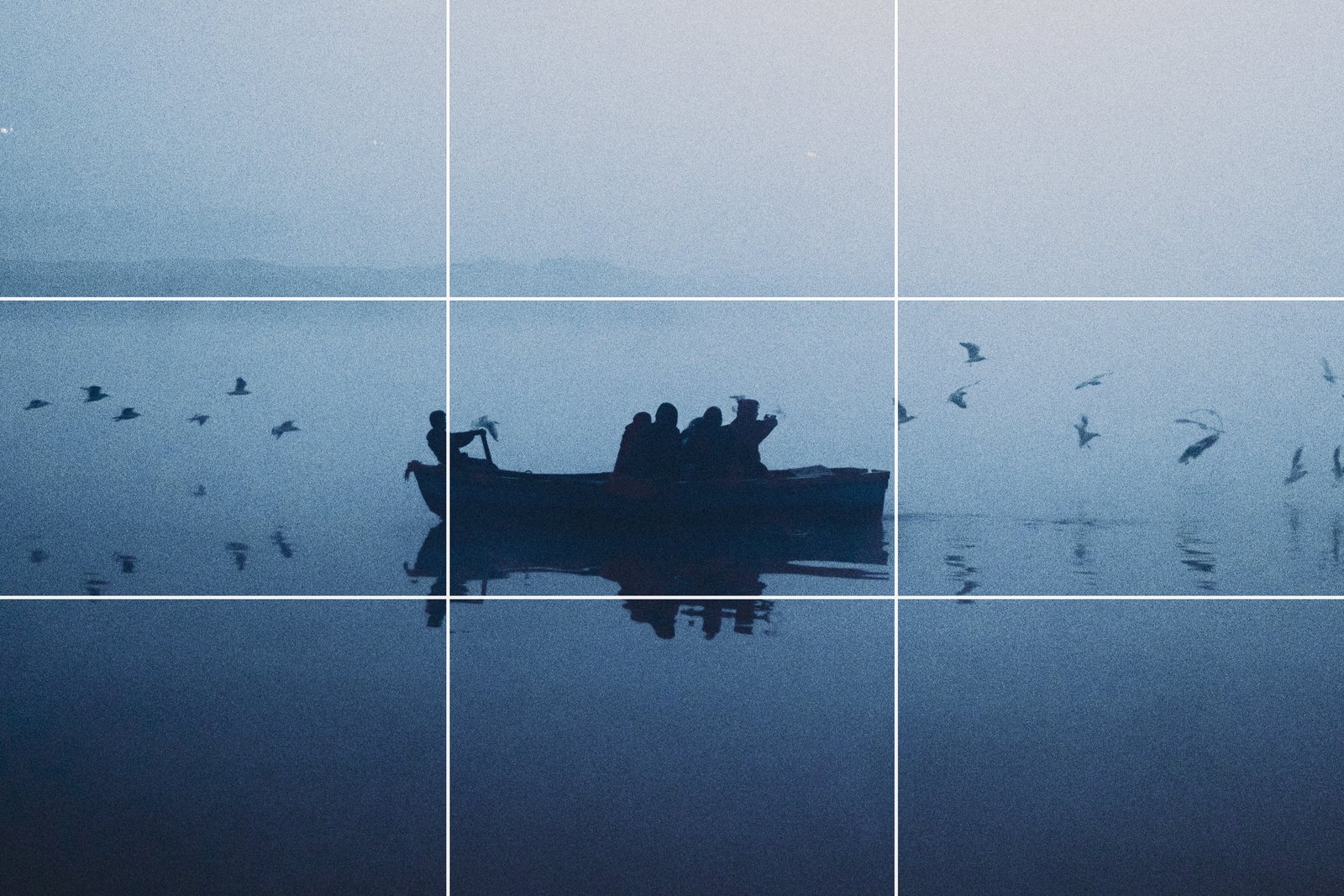
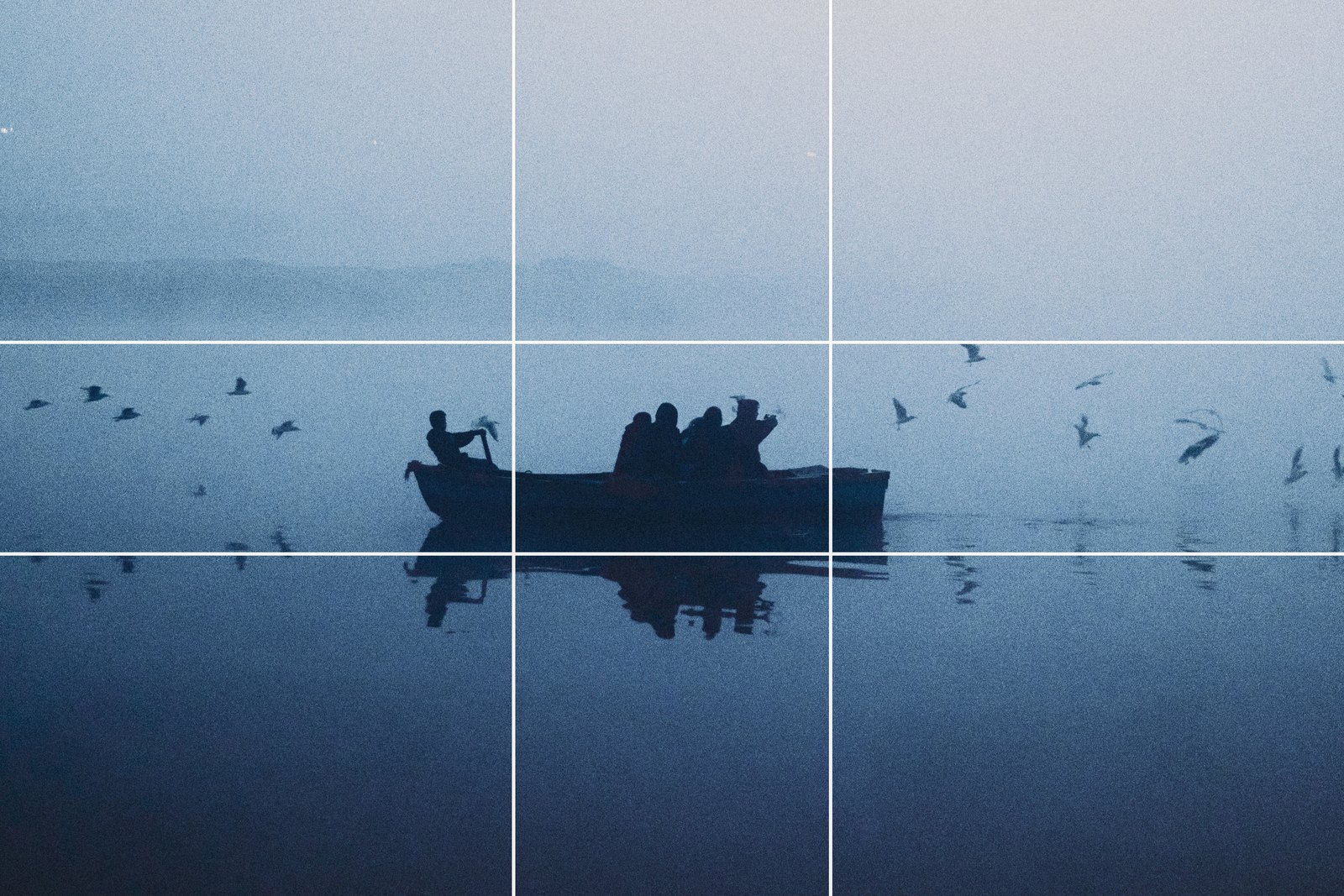
Pick one and stop worrying about it. Photoshop and Lightroom both offer Golden Ratio as an overlay, and the Golden Spiral is in the same menu for photos where the eye should curl in toward one point. If you want the maths and the Fibonacci spiral, our golden ratio guide goes through them with examples. For most photos, thirds is easier to see and the result is the same.
Does the Rule of Thirds in Photography Actually Work?
It is worth being honest about the evidence, because the rule is taught as if it were a law of vision and it isn’t.
In 2014 a group at the University of Jena had 10 people rate how closely each of 200 photographs followed the rule, compared those ratings with a computer measure of the same thing, and had 20 other people rate the same photographs for beauty. The link between following the rule and being rated beautiful was weak, and on the computer measure, photographs rated highly on a photography site and a large set of museum paintings scored about as low as photographs that ignored the rule. The authors concluded the rule seems to play a minor role, if any, in large collections of good pictures.
A small 2021 eye-tracking study found that people with photography training chose the rule of thirds version of a pair more often than untrained viewers did (11 of 15 pairs against 8) and looked at it longer. Part of what you’re learning with the grid is the taste of other photographers.
None of that makes the rule useless. It’s a habit that reliably improves a beginner’s photos, because the beginner’s default is the centre, and the centre is usually the weaker choice. Once the habit is in place you decide case by case, and if the subject is on a third and the photo is worse, the rule lost.
Common Questions About the Rule of Thirds
What is the rule of thirds in photography? Divide the frame into thirds with two horizontal and two vertical lines, and place the horizon on a line and the subject where two lines cross, instead of in the middle. It is a guide to balance, not a law.
How do I turn on the rule of thirds grid on my iPhone? Settings > Camera, then turn on Grid. The lines appear in the Camera app and are never saved into the photo.
Is the golden ratio better than the rule of thirds? They are nearly the same grid. The golden ratio’s lines sit about one twentieth of the frame closer to the centre. Use whichever you can see, and don’t switch between them on one photo.
Beyond the Grid
That is the rule of thirds in photography: a way to keep the subject out of the middle until you have a reason to put it there. The rest of composition starts where this leaves off, and our composition tips guide picks up with leading lines, framing and negative space.
Free with PHLEARN
This guide as a 3-page PDF
Every step and setting, ready to print.
With a free PHLEARN account.
In this article
- What the Rule of Thirds Says
- Before and After: Two Crops of the Same Photo
- Where the Rule Came From
- Turn On the Grid Before You Shoot
- People, Movement and Where to Leave the Space
- How to Fix It Afterwards in Photoshop and Lightroom
- When Centring Works Better
- Rule of Thirds vs the Golden Ratio
- Does the Rule of Thirds in Photography Actually Work?
- Common Questions About the Rule of Thirds
- Beyond the Grid
Free with PHLEARN
This guide as a 3-page PDF
Every step and setting, ready to print.
With a free PHLEARN account.